Is there a widget or a short code
Using Unified theme template Tags & Widgets and Unsanwered Topics plugins installed and activated
Thanks


Is there a widget or a short code
Using Unified theme template Tags & Widgets and Unsanwered Topics plugins installed and activated
Thanks

http://codex.simple-press.com/codex/plugins/our-plugins/available-plugins/plugin-unanswered-topics/
just the template tag…
My idea is to replicate what you are displaying in your forum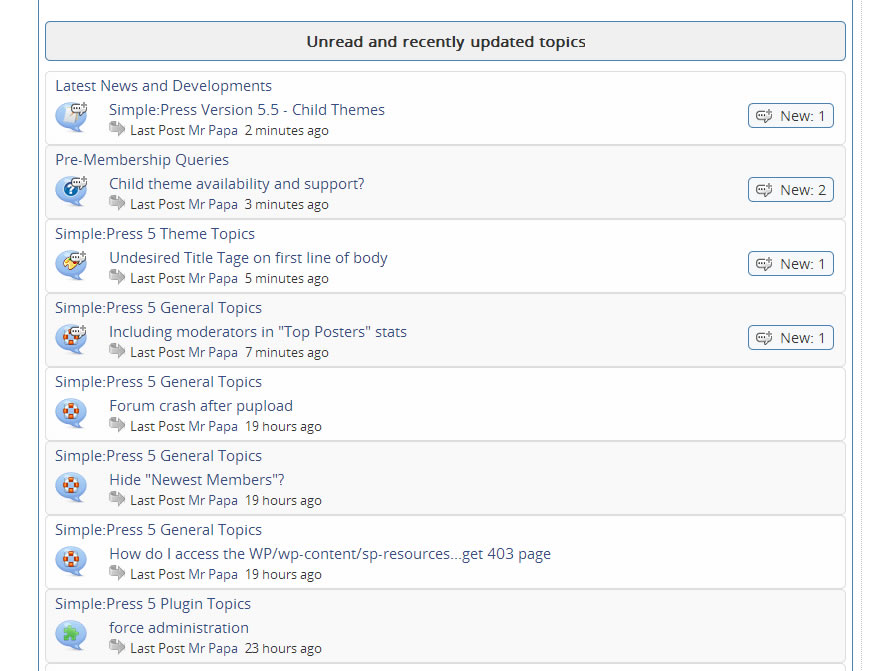
I don’t get it
It is supposed to appear automatically ? If so where?
appear automatically??? no… you need to place the template tag where you want it to show up… if in a widget area, just add the template tag to a text widget that supports php…
Can I use a Short code ¿? Which one. Features topics/posts have shortcodes. Why Unanswered topics/posts won’t ¿?
If so, can I put it in the forum announcement, at tha footer of every forum page ???
there is no shortcode for that plugin… we can add it to our list to add one in the future, but that wont help you right now…
put what in the announcement? a template tag? no… those go in text widgets or your wp theme template files… Or in this case, just put it in your sp theme template file.. spFoot.php right where you want it…
My apologies.. I was wrong… I took a quicker look at the unanswered topics plugin today to see how hard to add a shortcode because we releasing a new version today anyways… and discovered that it is ‘automatic’… no template function or short code needed…
it adds a new page… so visit http://yoursite.com/forum/unanswered and you should see it… of course, replace yoursite.com/forum with your appropriate url…