Support Forum

Unified issues

ME Meztli
Meztli
Member

Hi guys,

We are using the Unified theme for mobiles at http://friskyttarna.eu

The toolbox (to edit topic etc), is currently reported from our moderators, to not work on any of those mobile plattforms they use.

It´s possible to log in and create new posts via mobile. It´s only the toolbox that do not respond at all.

Mobiles

Android 5.1.1, Samsung Edge

Windows 10, Microsoft Lumia 950

32 Answers

New Answer

IK Ike
Ike
Member

That’s slightly worrying, debugging on mobile can be a real pain!

Has it only been reported by two people, does it work OK for you or anyone else? Also has this been the case for a long time or is this a new issue?

This is the first time I’ve come across this issue specifically on mobile, so I guess it works OK on desktop?

I’m not seeing any errors on the desktop page which would be the normal cause but of course can’t check mobile.

YS Yellow Swordfish
Yellow Swordfish
Member

What about the  Actions menu? Does that work as expected?

And can we have  clearer definition and more detail please on what is meant by not working?

ME Meztli
Meztli
Member

Hi guys,

We only have 3 moderators (incl me) and all of us have the same issue.

I supose the issue is rather new, since the other two moderators surfing the forum frequently via mobile phone. They could not specify a exact date, since none of them could point out the last time they used the toolbox via mobile (besides today).

Via desktop everything works fine. But we do however use Reboot for desktop. Unified is for mobile only. It has a clean and nice layout for smal devices.

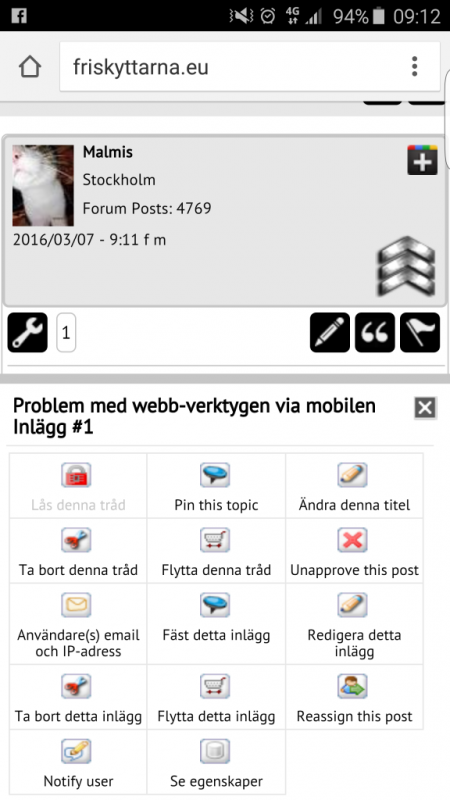
Yes it´s possible to log in and create new posts etc. It´s only the toolbox (see attached image) that do not work with one exception. It´s accually possible to approve/unapprove, but all other functions are not working.

With “not working” i do simply mean that nothing is happening when you point and click with your finger. It only greys out.

Besides Andriod and Windows 10 phones, we tryed Iphone 5 a hour ago with the same issue.

Screenshot_2016-03-07-09-12-08.png
IK Ike
Ike
Member

Just a shot in the dark but are you running any mobile specific plugins?

Also, may be worth just temporarily switching to Reboot mobile to see if it works then?

ME Meztli
Meztli
Member

Ike said
Just a shot in the dark but are you running any mobile specific plugins?

Also, may be worth just temporarily switching to Reboot mobile to see if it works then?

No mobile specific plugins are activated on the forum page. I do however use the Beaver Builder plugin on other parts of the website.

The site is built on a combination of the Genesis framework and the Dynamik Website builder theme. It has been working without any issues for a couple of years now.

Sure, i will switch to Reboot and see if it works.

YS Yellow Swordfish
Yellow Swordfish
Member

Perhaps you could try something else as well.

The Chrome browser has a great developers toolkit that includes mobile emulation. If you turn on the developers tools and open the web console there is a little icon on the left at the bottom in the vague shape of a mobile phone. This let’s you chose a device and mobile OS and run things as on a mobile.

If you could try running your site in this emulation mode with the console open to show errors then it would be interesting to see if anything is being reported when you try and use the tools.

Also – just for reference – are you using Unified out of the box or have you customised it at all?

ME Meztli
Meztli
Member

I am using Unified out of the box.

Did switch mobile theme and tried with both Reboot and Barebones.

The same issue remain.

P.S.

Will try the developer toolkit and get back to you.

YS Yellow Swordfish
Yellow Swordfish
Member

OK – it is out of the box and the same with both themes then it does suggest it is up against something else on you site that has been added or changed and is causing a script issue. The dev toolkit might uncover that.

Can you remember any other changes recently – WP theme or plugins etc?

ME Meztli
Meztli
Member

All of us has been trying out the developer toolkit with several of the emulated mobiles.

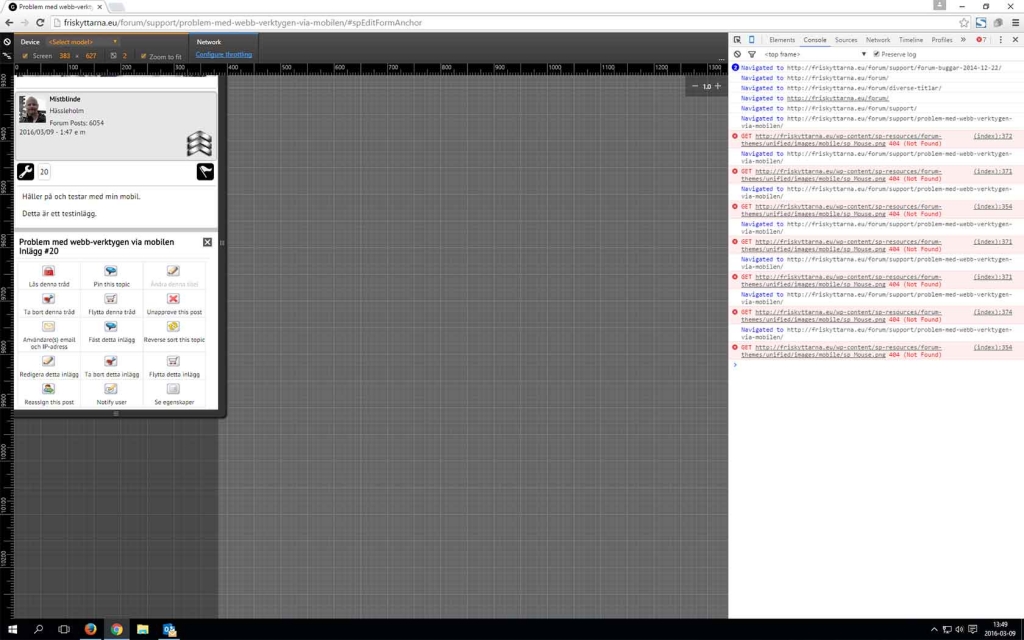
The issue remain, but the toolkit do not log anything (see attached image).

http://imgur.com/nP8suVR

YS Yellow Swordfish
Yellow Swordfish
Member

Along to the right of the little mobile icon you have it set to ‘Elements’. You need to set that to ‘Console to see errors I believe.

ME Meztli
Meztli
Member

As you can see of the attached image below, some errors did occur, but it´s a png image thats missing and i supose its not related.

No errors was logged from the acctual issue.

log.jpg
YS Yellow Swordfish
Yellow Swordfish
Member

Ok – so not helpful sadly.

The question of what has changed is an important one. There are no currently outstanding or known problems with the toolbox links and if it worked before it should still work now.

Tell me – some open a second dialog or popup and some do not. Is it one type that s failing – i.e., the second dialog/popup? And if this is the case – are other popups also failing? Like – for example – with a popup image…

ME Meztli
Meztli
Member

I have been doing some extensive testing last two hours at one of my test domains.

This is what my tests have included

  • Identical setup (framework, theme, plugins)
  • Identical setup, but without any plugins.
  • Setup with the same theme. No framework and no plugins.
  • New setups with 2 different themes (Genesis basic theme, WP Twenty sexteen) and no plugins.
  • Each setup has also been tested with different mobile themes in SP (Barebones (CSS), Reboot and Unified).

All setups are done with a new installations of WordPress, framework, themes, plugins and Simple:Press.

The same issue is persistent in all setups and with all tested mobile themes in SP.

P.S.

Finaly i want to add, that the issue only exist with mobiles. It’s working as intended with Ipad (and Andriod tablets), and desktops.