Support Forum

Updated Storage Locations Break Theme and Plugins

45 Answers

New Answer

MP Mr Papa
Mr Papa
Member

how did you get forum to dev site???  looks like data came from live site… but wp did not… bad situation…  you can see the effect when wp has different network site storage locations between the two… how would sp know where to get data????  we have wp tell us based on the storage model in effect – which in your case is different…

I would bet the live site works fine – the data is for that site…

JI jim
jim
Member

Mr Papa said
if you have pulled down partial db vs entire db, you will have issues because of difference…

Nope. No partial db import. This site was a fresh newer WP install for development purposes, plugin & theme testing, etc. It’s not a mirror.

MP Mr Papa
Mr Papa
Member

so you installed sp and all its plugins from scratch? did not copy ANY data from sp-resources???

have to think about this some more – this is post wp 3.5 install, but sp using pre wp 3.5 locations…  wonder is some oddity not considering there…

but live site likely okay since its pre wp 3.5 with sp using pre wp 3.5…

JI jim
jim
Member

Mr Papa said
how did you get forum to dev site??

It was a new install of SimplePress, and set up of just a few forums to confirm theme compatibility.

I would bet the live site works fine – the data is for that site…

Are you suggesting I just go ahead and attempt the update there? Kinda leery of that after what’s happened here, and the lack of any confirmed multisite network SP 5.6 update…

MP Mr Papa
Mr Papa
Member

did you actually move data after the issue on dev site?  or is it all still in blogs.dir?

MP Mr Papa
Mr Papa
Member

all of our multisite test sites updated to wp 4.4 / sp 5.6 just fine… 

but the key is we dont have a test site for multisite that is post wp 3.5 install and pre sp 5.6…  for this issue, think it has to be installed after wp 3.5 but before wp 4.4 and sp 5.6…  so yes, should be fine… but hey, get your trepidation…

so we can probably work a fix for you here (still dont know issue), but no matter what we do, its a special case and would not help (or hurt) your live site, I believe…  but if there is issue and we fix it, likely no harm in waiting either…

MP Mr Papa
Mr Papa
Member

may have missed my question, but on dev site, have you actually moved your storage locations?  If so, you probably want to move it back…

should be wp-content/blogs.dir/files

any fix is going to need it properly located there like it was… playing with the wp code now to see if we can ferret out an issue…

JI jim
jim
Member

Mr Papa said
so you installed sp and all its plugins from scratch? did not copy ANY data from sp-resources???

Correct.

but live site likely okay since its pre wp 3.5 with sp using pre wp 3.5…

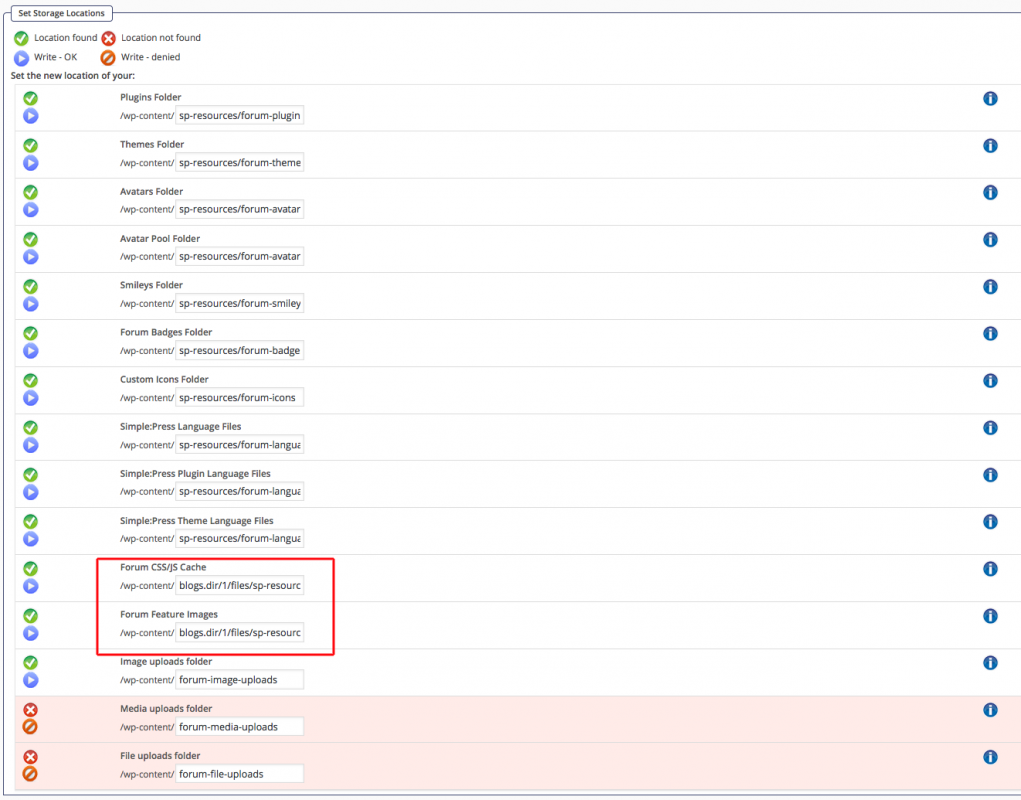
 Please note the live site storage locations include blogs.dir/1 for some files. (See screenshot) Everything is working fine there no. I wasn’t even aware of the new Media & Files folders I obviously need to create.

did you actually move data after the issue on dev site?

Yes, after the update this evening when everything blew up, I moved sp-resources to wp-content/uploads/ (since that was the new base URL in SP Admin) in an attempt to fix the theme display issues. Which it did, but other things still aren’t working.

MP Mr Papa
Mr Papa
Member

crossing messages…  can you move the data back to the original location??  any fix is going to require it be where it was, I believe…

wp kind of screwed things up when they moved away from blogs.dir… well actually good to move, but would have been better if they moved existing data to the new locations rather than having pre 3.5 and post 3.5 using different locations…

MP Mr Papa
Mr Papa
Member

btw, the difference is whether storage is network wide or network site specific…  some storage (ie themes and plugins) applies to ALL network sites, so only in wp-content… however, stuff that is site based, like cache, would be in blogs.dir for each network site…

JI jim
jim
Member

Mr Papa said
…you probably want to move it back…

should be wp-content/blogs.dir/files

FYI: Prior to the 5.6 update Storage Locations were in wp-content/sp-resources

Moving them back now.

stuff that is site based, like cache, would be in blogs.dir for each network site…

Ahh…

MP Mr Papa
Mr Papa
Member

oh, it gets worse – think i mislead a bit…  for post wp 3.5, the storage locations you reference are only for the main site…

so sitewide and main site storage is at wp-content/uploads/sp-resources

but network site storage is at wp-content/uploads/sites/xxx/sp-resources  (where xxx is the network site id)

it actually makes sense if you think about it… for main site, wp data store in wp-content/uploads similar to standard wp… for network sites, wp data store in wp-content/uploads/sites/xxx…

for pre wp 3.5, storage for any site in multisite is wp-content/blogs/dir/files/xxx…

post 3.5 makes more sense, but would have been nice if at 3.5, wp moved the data…  or, conversely, if we had made the same storage location change (problematic actually) for new sp installs… but not being multisite users, we didnt even know about the change…

so now we have to figure out a way to deal with installs that are post wp 3.5 but pre sp 5.6…  like your dev site…  installs pre wp 3.5 should be fine… famous last words…

I dont have any solution in mind currently though…

MP Mr Papa
Mr Papa
Member

please let me know when its moved back… want to try something..

JI jim
jim
Member

please let me know when its moved back…

I believe all sp-resources are back where they were prior to 5.6 update.