
Support Forum

Updated to 5.8 and lost "add topic" icon

TE Teresa
Teresa
Member

I updated to 5.8 yesterday. Today I went to add a topic, which I normally do from the listing of forums, and the little icon I normally use is missing.

A couple of weeks ago I took a screenshot to explain to a new member how to use that icon to add a topic, so I happen to be able to show you what I’m talking about (circled in red and highlighted with yellow).

Below it is a screenshot I took just now that shows no “new topic” icon there.

I can open the forum and click the regular “add topic” button but I would prefer to use the icon as I was able to do before. 
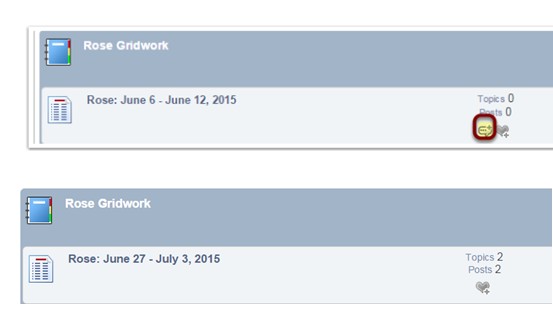
ScreenHunter_212-Jun.-28-21.51.jpg


Regards,

Teresa

21 Answers

New Answer

MP Mr Papa
Mr Papa
Member

so this is wp 4.2.2?

are you sure the user in question has permission to reply to topics?  you can go to the user profile – permissions tab when logged in as this user (if guest, you will have to check guest permissions in admin) and see permissions in this forum…

TE Teresa
Teresa
Member

Yes, this is WP 4.2.2.


I am the user in question. 

This icon allowed me to add a new topic (not reply to topics) without first opening the forum.

I can still add a topic once I open the forum, using the “add topic” button.

But I would like the convenience of using the icon without opening the forum first. 


Does this still sound like a permissions issue? 

TE Teresa
Teresa
Member

Here’s a screenshot of that icon on the support forum here (on the far right):


ScreenHunter_215-Jun.-28-22.39.jpg
YS Yellow Swordfish
Yellow Swordfish
Member

Is it at all possible that – for some odd and unknown reason – the icon itself is missing or corrupt?

Would you be able to look for it to make sure – in the SP theme /images folder – it is named ‘sp_ForumStatusAdd.png’ ?

If that is not the reason can other users see the icon? or is it every user? And I guess, if the latter, would you be able to make us an account so we could take a look as a user allowed to post? If that is possible then please PM credentials to both myself, to ‘Mr Papa’ and to ‘Ike’. Please include in the PM a link to your site, a link to this thread and brief reminder of the problem. And one of us will take a look for you.

TE Teresa
Teresa
Member

I checked the files: Yes, sp_ForumStatusAdd.png is there.

I logged in as a regular user and — could see the icon.

So other users can see it. It’s just me, the Admin,who can’t.  

TE Teresa
Teresa
Member

Oops — my mistake. What I was seeing is the “unread posts” icon that regular users see. But I never notice that because I always use the Admin Postbag.

When I log in as a regular user I can’t see it that way either.

I’ll be happy to create user accounts for you — but you’ll only be seeing that there’s no icon for adding a topic.

However, I am going to have my coffee first. : )

Will PM you and Ike when I’ve created those users for you. 

IK Ike
Ike
Member

OK, I’m here for the rest of the day so will pick it up as soon as I see a PM.

IK Ike
Ike
Member

So I’ve just taken a quick look and things do seem to be a little strange. The icon does indeed exist but it’s not calling it, nor does it specify a URL.

Have to check, although you have updated SP and WP, have you also updated SP themes and plugins?

Also, is this a child, full custom or standard version of Default?

Could you try a different stock SP theme? CSS-Only, Unified or Stacked maybe to see if it shows up then?

TE Teresa
Teresa
Member

Thanks, Ike.

Yes, I updated the SP themes and plugins at the same time that I updated WP and SP.

I do not know what version of Default this is. I will need to ask the web designer who set the forum up for me.

At the same time I will make sure it’s fine for me to try a different stock SP theme. 

I’ll be back when I have those answers. 

Regards,

Teresa

MP Mr Papa
Mr Papa
Member

Is it really default?  or a customized version?

you can look at the spTheme.txt file in the default theme folder for the version…

TE Teresa
Teresa
Member

I looked under Themes and it says the current theme is: 

Default 1.2.16

TE Teresa
Teresa
Member

There is something that my designer had customized (I forgot) that is now looking different. I had wanted a “Like” button. So she took the “Thank” button and made it say “Like.”

Now the button doesn’t say “Like” anymore. The button says “Thank” but if I click it, it says “The following user(s) wish to say to [name] that they LIKE this post”.

I have not written to her yet. I have one other question to ask her (unrelated to the forum) and I want to send her just one email.

Teresa

TE Teresa
Teresa
Member

I did not find the spThemetxt file yet. I found the Theme version in Themes. 

IK Ike
Ike
Member

spTheme.txt will be in wp-content > sp-resources > forum-themes > default.

I’d be interested to know what they’ve done, as if something has been put in place and it’s now reverted that would suggest that it’s either not a child theme, or that the plugin / core has been edited itself.

If you’re not expecting a reply any time soon but wanted us to keep looking, could you grant us access to an admin account so we can see the forum back end?
