Support Forum

Upload file stopped working

MA Marcel
Marcel
Member

Hi there,

It’s been a while since the last issues, everything was working fine. But now the upload of files won’t work anymore.

I’m not sure when it stopped working ( we do not upload that often )

  • WordPress 4.7.1
  • Jupiter theme 5.5

When users click on the Attachments button it will open the upload screen, normally they can drag and drop the file into the field and then start the upload.

Now it will open the attachment directly in the screen itself.

Any idea ?

Best Regards,

Marcel

27 Answers

New Answer

YS Yellow Swordfish
Yellow Swordfish
Member

Do you mean by that it opens the attachments form in the entire screen all by itself? If so that sounds like some sort of classic javaScript conflict.

Go to the forum admin > toolbox > housekeeping and clear the JS cache. Also clear your browser cache. Try it again. If still a problem can you use the browser web console to look for errors?

Open the console – go to the forum page and then try again. If there are any actual scripting errors they will show up (in red) on the console window. For help with using the console please see – https://simple-press.com/documentation/codex/faq/how-to/how-to-use-your-web-browser-console/

It is very, very easy and quick to use.

MA Marcel
Marcel
Member

Hi,

Do you mean this one:

This will force a rebuild of the combined CSS and JS cache files.

MA Marcel
Marcel
Member

Not working.

Also the console is not showing anything, as soon I drag and drop an image it will open a full screen with the image.

I use Safari, will try it with other browsers as well, keep you informed.

YS Yellow Swordfish
Yellow Swordfish
Member

Hold on. I thought you meant that when you clicked on the ‘attachment’ button it went to a new, blank screen.  But you last post suggests that it is when you perform a drag operation. That sounds more like interference from another plugin or from the WP theme.

Have you added any new components to the website recently that could be causing a knock-on effect?

MA Marcel
Marcel
Member

There are not any new components recently installed except a new version of WP and update of the theme, but I’m not sure when it stopped working. It could be a while ago.

The upload process within the media library of WP itself is still working with the same drag and drop.

YS Yellow Swordfish
Yellow Swordfish
Member

There will be a lot of different code loaded on the front-end compared to the back-end Admin. Can we have a link to the site? Are we able to look at the forum page as non-logged in users?

MA Marcel
Marcel
Member

No I’m sorry, forum is only visible for logged in users.

MP Mr Papa
Mr Papa
Member

and both simple press and file uploader plugin are up to date to the wp 4.7.1 version?

did you ever try other browsers?

MA Marcel
Marcel
Member

Sorry for the late response..

WP is 4.7.2 at this moment and the file uploader plugin of SP is 4.6

I’ve tried it on Safari, Chrome and Firefox, they all open the uploaded item as full page.

YS Yellow Swordfish
Yellow Swordfish
Member

We will need to see this visually and check the source code and activity as it happens. 

If we are unable to visit the site as guests are you able to create an account we can use to view the site with? If so – please send a PM to both myself and to @mr-papa with the credentials, a link to your forum page, a link to this thread and a brief reminder of the problem. One of us will take a look. Please note the user account will need to have permission to use the file uploader.

YS Yellow Swordfish
Yellow Swordfish
Member

Are your WP, SP and SP Plugins all up to date? My first thought is that there may be a disparity.

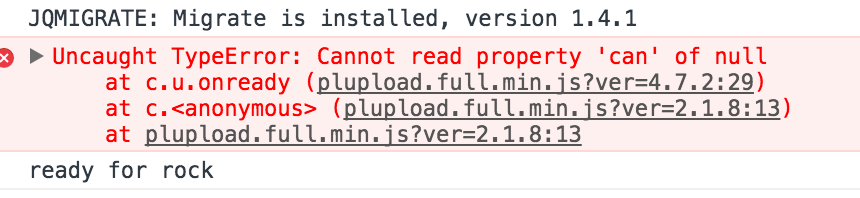
You system is throwing a script error on the page load which, I believe is causing the issue. This is a screen shot:

Screen-Shot-2017-01-29-at-9.59.22-pm.png

and it states that plupload is possibly the cause which is why I ask about versions. 

If not we need to ask @mr-papa if he has any ideas what the cause might be.

MP Mr Papa
Mr Papa
Member

think @yellow-swordfish is oh so close… 😉

looking at that error, its coming from a plupload version being loaded, it appears, by your theme…

<script type='text/javascript' src='http://ktmco.nl/wp/wp-includes/js/plupload/plupload.full.min.js?ver=2.1.8'></script>

now, its loading the wp version (which is not normally done), but on the front end…  and it appears that loading, the older version (2.1.8) from WP is conflicting with the version of plupload that we load for uploads (2.2.1)…   the WP version (oddly) is out of date…  but almost certainly the cause of the conflict is the two differing versions being loaded…

this is first time I have seen someone load that plupload on the front end…  WP has made extensive customizations of the plupload stuff for media uploading in back end… I dont know if this file is untouched or not…  would be a bit uncomfortable loading this old a version, but it might work…

so you could try to stop the loading of ours…  but might be issue working with other plupload stuff we have that WP does not… but worth a try… in your spFunctions.php file of your theme, try adding this:

add_action('wp_print_scripts', 'mydequeue_script', 99999);
function mydequeue_script() {
   wp_dequeue_script('spplup');
}

that should stop ours from loading and force use of WP…  should be interesting 🙂

MA Marcel
Marcel
Member

I’m afraid I’ve messed up something 🙂

I saw some things are missing in the Reboot theme ( png ) so I choose the Barebone theme and update the reboot theme, but now the complete site is not working.

Will need to fix that first before I can do anything.

Keep you informed.