Support Forum

Various issues on uploader and profile edit after upgrade

YE Yehonal
Yehonal
Member

After upgraded wordpress to latest 4.7.5 version and simple-press with all plugins

i’m currently facing various big issues:


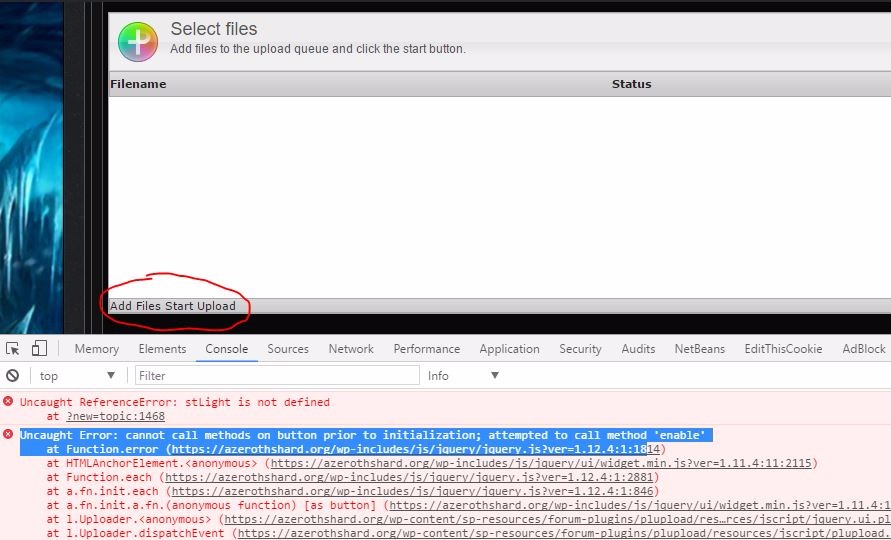
1. i’m not able to upload attachments in forum. In browser console i’ve tried to change the javascript loading option between header and footer. And 2 different kind of errors in both cases


with javascript in header:

Uncaught TypeError: Cannot read property ‘can’ of null
at c.u.onready (plupload.full.min.js?ver=4.7.5:29)
at c. (plupload.full.min.js?ver=2.1.8:13)
at plupload.full.min.js?ver=2.1.8:13

and the buttons to start uploading are shown like in screen below…


with javascript in footer:
 

sp3.jpg


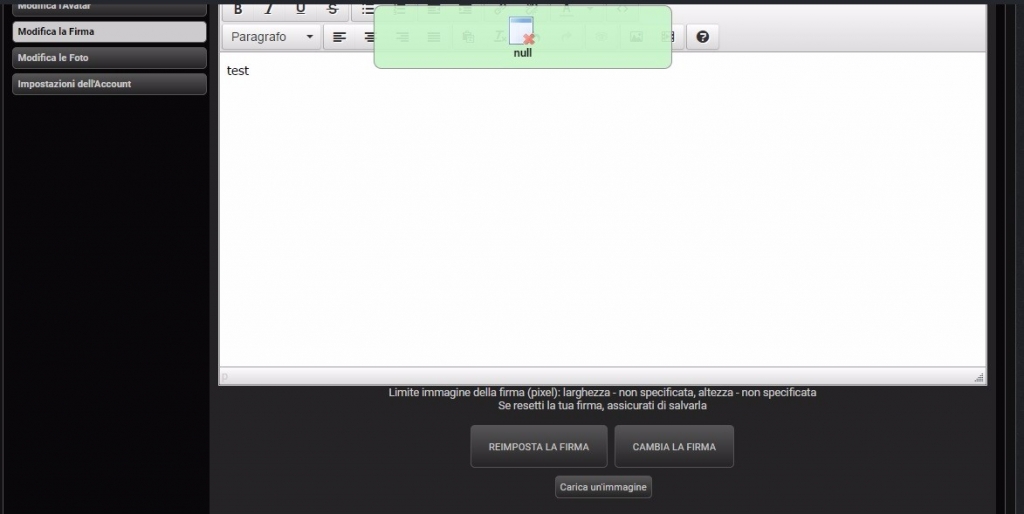
2. user profile fields cannot be modified, i’m receiving a “null popup”
 

sp.jpg


however in this case the uploader system is working correctly confused


sp2.jpg


3. All new users are shown without any nickname 
 

sp4.JPG


4. Fatal Errors with rating plugin that block the topic visualization (i’ve disabled it):


[Thu Jun 08 00:09:22.966320 2017] [fcgid:warn] [pid 10960] [client 127.0.0.1:46954] mod_fcgid: stderr: PHP Fatal error: Uncaught Symfony\Component\Debug\Exception\FatalThrowableError: [] operator not supported for strings in /home/azerothshard/public_html/modules/wp/wp-content/sp-resources/forum-plugins/post-rating/sp-rating-plugin.php:200
[Thu Jun 08 00:09:22.966353 2017] [fcgid:warn] [pid 10960] [client 127.0.0.1:46954] mod_fcgid: stderr: Stack trace:
[Thu Jun 08 00:09:22.966359 2017] [fcgid:warn] [pid 10960] [client 127.0.0.1:46954] mod_fcgid: stderr: #0 /home/azerothshard/public_html/modules/wp/wp-includes/class-wp-hook.php(300): sp_rating_topic_query(Object(spdbComplex))
[Thu Jun 08 00:09:22.966363 2017] [fcgid:warn] [pid 10960] [client 127.0.0.1:46954] mod_fcgid: stderr: #1 /home/azerothshard/public_html/modules/wp/wp-includes/plugin.php(203): WP_Hook->apply_filters(Object(spdbComplex), Array)
[Thu Jun 08 00:09:22.966366 2017] [fcgid:warn] [pid 10960] [client 127.0.0.1:46954] mod_fcgid: stderr: #2 /home/azerothshard/public_html/modules/wp/wp-content/plugins/simple-press/forum/content/classes/sp-topic-view-class.php(229): apply_filters(‘sph_topicview_q…’, Object(spdbComplex), Object(spTopicView))
[Thu Jun 08 00:09:22.966370 2017] [fcgid:warn] [pid 10960] [client 127.0.0.1:46954] mod_fcgid: stderr: #3 /home/azerothshard/public_html/modules/wp/wp-content/plugins/simple-press/forum/content/classes/sp-topic-view-class.php(108): spTopicView->sp_topicview_query(‘2289’, 1, ‘1770’)
[Thu Jun 08 00:09:22.966373 2017] [fcgid:warn] [pid 10960] [client 127.0.0.1:46954] mod_fcgid: stderr: #4 /home/azerothshard/public_html/modules/wp/wp-content/plugins/simple-press/forum/content/classes/sp-topic-view-class.php(22): spTopicView->__construct( in /home/azerothshard/public_html/modules/wp/wp-content/sp-resources/forum-plugins/post-rating/sp-rating-plugin.php on line 200


Sorry for this long list confused

19 Answers

New Answer

YE Yehonal
Yehonal
Member

i had some issues to format images with text :-/ sorry

MP Mr Papa
Mr Papa
Member

Version 4.7.5???? . That version has not been supported for some number of years. Do you mean 5.7.4??

If so, from what version did you come? 

What is wp version? 

Anything else change like these? 

Did you clear js cache on forum – toolbox – housekeeping? 

Afraid I don’t understand any of those errors. They don’t actually say what is supposedly wrong? Stderr 3 or 4 doesn’t mean anything to me. Maybe I am missing something since reading at 38,000 feet on a phone. 

YE Yehonal
Yehonal
Member

4.7.5 is my wordpress version. I’ve the latest simple-press version too , 5.7.4 (no other updates available)

i’ve cleared cache, resetted profile tables etc..


Currently it’s quite unusable :-/

MP Mr Papa
Mr Papa
Member

Ah, yes. Sorry now see that was your wp version.

Is it same with all other wp plugin disabled? Sounding like conflict. 

Do you have link so we can see what is loaded and ordering? 

YE Yehonal
Yehonal
Member

what link do you need exactly?


i’ve tried disabling all plugins using plugin organizer , but issues are still there. 

However the null popup on profile editing is the most critical for now


forum is located here: https://azerothshard.org/forums/

YS Yellow Swordfish
Yellow Swordfish
Member

@mr-papa was asking for a link to your forum page – always assuming we can at least load it and look at it. The first thing we would check would be to see what JS libraries are being loaded. Are we going to need a user account for this? We may need one to look at the profile issue. We will come to that.

I would leave the rating plugin deactivated for the moment. Then I would empty the error log and try this again. If similar errors to the above I would be tempted to ask your hosting support if they can untangle them as they also mean little to me and seem to be more an internal conflict of some kind.

YE Yehonal
Yehonal
Member

i’ve shared the link in reply before: https://azerothshard.org/forums/

You can register but it’s mostly in italian (you could use the google translator feature integrated in chrome eventually)


I’m hosting this on a vps behind apache + fgci php 7.1.

UPDATE: i’ve just solved the issue about the plugin. Just FYI: it’s the php 7.1 😀 i’ve downgrade to php 7.0 and now it works!

in fact in stack trace you can read: ” [] operator not supported for strings ”  maybe php 7.1 broke the compatibility with some simple-press rating plugin syntax. I think it requires a fix.

So now it remains the upload attachment and the profile issues.

YS Yellow Swordfish
Yellow Swordfish
Member

Odd regarding rating. We develop under 7.1. I will check this out so thanks for the info.

OK a couple of  issues on your site.

Firstly the WP theme is loading the Bootstrap JS library. This is NOT supported by WordPress and has the added effect of causing the jQuery UI library – which IS supported – to misbehave – especially on buttons and most notably on the attachments form. There are many topics on this from over the recent years and the key is to get the bootstrap library to load before the query UI library. 

However – your theme is also force loading its own copy of the jQuery Ui library which is totally against WP standards and rules and can clash in unknown ways with the official library which has already been loaded.

Finally you appear to have a third party component – and I assume this is a plugin – that is also loading the plupload scripts which the forum is also loading. So you must have something active that allows for uploads beyond the forum. It would be adsvisable for this plugin NOT to load these scripts where they can not be used.

Any and all of the above can cause problems – may of them hard to pin down – so it is advisable to get these sorted out before we can look any deeper as they may be responsible.

YE Yehonal
Yehonal
Member

i’ll try to change the order of bootstrap.js library and disabling jquery UI on theme using my child theme. I’ll let you know 

however about plupload, it’s loaded by wordpress core .

You can see it here: https://github.com/WordPress/WordPress/blob/master/wp-includes/script-loader.php#L305

YS Yellow Swordfish
Yellow Swordfish
Member

WP loads plupload on the back-end/admin. It does not do so on the public side of WP websites

YE Yehonal
Yehonal
Member

Are you sure about it? because i’ve navigated the code and found 2 calls about wp_default_scripts (the function that enqueue the pupload script)


backend:

https://github.com/WordPress/WordPress/blob/dd6da701b286579819cd6aa518aa2d7018efd759/wp-admin/load-scripts.php

front end:

https://github.com/WordPress/WordPress/blob/master/wp-includes/default-filters.php#L434


if i comment out the front end line in core files, the whole site has errors about missing jquery etc. 

It’s quite strange 

YE Yehonal
Yehonal
Member

Anyway, i’ve delayed bootstrap loading in this way:

wp_dequeue_script( ‘bootstrap1’ );
wp_deregister_script( ‘bootstrap1’ );
wp_enqueue_script( ‘bootstrap1′, get_template_directory_uri().’/js/bootstrap.min.js’,9999,”,true);

and now the add file / start upload buttons are working! But there’s still that errors and my buttons are not shown correctly (just text, no style)


PS. the most critical issue is still the popup errors on profile editing 🙁  i’ve a lot of users without displayed name and they cannot update it in forum profile dashboard.

YS Yellow Swordfish
Yellow Swordfish
Member

Yes I am sure. Why would they load their media library stuff on the public site where it is not used?

And what do default filters have to do with this? (The second file you reference above)

YS Yellow Swordfish
Yellow Swordfish
Member

What about the other issues like the double loading of the jquery UI?