Support Forum

who @username and display name at the same time

CA Carlos
Carlos
Member

Hi, on the normal forum.. on every post… any chance to show the username (@username) at the same time of the name the member display name?  

on example, my user name here is @Sambora51 but my display name is Carlos, i would like to show both 


¿Why? I have a large user with around 30.000 users… is quite difficult to made mentions if you dont know exactly the @username


thanks in advance

14 Answers

New Answer

MP Mr Papa
Mr Papa
Member

the latest version of the mentions plugin does that… will release when wp releases the v3.6 currently in beta…

CA Carlos
Carlos
Member

Another “bug” is that… for example, on my forum my username is @carlosasensio but my screen name is Carlos Asensio  if someone mentions me the “link” of the mention links to the user @carlos and not for carlos asensio… Do you know what i mean?


MP Mr Papa
Mr Papa
Member

not a bug, but design…  you MUST type in @user_nicename…  you cannot use a display name because the regex to recognize (any where in a string) a space is very complex and expensive…

so if you use the popup and click a name, it handles it for you.. if you just type it manually, it had better be the user nicename…

if I am missing the point here, please elaborate further…

CA Carlos
Carlos
Member

yep, thats what happens… you write @CarlosAsensio and appears @carlos asensio so only mentions @carlos

CA Carlos
Carlos
Member

Check it here:

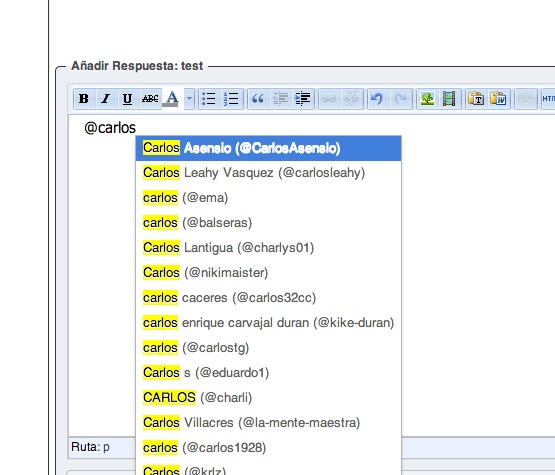
Step 1 ( user starts writing the name of mine @carlosasensio )

1.jpg


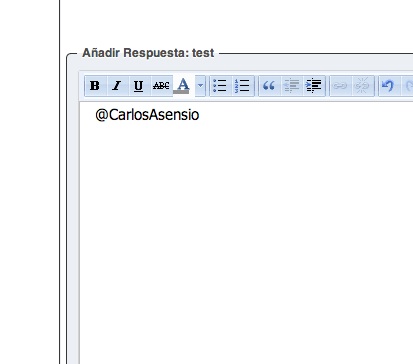
Step2: User clicks on the login name so appears the entire @carlosasensio

2.jpg


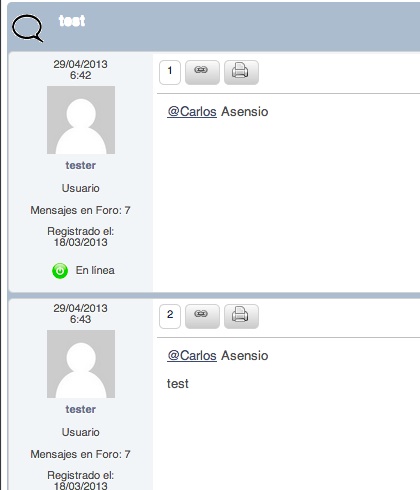
Step 3 : Click on save post and this is what appears… 

3.jpg

So the link that appears doesn link to my profile and seems to be mention the other user too….

MP Mr Papa
Mr Papa
Member

so the last image is what is shown on display after saving?  and the image by step 3 was exactly as saved?

I will need to create an exact test case like this… couldnt duplicate it with similar, but best to use real data…

my plate overflow’ith, so might be few days…  tweak me in couple days if you havent heard anything back…

CA Carlos
Carlos
Member

Hi Mr Papa, i can give you FTP access and admin if you want ! 


the last image is after saving… yes.. is exactly as saved… 


If you want i can give you access via FTP so you can check this and if you like check why crashes when installing buddypress plugin… :)

MP Mr Papa
Mr Papa
Member

okay, seems I can duplicate this now…  so just need to figure out what is wrong…  oh boy, more regex work! ;)

MP Mr Papa
Mr Papa
Member

actually, this is not a simple press issue…  its a BuddyPress issue…  its parsing the forum post content and incorrectly doing the mentions…

this is because we properly change the @name to a link to the profile using the display name…  but then BP comes along and dorks it up… take a look at the link to the Carlos name…   it actually points to your buddypress profile…  we dont do that…

so long story short, I cannot correct buddypress incorrectly doing mentions (it assumes the space in the link breaks the mention check)…  but what I can look into is seeing if I can remove the hook from buddypress and keep it from checking our post content…

MP Mr Papa
Mr Papa
Member

If you want to stop BuddyPress from dorking with our mentions, stop it by putting this in the sp-mentions-components.php file, function sp_mentions_do_content_filter() right at the top…

    remove_filter(‘the_content’, ‘bp_activity_at_name_filter’ );

will get it in the next release of our mentions plugin that will coincide with 5.3 release…

MP Mr Papa
Mr Papa
Member

so just to verify, that worked for you?  just an extra verification for me…

CA Carlos
Carlos
Member

Hi! I just wanted to tell you that it worked for me!!!