Support Forum

"auto subscribe user groups"-plugin doesn't work

EW Erik Wanrooij
Erik Wanrooij
Member

I am using both the subscriptions-plugin and the “auto subscribe user groups”-plugin.

I made a new usergroup and want to add a permission set for that group in a certain forum. So at that point I check the box “Auto subscribe selected user group to this forum when adding permission”.

After pressing the button (add permission set), the proces seems to hang: I keep seeing “please wait”.

Any idea what could be wrong?


Thanks & regards,

Erik

21 Answers

New Answer

IK Ike
Ike
Member

Hey Eric,

Behaviour like this is not too common, do you get it with any other plugin or core admin actions or just the auto subscribe?

If I had to guess I would put it down to some kind of conflict, are you able to use the browsers console to see if you are getting any errors on the page when you are setting options and clicking the button?

It might be the case that some other plugin you have active is interfering with the process, so it might be worth disabling every other WP plugin except Simple:Press and trying again.

EW Erik Wanrooij
Erik Wanrooij
Member

Just with auto subscribe as far as I’ve noticed.

There are no errors in the “tools” section. I will try to disable other plugins although it will be a hassle because each time I do a test I will have to delete- and recreate the new usergroup (and add members to it). Otherwise the “auto subscribe user groups” plugin will not kick in…


it’s also worth mentioning that the usergroup and permission set are added just fine to the forum – so that part of the proces works ok. It’s just that the members are not being auto-subscribed to the forum.

Regards,

Erik

YS Yellow Swordfish
Yellow Swordfish
Member

Hold off on that. I am running some tests so best to wait a little while – wont be long.

YS Yellow Swordfish
Yellow Swordfish
Member

I think I have found the root if the problem although the reason why it like it is will take me a little longer!

Are you willing and able to make a small edit to a code file to get things working?

YS Yellow Swordfish
Yellow Swordfish
Member

OK – good. This should solve your problem but is probably not the final fix that will appear in the next update…

Actually I would like you to make two small edits so first one…

The first file you need to look at is in the SP core at
/simple-press/admin/panel-forums/support/spa-forums-save.php and the function to locate is called spa_save_forums_forum_perm() starting at line 397.

At line 418 on this function is the code:

sp_reset_memberships($uid);

can you please alter this to

sp_reset_memberships($usergroup_id);

and for the second edit yupou will need to look in the forum plugins folder at the membership subsctibe plugin. The file *using the default path is
/wp-content/sp-resources/forum-plugins/membership-subscribe/admin/sp-membership-subscribe-admin-options-save.php ()which is a bit of a mouthful!)

Line 12 which starts:

check_admin_referer()

please comment out or remove this line of code.

Hopefully should resolve things and I will start to look at what changed here!

EW Erik Wanrooij
Erik Wanrooij
Member

Now the system does not “hang” anymore, however members are still not subscribed to the forum. (At least it doesn’t show in their member-profiles in the frontend, nor in the backend at users>forum_subscriptions)…

YS Yellow Swordfish
Yellow Swordfish
Member

100% is working on all my tests here with those two code changes. However – I would trust looking at the members profile/front-end as opposed to the lists shown in the admin which can be a bit funky sometimes and probably need a complete overhaul or even removing.

So – not sure what to say really. When looking at the users profile (editing their profile) you are looking at the ‘forum’ subscriptions tab I assume,,,

EW Erik Wanrooij
Erik Wanrooij
Member

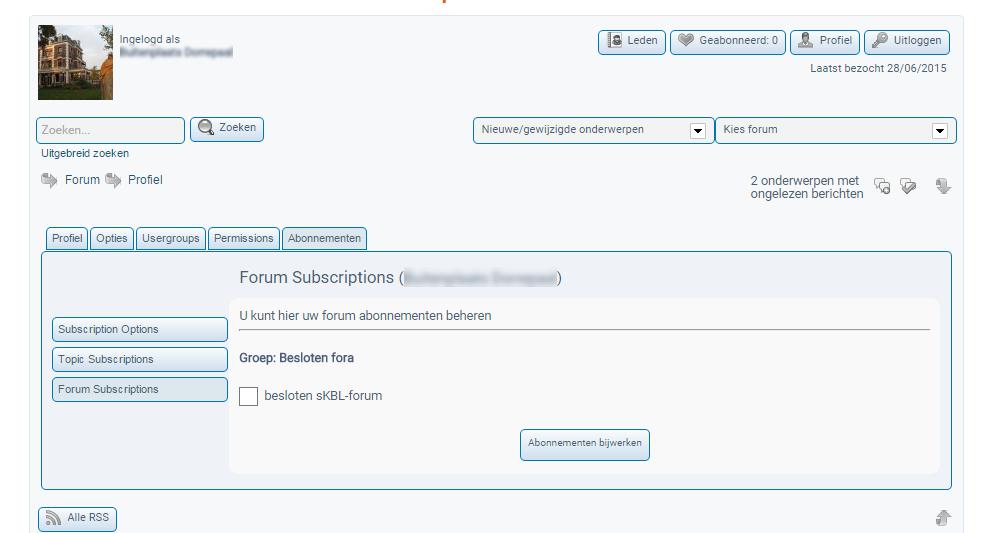
Yes, like here (forum subscription remains unchecked):

forum_sub2.jpg
YS Yellow Swordfish
Yellow Swordfish
Member

So let us just confirm
You went to the manage groups and forums – selected the forum and clicked on the ‘Forum Permissions’ button. At this point can I assume that the new user group did NOT have an entry. If it did can you delete it – update – reload everything?

EW Erik Wanrooij
Erik Wanrooij
Member

Exactly what I did. Just did it again:  – no result..

Should I perhaps try to delete the entire usergroup and start all over again?

YS Yellow Swordfish
Yellow Swordfish
Member

No – there is no need to delete the user group.

Do these users actually have permission to subscribe to forums in the user-group/permission set you are adding?

And how many users are there in the group?

EW Erik Wanrooij
Erik Wanrooij
Member

Yes, they do have permission. There are approx. 100 members in that usergroup..

EW Erik Wanrooij
Erik Wanrooij
Member

The same users are members of another usergroup as well. Could that perhaps  cause a problem?