Support Forum

Blog linking error

ME Meztli
Meztli
Member

Hello guys

I was downloading the blog linking plugin today and when i activated the plugin i got this error message:

Warning: in_array() expects parameter 2 to be array, null given in /problem-with-post-edit-buttonome/friskytt/public_html/wp-content/sp-resources/forum-plugins/blog-linking/admin/spa-components-linking-form.php on line 110

What to do? Please help!

My site: http://friskyttarna.eu

P.S.

I did deactivate the plugin because of the error.

25 Answers

New Answer

YS Yellow Swordfish
Yellow Swordfish
Member

Oh – that’s annoying. I clearly need to put a stricter check in there and will get that done.

Meantime – activate the plugin – ignore the error. Navigate in the forum admin to Components > Blog Linking and turn on the post types option you want – i.e., want to link from ‘posts’ and/or ‘pages’ – and update. That should stop the error. It is expecting some data that isn’t there. It is, as it says, a ‘Warning’ not an ‘Error’.

ME Meztli
Meztli
Member

Okey will do so.

Would appricate if you could tell me what options to activate since i dont understand how to configure the plugin to achive what i want.

I do want the plugin to create a blog post every time a user create a new thread in the forum and include a link to the thread in the blog post.

Thank you in advance!

Thomas

YS Yellow Swordfish
Yellow Swordfish
Member

Well it is really intended for the other way around – creating from topics from blog posts.

It IS possible to create blog posts from new forum topics but remember that WordPress security will only allow users to write blog posts if the are in certain WP roles – this is nothing to do with SP. So your users wo0uld have to have access and the capability to write blog posts. You would also then need to set the Sp permissions to allow them to do so as well.

As to the blog linking form itself and the options – I would read the popup help on the panel for more detailed help.

ME Meztli
Meztli
Member

Yellow Swordfish said

As to the blog linking form itself and the options – I would read the popup help on the panel for more detailed help.

The popup help is not working with swedish installation of wordpress. I get following message evrytime i click the popup help:

“Sorry but a help file can not be found in your language”


Thanks for refreshing my memory about wordpress security. I have no intentions of giving every user the rights to write post at my site. That would create a terrible mess. laugh

PL Peter lawrence
Peter lawrence
Member

I’m having a little trouble with this as well, but completely different issue

It seems that although I have blog linking switched on, when creating new posts, it’s not creating new topics and I can’t see any thing in the edit post screen to make sure it’s on

Any advise?

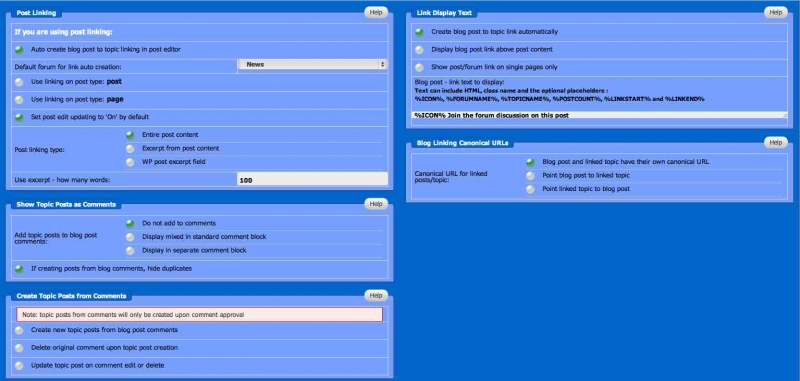
attached screen shot of options screen just incase I’ve missed something, but all links to old posts are there, just not new ones. Maybe there is a file edit I have to do or something

Screen-Shot-2012-04-12-at-16.06.25.jpg
PL Peter lawrence
Peter lawrence
Member

Randomly, It seems to have solved it’s self

Having already been in and saved everything we upgrading, a simple save has done the trick

YS Yellow Swordfish
Yellow Swordfish
Member

That’s good,
The problem was that in the admin panel shot you posted none of the post types were turned on so the linking form would not be appearing anywhere.

PL Peter lawrence
Peter lawrence
Member

Yes, thank you, I must have hit it after posting the image and not even realised as when I’ve checked again, I had done so.


Should these not be set on by default if blog linking is enabled??

YS Yellow Swordfish
Yellow Swordfish
Member

Certainly the standard ‘post; one should be. I will look into it and correct if needed.

ME Meztli
Meztli
Member

Hi guys,

I have been using the blog linking plugin a while, and it´s working as intended. However today i stumled up on a new issue that i can not seem to solve.

We needed more blog writers, so i did promote one member to “author”. Fem minutes later she contacted me and told that she could not open the “blog linking menu” within the wordpress post and mark “Create forum topic”.

I did give her higher wordpress permission (Editor), but she still have no access to the blog linking menu when writing blog posts in wordpress.

Is it only working with admin permissions, or does it exist any way to make this work with lower wordpress permissions?

Cheers

Thomas

YS Yellow Swordfish
Yellow Swordfish
Member

To enable blog linking capability one must be able to publish WP posts/pages and have the SP permission to create linked blog posts turned on. So I would take a look at the latter in regard to you user.

ME Meztli
Meztli
Member

Yellow Swordfish said
the SP permission to create linked blog posts turned on. So I would take a look at the latter in regard to you user.

Thank you Andy. That helped me! 🙂