
Support Forum

Blog linking error

25 Answers

New Answer

ME Meztli
Meztli
Member

Yellow Swordfish said
To enable blog linking capability one must be able to publish WP posts/pages and have the SP permission to create linked blog posts turned on. So I would take a look at the latter in regard to you user.

Hello guys,

I got a problem with the blog linking plugin since last SP update. As administrator it´s working as intended, the issue is related to my forum moderators.

They have permission (authors) to publish WP post/pages. All of them are SP moderators and the SP permission to create linked blog posts is enabled. Se below image!

However the blog linking option “create forum topic” remain disabled to them. I supose i am missing something, but what?
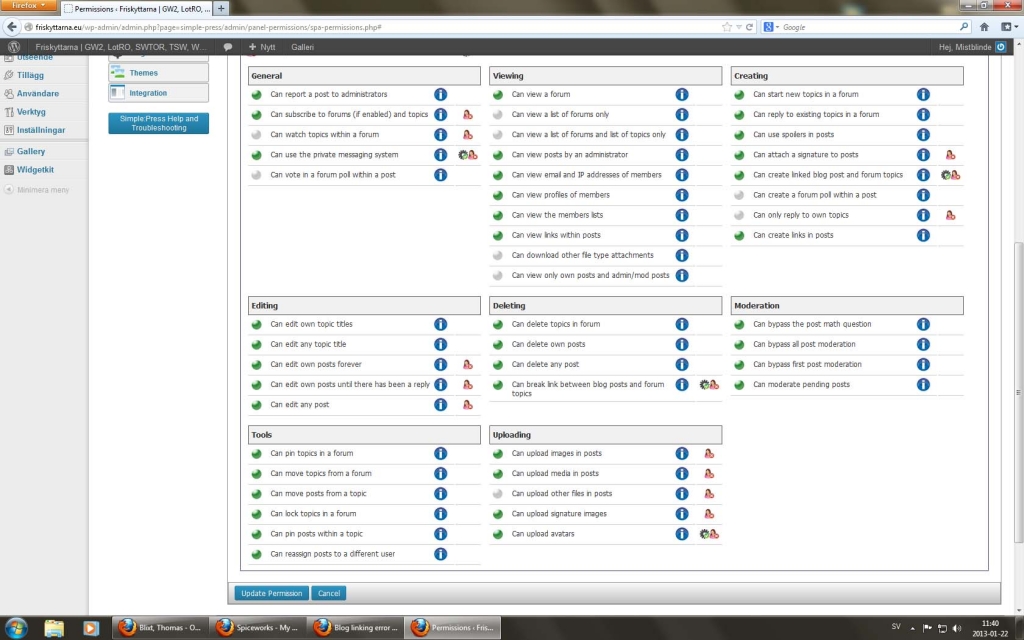
blog-linking.jpg


ME Meztli
Meztli
Member

Just realized that my moderators are not only members of the moderator group, but also member of one other group with lower permissions.

Could that be the reason to my problem?

MP Mr Papa
Mr Papa
Member

shouldnt be…  when a user has multiple permissions, the ‘best’ permission wins…  and that wouldnt be anything that has changed in a long time…

we had a user a few weeks back with a permission inheritance but it was related to use of the default guest group…  so the best permission stuff has been working properly and still was in testing his issue…

this is creating a wp blog post right?  what do you mean by disabled? it would either be there or not so confused by disabled…

ME Meztli
Meztli
Member

This is how it looks when you create a WP post and try to use blog linking:

Blog-linking.png

Blog linking title is visable but no options is given below.

YS Yellow Swordfish
Yellow Swordfish
Member

IS there nothing within the box if you open it? Using the arrow on the right of the title?

ME Meztli
Meztli
Member

Yellow Swordfish said
IS there nothing within the box if you open it? Using the arrow on the right of the title?

Nothing happens by clicking the arrow on the right of the title, like it normaly would.


YS Yellow Swordfish
Yellow Swordfish
Member

Can you ask this person to go to their forum profile ans click on the ‘Permissions’ tab. Choose a forum and open the permissions profile and see what the setting is for ‘create linked topics’ – on or off?

ME Meztli
Meztli
Member

I solved the issue.

Both users actually belonged to 3 groups:

  • Members group
  • Moderators group
  • Own costum made group

When i did remove the users from my costum made group, both could start use the blog linking plugin.

As soon i add them to an 3rd group the plugin stops working.

MP Mr Papa
Mr Papa
Member

Shouldn’t matter… Too late now, but would have been good to know if the user auths cache was correct or missing that usergroup.

ME Meztli
Meztli
Member

Mr Papa said
Shouldn’t matter… Too late now, but would have been good to know if the user auths cache was correct or missing that usergroup.

Thanks Steve. I will check it out if it happens again.

Cheers


MP Mr Papa
Mr Papa
Member

okay… not sure I fully understand the notice, but have made a minor tweak…
