Support Forum

Blog Post Linking – access to linked post denied

CH Charles
Charles
Member

I have downloaded Blog Post Linking plugin and it works as I hoped except I am getting Access denied – you do not have permission to view this page error when when trying to see linked post. If I create normal post in same forum, not linked from WP post, I can access it normaly.  

Here is link

I checked all permission on forum and  Moderators => Moderator Access .
 
I think I have done everything right. I’ve read info about this plugin but it did not answer my question.
 
Why am I getting Access denied to linked posts?
 
 
                  Thanks  Charles 


48 Answers

New Answer

MP Mr Papa
Mr Papa
Member

sorry, not following… how is this related to blog linking?  are you saying you only get the issue with the blog linking plugin active?  who does the issue occur for? admins? users? guests? all?

you are running the yoast seo plugin… please ensure that its setting for auto fixing ugly urls is off..

do you understand how the permissions work? http://codex.simple-press.com/codex/getting-started/controlling-access/

please elaborate further… 

as guest I only see the access denied when I visit a forum… but that may be correct for me for your permissions…

CH Charles
Charles
Member

Yes…  When I create regular post in forum Horse World it is accessible. 

I created post “Normal post” in same forum and you can check it out. You can see it just fine.


          Charles

CH Charles
Charles
Member

Here is link to original post that is linked in the forum if that should help.. 

Original WP post

I’ll check ugly urls.

Charles

MP Mr Papa
Mr Papa
Member

still not really following…  that link in post #4 is a wp blog post – its not a forum post… 

when you created the wp blog post, did you attempt to create a blog linked topic?

any caching plugins?

might be worth going to forum – toolbox – housekeeping and clicking on the reset auths cache button…

CH Charles
Charles
Member

I forgot to mention that it applies to all users. 

Redirect ugly URL’s to clean permalinks is off in SEO..


       Charles

CH Charles
Charles
Member

that link in post #4 is a wp blog post – its not a forum post… 

That’s correct.. I wrote that just so you have reference to original post in Word Press. 

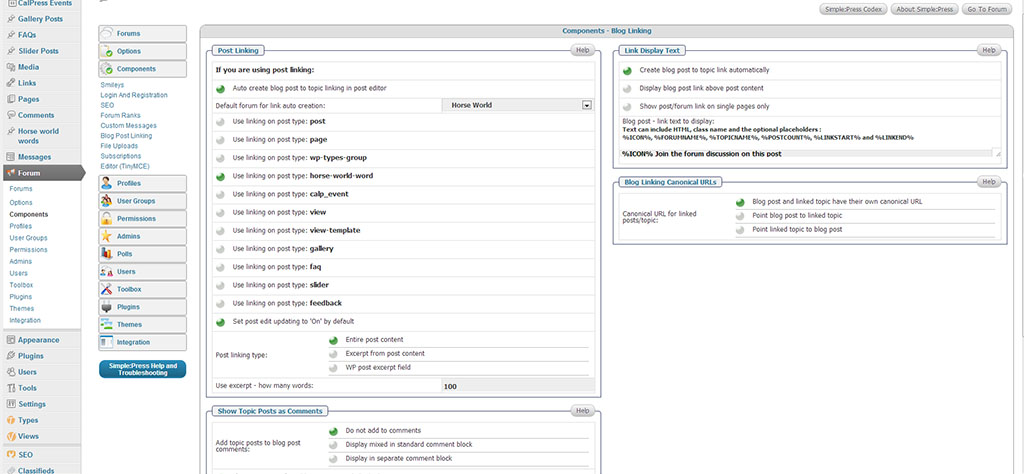
I attached image with plugin setting. 

I just edited original WordPress post and it showed up in SP forum as expected.  Same has happened when I created new post in WordPress. It would show up in SP forum but access is denied for all users. 

I have also email back to support username/password just in case you need access to WP.

  Charles

CH Charles
Charles
Member

any caching plugins?

I haven not installed any..  So to my best knowledge the answer would be no.. 

MP Mr Papa
Mr Papa
Member

sorry a bit confused…  trying to understand your custom post types and how you are using them…

odd your post is showing up under custom post type horse-world-word, the breadcrumbs omit the custom post type…

do you have a page or something called horse world?   you tried to create a forum by same name, but it must already exist since it got -1 appended to the end…

where did you try to link the wp blog post to???  I see test post and normal post fine…  and registration is free too…

so please explain all steps you did in creating the wp post…

MP Mr Papa
Mr Papa
Member

okay, the posts were not created right for some reason…  so lets go back to step by step on how you created…

also, perhaps quickly go to forum – toolbox – housekeeping and try rebuilding the forum and post indexs for that forum and see if that brings them back…

CH Charles
Charles
Member

Would it help if I PM username/pass to wordpress?  It might give you better idea. 

In the mean time I’ll try to be more clear… and explain the setup next..

MP Mr Papa
Mr Papa
Member

not the setup, but the exact steps you did in creating the wp blog post…

did you try the rebuild?

the linked topic is broken…  so want to know what you did in steps…