Support Forum

Blog Post Linking – access to linked post denied

48 Answers

New Answer

CH Charles
Charles
Member

In WordPress I have setup Custom Post Type named “Horse world words” I have several existing post under that CPT.  Two of them are linked in Forum “Horse World”. Specifically  Test & Abscess.  

In Post lilnking my setup is as follow:

Auto create blog post to topic linking in post editor

Default forum for link auto creation:   Selected Horse World  
Use linking on post type: horse-world-word

——————————————————–


Two linked posts in forum. 

“Test” was created in WordPress after plugin was installed and setup

“Abscess” was just edited previous wordpress post but it has showed up in forum because it was edited and updated.  I assume that would be expected. 


         Does it make more sense?    Charles

CH Charles
Charles
Member

Here is another one..

This is link to Worpress post in Custom Type Post “Horse world words”      Link to the wordpress post

When I make change in Worpress post it will show up as linked post in forum “American Saddlebred”

—————————————————————————————————————

Custom Type itself in wordpress was created using “Types and Views” plugin.  


                    Please let me know what else you need to know. That is something I really wanted to have on my forum. I hope it can be resolved somehow.  

       Thanks  Charles

CH Charles
Charles
Member

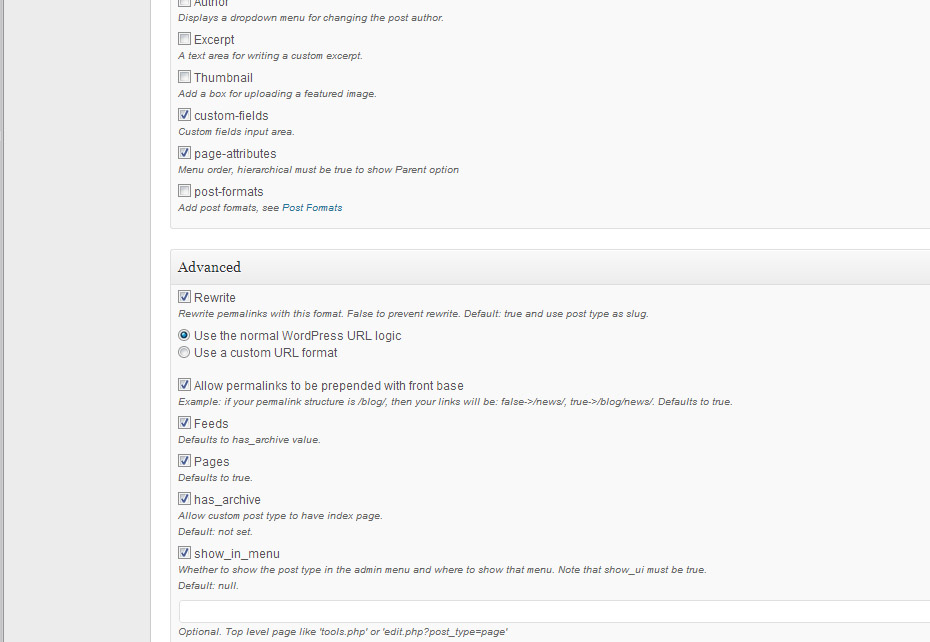
I found some re-write options for this Custom Post Type if that helps – see attached picture. 

SP2.jpg
MP Mr Papa
Mr Papa
Member

did you do the housekeeping rebuild I asked about in post #13?

can you also do me a favor… try creating a standard wp post and blog linking it to the forum…  lets see if in your case, a non custom post type creates fine…

btw, when I asked about steps you took, I wanted you to walk me through the steps you did to create the wp post…

also, might be worth turning off the advanced option for rewrite… not sure what that is doing since wp does that build in… 

but just trying to narrow down the issue…

CH Charles
Charles
Member

1. Yes I rebuild as you asked

2. Created standard WP post (non custom) called “Just a normal post i wordpress”. Unfortunately is behaves same way as custom post.


When you asked how I created wp post I just did it same way as regular post. Instead of clicking on Posts – Add New a would click on Horse World Words – Add New

Then I would fill what I need to fill and publish. There is a content template selected for this custom post but is doesn’t matter I guess since non custom post has same issue.

3. I turned off that advanced option for rewrite. It was only for this Custom Post Type. (Horse World Words)

                             Thanks  Charles 

MP Mr Papa
Mr Papa
Member

so when you created the wp post, did you set any of the blog linking options at the end of the create post (for your custom post type) panel?  or did you just rely on defaults?  if the former, can  you try once more and just look at the blog linking meta box at the bottom and see if everything looks right…

this is quite weird… we have thousands (or tens of thousands of users) using blog linking just fine…  I was wondering if there was an issue with the custom post type linking, but a regular wp post doing the same for you knocks that one out there…

if you want to create me a temp account with both wp admin and SP admin caps, I can try to take a closer look tonight…

CH Charles
Charles
Member

Assuming you have access to email conversation that I had with Simple Press support, I have already admin account created for you in WP and user SimpleTest in SP and I emailed that login info to them/you a couple of days ago. Do you have access to it?

MP Mr Papa
Mr Papa
Member

Please PM the account details to Mr Papa AND Yellow Swordfish. Make sure it is both wp and SP admin account. And please link the pm tonthe support topic.

CH Charles
Charles
Member

PM’d ..

I wasn’t sure how to link it to this topic but I included problem in subjects with links in message..

    Thanks   Charles  

MP Mr Papa
Mr Papa
Member

you would use the permalink button (the chainlink icon) within the post to copy the url.. then paste it into the pm…

will take a look in a bit…

CH Charles
Charles
Member

Oh.. Just to include a link to the topic…  I thought there was a special way to somehow link pm and topic together here in forum. 

 English is not my first language so sometimes I get lost..    Sorry about that.. :-)

MP Mr Papa
Mr Papa
Member

no worries…

but that account does not appear to be a full sp admin as requested… please go to forum – admins – manage admins and make the user an sp admin with all the sp capabilities…  As is, this user is not allowed to create blog linked topics…

CH Charles
Charles
Member

Done… Please feel free to make similar changes to get to the bottom of the problem (if that can be done from your end). You have admin access to WP.

It might be faster to fix the problem that way. I still don’t know all features of SP and most likely will miss stuff like this.

But I have learned something new which is good thing I guess.. 

MP Mr Papa
Mr Papa
Member

so okay if I try few things?  like disabling some plugins and maybe even a theme change?  temp of course…