then time to ask your host…
often you will find it in the wp root directory…
also, if you have cpanel, you can sometimes get to it through there…
what is your php memory allocation?


then time to ask your host…
often you will find it in the wp root directory…
also, if you have cpanel, you can sometimes get to it through there…
what is your php memory allocation?

Before we had a problem with SP forum updated posted on BP Activity page like they were posted “7 hour ago”. Now it is working right, but our regular post displaying like they were posted 7 hour ago. When I deactivated BaddyPress plugin for SP, everything was posting normal without time issue. So this must be a glitch created by BaddyPress plugin.

I deactivated all of my plugins to see if there was a conflict and it still does the same thing. The only plugins I have activated are buddypress and simple press forum. When I activate the plugin all of my content disappears. The only thing I could think of that might be a problem is I am using a wordpress theme instead of a buddypress theme. With the new buddypress you can now use a wordpress theme.
Update: I changed to a buddypress theme as well as deactivated all of the SP plugins. So, a buddypress theme, only buddypress and simple press plugins activated and all of the SP plugins deactivated and it still makes all my content disappear when I activate it.

Kevin: Look in your Simple:Press plugin folder (by default /wp-content/sp-resources/forum-plugins/ and ocate the Sp buddypress plugin. The folder name should be ‘buddypress’. If it has a number after it – or indeed there is more than one – then remove the number or the dupes and try the activation again. There is a problem with the WP uploader that sometimes leaves a number on the end of folder names.
let us know if this is the problem…
Yellow Swordfish said
Kevin: Look in your Simple:Press plugin folder (by default /wp-content/sp-resources/forum-plugins/ and ocate the Sp buddypress plugin. The folder name should be ‘buddypress’. If it has a number after it – or indeed there is more than one – then remove the number or the dupes and try the activation again. There is a problem with the WP uploader that sometimes leaves a number on the end of folder names.let us know if this is the problem…
There is no number on the folder, it’s just named buddypress. Also, no duplicate copies. If I upload the plugin through the uploader it completely crashes my site. If I upload it through FTP then activate it my site doesn’t crash but all of my content disappears throughout my website.
First, all my latest testing is with the latest BuddyPress and a standard wp theme – not a bp theme… if bp is working fine with your wp theme, sp wont change that…
difference when using sp plugin uploader or ftp doesnt make sense – wouldnt be different.. unless you get the number in folder…
and we really need to know the info in the error log when this happens so we can see the error and assess it…
go into your wp-config.php file and add this line:
define(‘WP_DEBUG’, true);
lets see if that helps show some errors..
OK, this is the error message that shows up
Fatal error: Allowed memory size of 134217728 bytes exhausted (tried to allocate 523800 bytes) in /var/www/vhosts/vapersplace.com/problem-with-post-edit-buttonttpdocs/wp-includes/cache.php on line 113
So it looks like there is a memory problem. I will check into this.
UPDATE:
My memory limit is now set to define(‘WP_MEMORY_LIMIT’, ‘128M’);
it still gives the error.
I am not sure if my post was missed, so reposting it again:
“Before we had a problem with SP forum updated posted on BP Activity page like they were posted “7 hour ago”. Now it is working right, but our regular post displaying like they were posted 7 hour ago. When I deactivated BaddyPress plugin for SP, everything was posting normal without time issue. So this must be a glitch created by BaddyPress plugin.”
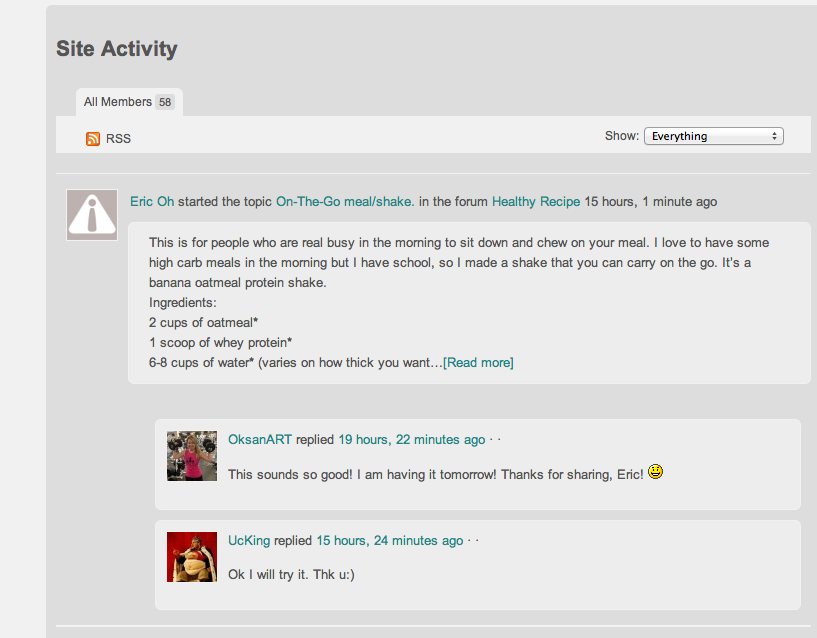
As you can see on the photo Fric Oh started topic 15 hours, 1 minute ago.
OksanART comented on it on activity page 19 hours, 22 minutes ago (so before the topic was posted).
When I deactivate plugin, time shows correctly.
Our website: http://ucgym.com/

not sure I follow… buddypress does NOT adjust times for users… we do… so every buddy press activity will be relative to the server time… the actual forum post will be relative to the timezone the user has set in their sp profile…
comment? so they did that in bp?
The thing is, all our users are in Los Angeles so far. This is a general time set. When buddypress plugin for SP is not active, everything works fine. As soon as I activate the plugin, all the posts (exempt the SimplePress updated) on Activity page will show up as they were posted “7 hours ago”. First we had this problem with SimplePress updated (not regular Buddy Press updates), then you fixed something, and now we have it other way around.
so which time is right now? we do not affect the times buddypress puts on its activity… so are you saying the our times are still wrong for you?
I have changed my server to a memory limit of 128m which is plenty and I’m still getting the error message. They said there must be something in the plugin script that is causing it.
Well, It looks like your plugin do effect the time buddypress puts on its activity. Your time is right now, but time on buddy press activity is wrong because of your plugin. When I deactivate your plugin, it works fine.
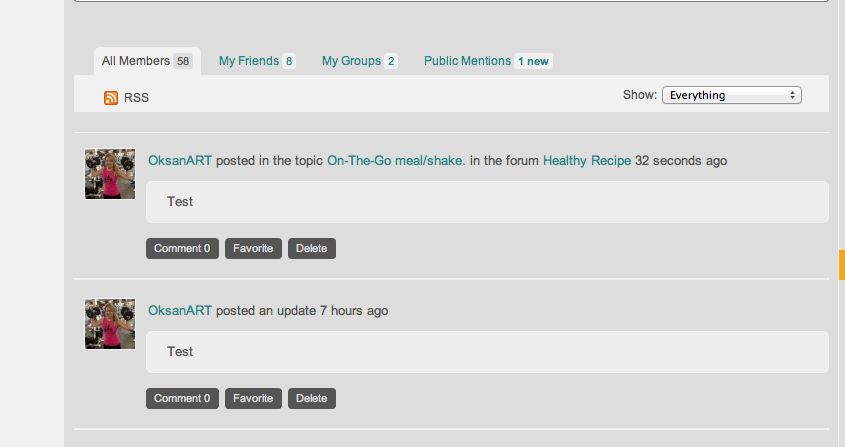
See the screen shoot: Both Posts by OksanART were posted almost at the same time. One was posted on the forum and one on activity page itself. The one which was posted on activity page is displaying that it was posted 7 hours ago.
Before it was other way around – posts from the forum were displayed as if they were posted 7 hours ago.

Kevin,
another user Carlos, is having same kind of memory issue… but have dozens others running it fine… I have tested it in 32M with no issue – it doesnt do anything really… so that is a bit of a mystery… not sure where to go with it… can they track down any further which php script might be causing the issue on your server?
Jamie,
another mystery as I dont see that… I dont even know what buddypress does with follow up comments – certainly we dont have any code that can (or should) be affecting that… I will play around with those comments and see if I can figure out what is going on and/or duplicate it…
its a shame that buddypress doesnt deal with time properly… for a social network plugin, wonder why they just ignored the whole user timezone issue… your in a lucky situation where everyone is in the same timezone, but that’s the exception not the rule… 