Support Forum

Can't add new topic since themes and plugins update earlier today

43 Answers

New Answer

RI RickA
RickA
Member

I will set you up with an admin account in a few minutes. In the meanwhile, are you asking me to disable forum plugins or WP plugins?

MP Mr Papa
Mr Papa
Member

your other wp plugins… just for a quick check to see if the issue resolves… if it does resolve, then reactivate one by one checking to see when it breaks…

MP Mr Papa
Mr Papa
Member

Not sure what to say here…  I get the tinymce editor with no issue..  tried several add topics and add posts… images below…

newtopic.pngreply.png


What browser are you using?  have your tried more than one?

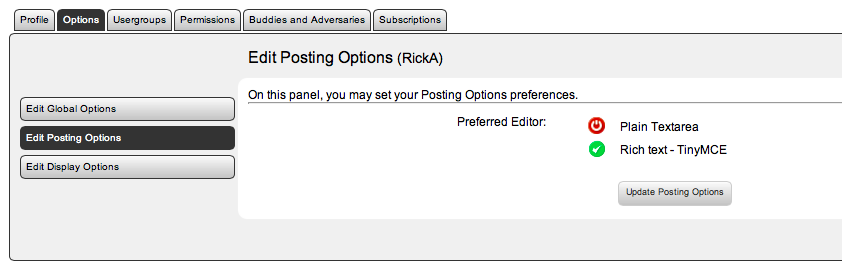
also, go to your SP profile in forum and look at the profile – options- posting options and make sure you have tinymce selected as your editor of choice…

RI RickA
RickA
Member

When I login as a user (not an Admin), I get the tinymce editor in Safari, Firefox, IE9 and Chrome. When I login as an Admin, it’s not there (same four browsers).

Rick

MP Mr Papa
Mr Papa
Member

I thought the account you sent us was a wp admin and sp admin?? seemed to be…

did you ever check your profile options as requested (or did I just miss the response?)?

RI RickA
RickA
Member

Yes, I checked my profile options as an admin but I forgot to send you the image with my last reply. 

Screen-Shot-2012-12-18-at-6.12.59-PM.png

The Tinymce editor is not present in Safari, Firefox, IE9 and Chrome when I login as an Admin but when I logout and login as a regular user (separate account), I get the editor in all of these browsers.

Rick

MP Mr Papa
Mr Papa
Member

So what was the account info you sent us?  was that wp/sp admin?  did you log in as it and try?

do you have other plugins granting you special permission on the front end?  like editing or writing posts?  or other that a plugin might grant you and not others?

RI RickA
RickA
Member

I sent you the login info via PM. Here the current of status of things after doing a little research.

Old admins can’t see the the TinyMCE bar.
 
Old users can see it. 
 
When I login with a new user account, I can see it.
 
When I login with the new admin account that I created for SimplePress, I can see it.
 
So the problem remains that the old admins can’t see the TinyMCE bar but they have checked their profile settings and the setting are correct.
 
Rick
MP Mr Papa
Mr Papa
Member

lol, which doesnt make much sense…  we dont have any kind of checks like that… in either tinymce… 

go to your wp profile and see if you have the visual editor disabled…

can you send us the info for that account so we can see what is up?

RI RickA
RickA
Member

I am logged in using my old admin account. I can’t see the MCE Editor. I checked the “Disable the visual editor…” is not checked.

I sent login information for you via PM just a few minutes ago.

MP Mr Papa
Mr Papa
Member

Rick, I think you are misunderstanding…  with the account you sent previously and in the last PM (SimplePress), I can see tinymce just fine…

I would like you to send us the other admin account where you cannot see tinymce… I want to see what is different…

RI RickA
RickA
Member

We can close out this issue. The solution to the problem was to open each browser and clear the caches and cookies.

Here is a web page that has detailed information on how to do this for each of the major browsers: http://kb.iu.edu/data/ahic.html

Thanks for your help.

Rick


MP Mr Papa
Mr Papa
Member

good news! thanks for the update and letting us know… >