Support Forum

How To Add Avatar To Profile?

JC Jonah CHEW
Jonah CHEW
Member

hi,

I have scoured this forum and the simple press until my eyes are dropping out. But still I cant find a solution to this.

How do I allow users to upload their avatars? I am not considering on installing buddypress.

How can users upload their picture? I have allowed this in permissions and allowed for standard users all the way to moderators.. but I STILL CANT UPLOAD.

Please help!

18 Answers

New Answer

IK Ike
Ike
Member

Sorry this won’t be too helpful, but can you be more specific?

I take it you understand the process of uploading an avatar – i.e click the ‘Profile’ button at the top of the forum, then ‘Edit Avatar’ from the sub-options on the left. You should then see a file browser and an ‘Upload Avatar’ option.. Not being condescending but need to cover the basics.

Please elaborate on what exactly the problem is, as ‘CANT UPLOAD’ could mean many things..

JC Jonah CHEW
Jonah CHEW
Member
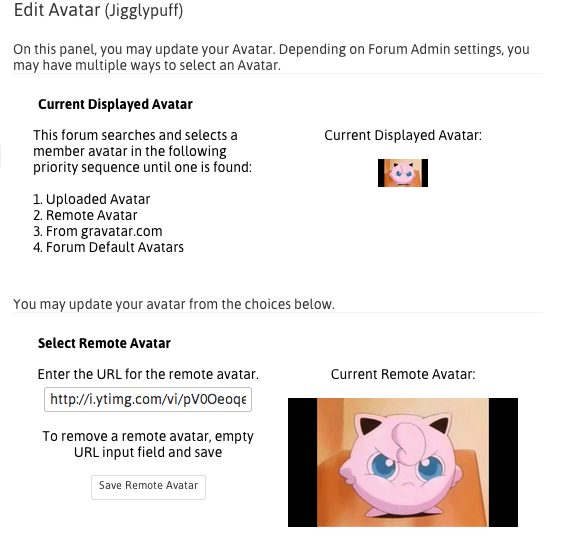
Screen-Shot-2014-08-26-at-12.23.59-am.png


Hi Ike,

Thanks for your reply.

I do understand that clicking on “Profile” and Click “Edit Avatar” then “upload an avatar” will prompt a browse window to select pictures.

Problem is, my website doesnt have the “upload an avatar”, as attached in the screen shot

IK Ike
Ike
Member

OK thanks,

Well, the obvious reason that you won’t see the ‘Upload Avatar’ option, is if uploading of avatars is disabled.

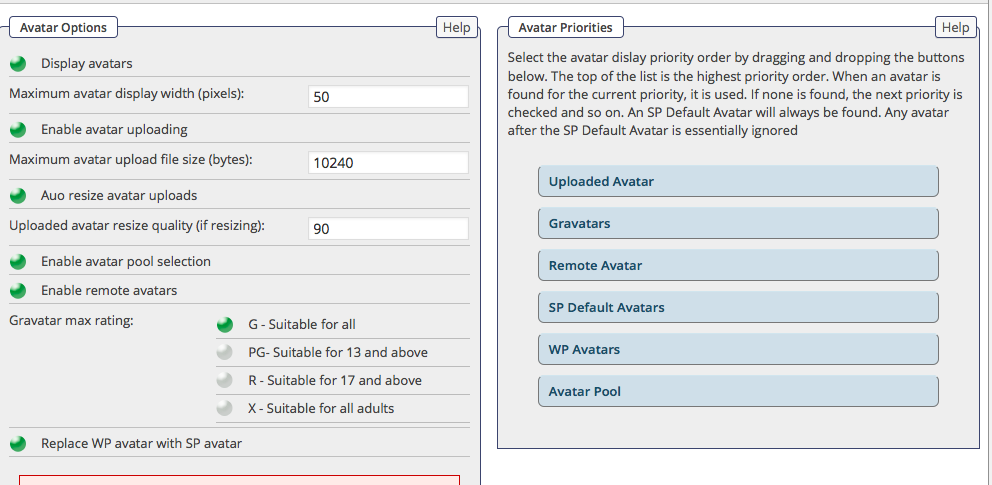
Please can you go to your WordPress admin, go to Forum > Profiles > Avatars, and make sure that the 2nd option – ‘Enable Avatar Uploading’ is enabled.

It’s at least it’s the first thing to check!

YS Yellow Swordfish
Yellow Swordfish
Member

Have you actually tried removing the remote one that is already assigned on that particular profile?

JC Jonah CHEW
Jonah CHEW
Member

I did remove, tried many combinations, made sure the account is a member.. but it just doesnt work. The option to upload the avatar just doesnt show up. I tried so many things now, sigh.

JC Jonah CHEW
Jonah CHEW
Member

even when I log in as the admin, there still isnt an upload option for me. Oh man!

YS Yellow Swordfish
Yellow Swordfish
Member

I suggest you make me a new user account so that I can come and take a look…

If that is acceptable to you then please PM credentials to both myself and to ‘Mr Papa’. Please include in the PM a link to your site, a link to this thread and a brief reminder of the problem. And one of us will take a look for you.

JC Jonah CHEW
Jonah CHEW
Member

Yellow Swordfish said
I suggest you make me a new user account so that I can come and take a look…

If that is acceptable to you then please PM credentials to both myself and to ‘Mr Papa’. Please include in the PM a link to your site, a link to this thread and a brief reminder of the problem. And one of us will take a look for you.

Hi I think it’ll be difficult as I need to ask my partners too.
am I missing out anything? Any plugins or settings that I have missed?
Or maybe what are the steps needed here?
please advice..

MP Mr Papa
Mr Papa
Member

I would ask if you have given users permission to upload avatars?  but when you said as an sp admin you couldnt either, kind of rules that out – unless you meant wp admin which is not the same as an sp admin…  you can check permissions on forum – permissions – manage permissions…

also, check forum – integration – storage locations and verify that your avatar storage location is valid and writable…

JC Jonah CHEW
Jonah CHEW
Member

Mr Papa said
I would ask if you have given users permission to upload avatars?  but when you said as an sp admin you couldnt either, kind of rules that out – unless you meant wp admin which is not the same as an sp admin…  you can check permissions on forum – permissions – manage permissions…

also, check forum – integration – storage locations and verify that your avatar storage location is valid and writable…

I have done and enabled all of that. what do u mean wp and not sp? i have used sp. or maybe I didnt set that? please advice..

MP Mr Papa
Mr Papa
Member

wp admins are not sp admins… by default, at install time, only the wp admin that installed sp becomes an sp admin…  additional sp admins can be set at forum – admins – manage admins…  wp admins are like any other user in the forum – they only get the permissions assigned to them…  sp admins get every permission on the forum…  can you verify if the ‘admin’ user you set up was a wp or sp admin (could be both of course)…

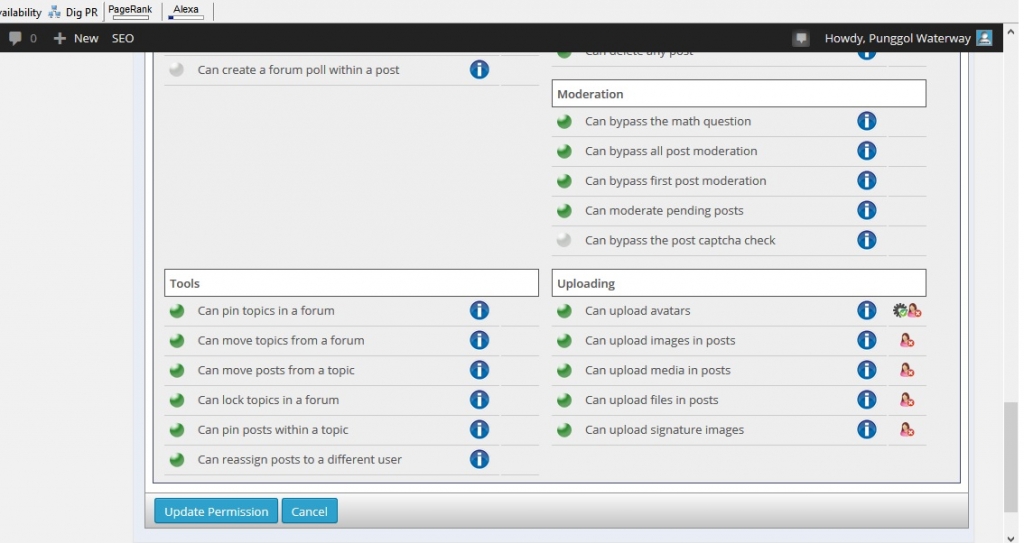
as any user or admin on your site, please go to your sp profile…  select the permissions tab and then click on view for any of the forums…  can you take a screenshot of the listed permissions and please upload it here…

MP Mr Papa
Mr Papa
Member

Please see my previous post… It’s on forum – admins – manage admins