
Support Forum

How To Add Avatar To Profile?

18 Answers

New Answer

JC Jonah CHEW
Jonah CHEW
Member
1.jpg


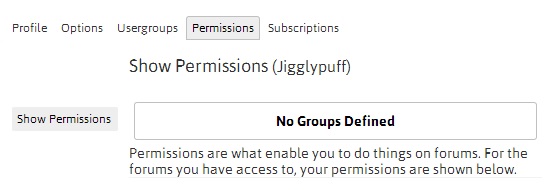
hi, sorry I meant to send this. This is the screenshot for:

“as any user or admin on your site, please go to your sp profile…  select the permissions tab and then click on view for any of the forums…  can you take a screenshot of the listed permissions and please upload it here…”

it seems the normal member cannot upload avatar because he or she is not in the user group defined?

How do I rectify this?

MP Mr Papa
Mr Papa
Member

you havent created any groups yet???  or if you have, this user has no permission on any of those forums…  that is the problem… no groups or forums, then no permissions…

a primer on permissions and accesses:   https://simple-press.com/documentation/codex/getting-started/controlling-access/

so give that a read and you will know how to assign users to a usergroup and then combine a usergroup with a permission set to control how they can access and use your forums…

JC Jonah CHEW
Jonah CHEW
Member

thanks everyone for the help… its finally solved! Cant believe how I miss this mossst important step of creating groups and forums… thanks!

YS Yellow Swordfish
Yellow Swordfish
Member

smile You’re welcome. Glad we got there in the end!