Support Forum

Link To Forum installed but not working correctly

FB Frederic Buonincontri
Frederic Buonincontri
Member

Hi, We’ve used this feature pre-version 5 and now we’re on version 5.1.3. We installed the “Link To Forum” plugin, it’s in there (the correct area for SP plugins), it shows up in the forum admin panel and it’s possible to adjust it’s settings, BUT on the WP admin panel to create a post it shows the text “Link To Forum” but no list to choose from to link the post to. On the pre-version  5 it would show a list of forum topics to choose from. Also, yes I clicked it and the down arrow but no list shows. It’s the same forum and all the same data from the pre-version  5. Hope my explanation makes sense. Possible plugin incompatibility? or possibly some other issue?


Looks like this (no list to choose from version 5.1.3):Screen-shot-2012-09-13-at-2.56.31-PM.png

Used to look like this (list to choose from pre-version 5):
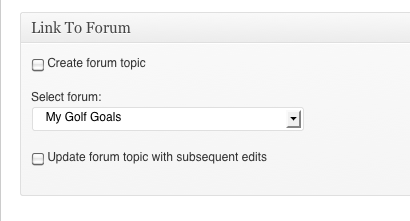
Screen-shot-2012-09-13-at-2.57.04-PM.png

51 Answers

New Answer

YS Yellow Swordfish
Yellow Swordfish
Member

Go the Blog Linking forum admin panel. It is probably because the post types have been unchecked (I know this happened with a few updates). See if the post type (post, pages etc) need to be turned on…

FB Frederic Buonincontri
Frederic Buonincontri
Member

Thank you for the quick reply :)

I think it is on/was already checked and on.

I had written the settings down and had made sure they were the same settings from the previous version.

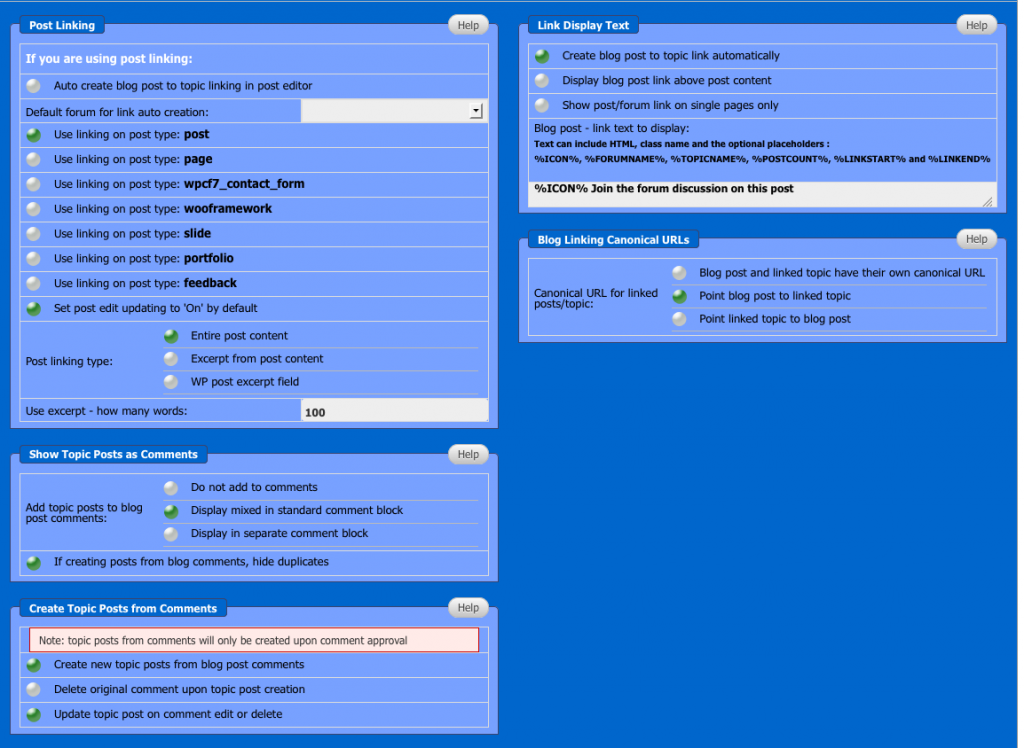
here are the current settings just to be sure I didn’t mistake you or that I didn’t make some sort of mistake:


Screen-shot-2012-09-13-at-5.42.58-PM.png
BR Brandon
Brandon
Member

In your pic the default forum for blog linking dropdown appears to be empty. One other guy reported this and he deactivated the blog linking plugin and then re-activated it and then the forums showed up in the drop down.

Might give that a shot.

FB Frederic Buonincontri
Frederic Buonincontri
Member

Thank you for the reply Brandon C, I did try that and it didn’t work for me. Any other ideas?

MP Mr Papa
Mr Papa
Member

do the users have sp permission to create linked topics?  and wp capabilities to publish posts?

FB Frederic Buonincontri
Frederic Buonincontri
Member

The users (members of a membership site) have, or are set to, standard forum access and no ability to create posts but can comment, all the same settings as before. The admins have all access to do everything in WP and SP. I’m not understanding your question though because when I’m logged in as an admin I’m not getting the list to link the post to the forum. Are you saying I need to change a setting of some sort for the users? Not sure what you mean but I’ll try anything to get it to work and your help is greatly appreciated.

FB Frederic Buonincontri
Frederic Buonincontri
Member

to clarify… the users can create forum posts but not wordpress posts. and the standard setting refers to the forum. forum settings: guests=no access, members=standard access, moderators=moderator access. Will keep trying to change various settings back and forth to see if anything fixes it.

MP Mr Papa
Mr Papa
Member

now you have me confused… ;)

my point is that in order to create a a linked forum topic to a blog post, the user must have wp capability to create blog posts (ie wp posts)…  how else could they create such a linked blog post to forum topic if they cannot create the blog post? they must also have the sp permission to create linked topics…

and just to be clear, wp admins are NOT sp admins…  any wp user can be an sp admin… you determine which wp users are sp admins on forum – admins – manage admins… 

any sp admin will by definition have the sp permission to create linked topics… but they still need the wp capability to create posts…

but what is odd, is that these permissions have not changed from v4 to v5…  so not sure we are on the same page here yet…

FB Frederic Buonincontri
Frederic Buonincontri
Member

sorry about the confusion.

We used to be able to have a forum topic created when we created a post and be able to link them and I’d like to achieve that again. When we created a wp post previously it gave us a drop down list to create a forum post/topic. Now it doesn’t give that list (see pics above). So I must be missing something somewhere and I must not be explaining what I’m trying to re-instate very well. I was hoping the screen shots would help with my explanation.

Trying again; We have a forum with forum topics and a group, etc. Previously when we created a wp post we were able to make it create a forum post and link it. This was achieved by selecting from a list on the wp post creation page. Now with version 5.1.3 forum linking has become a plugin. The plugin is installed and the settings are configurable but the list of forum topics doesn’t show up in the wp post creation page. I’d like it to show that list so I can link the wp post to a forum topic but I can’t get it to show that list. I tried deactivation/reactivation and a number of other things. I will try to reinstall the plugin next. I’m wondering if there may be some sort of plugin incompatibility.

MP Mr Papa
Mr Papa
Member

I might need Andy’s help on this one now… he wrote that plugin…  he will be back tomorrow…

YS Yellow Swordfish
Yellow Swordfish
Member

Let’s check this another way…

From any forum page, click on the profiles button and then select the permissions tab long the top.

Check a few forums. Do you – or the user who is having the problem – have both ‘can create linked topics’ and ‘can start new topics’ checked on?

FB Frederic Buonincontri
Frederic Buonincontri
Member

‘Can start new topics in a forum’ is checked on

‘Can create linked blog post and forum topics’ is NOT checked on


Looks like a clue!

Where can I change this setting?

MP Mr Papa
Mr Papa
Member

this is what I was referring you need to do in post #9…  its on forum – permissions – manage permissions…  you will need to edit the permission set you have defined for the usergroup you use for the users you want to have this permission…  you can see which permission set you have assigned to each usergroup for each forum on forum – forums – manage permissions…

you can get a primer on permissions at:  http://codex.simple-press.com/codex/getting-started/controlling-access/

FB Frederic Buonincontri
Frederic Buonincontri
Member
Thank you for the link. I am aware of setting the permissions for both the forums and the group. From my earlier post:

to clarify… the users can create forum posts but not wordpress posts. and the standard setting refers to the forum. forum settings: guests=no access, members=standard access, moderators=moderator access. Will keep trying to change various settings back and forth to see if anything fixes it.

I did have the permissions set as above for both the group and the individual forums. I went back and it seems that the problem is that it’s not saving the settings for the group? The settings for each forum are as described above, have been and have not changed. The group setting doesn’t seem to be saving. But yes, way back when, months before I started this thread I did click “add group permission” for the group after setting the options and I expected it was saved. Since your post I’ve gone back, checked again (multiple times) and I believe it’s possible the settings are not saving for the group, but they seem to have saved for the forums as they are as I had originally set them and I have not touched their settings. Hopefully I’m describing it clearly. Again, way back when, months ago, I did set the permissions for both the group and the forums. The forums seem to have retained their original settings but the group doesn’t seem to be retaining it’s setting. Thanks for your help. I will re-review the information from the link you sent to see if there was anything I missed from way back but I believe the problem is that the group settings are not saving.