Support Forum

Link To Forum installed but not working correctly

51 Answers

New Answer

FB Frederic Buonincontri
Frederic Buonincontri
Member

Also, when I asked “Where can I change this setting” that’s because I had already added permissions for bot the group and the forums and thought maybe there was some other new place to add or change settings that I wasn’t aware of.


Again, thank you for your help,

FB Frederic Buonincontri
Frederic Buonincontri
Member

Got it, there is another section for setting permissions beyond the guest, moderator, standard etc. or it’s different than before, or whatever, because checking blog linking was all that was needed before. Now it has to be added as a plugin, then you also have to check the setting in the plugin and then some permission settings other than the settings in the plugin. Basically three sections have to be set where previously it was only one. Wow, makes me feel like an idiot having to chase all over just to add something that was a simple add previously. Ah well, such is progress.

Thank you so very much for your help as it enabled me to finally track it down. I would suggest that the plugin developers add tutorials with pictures as it’s become more complex than previously.

FB Frederic Buonincontri
Frederic Buonincontri
Member

I’m so sorry, but something is still not right:

Screen-shot-2012-09-18-at-2.07.14-PM.png

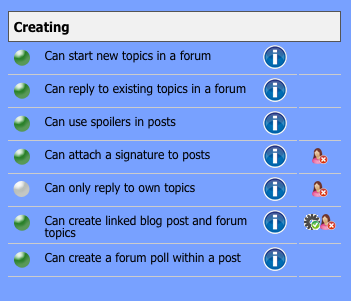
As you can see for my admin set up in SP I have checked “can create linked blog and forum post” selected. Yet…

Screen-shot-2012-09-18-at-2.07.22-PM.png

In the forum permissions the setting did not save and you can see “can create linked blog and forum post” has a red ‘x’ instead of a green check. Things don’t seem to be saving as they should. Maybe I need to do a reinstall?

What do you suggest.

YS Yellow Swordfish
Yellow Swordfish
Member

Could you try going to the forum admin > Toolbox > Housekeeping > and clicking on the ‘reset Auths’ option to see if that clears it up?

FB Frederic Buonincontri
Frederic Buonincontri
Member

Thank you, just tried the reset and it didn’t change anything. The settings are still the same as the pics above.

YS Yellow Swordfish
Yellow Swordfish
Member

Ok that’s a little worrying. Did you have any problems when you upgraded to V5? We had one or two users who had problems with their permission records becoming duplicated but this was usually a manifestation of an upgrade problem leading to it being upgraded twice… Anything in that?

FB Frederic Buonincontri
Frederic Buonincontri
Member

I didn’t notice any issue at all when upgrading. It seemed to go perfectly smoothly. I can check MySQL to see if there are any duplicates. Do a reinstall or whatever is needed.

YS Yellow Swordfish
Yellow Swordfish
Member

that would be helpful. Can you start with the table called ‘sfauths’. Depending on what SP plugins you have active that should contain between 45 and 55 rows only. If there are duplicates we need to deal with them.

FB Frederic Buonincontri
Frederic Buonincontri
Member

checking ‘sfauths’ and it’s showing 47 rows and I don’t see any duplicates.

also create_linked_topics, “Can create linked blog post and forum topics” is showing active=1, ignored=1, enabling=1, admin_negate=3, authcat=3 if that helps at all.

One other odd thing from a few weeks back was that upgrading plugins from within simplepress wasn’t working either, but it did work last time a week or so ago.

FB Frederic Buonincontri
Frederic Buonincontri
Member

could it be possible some apache mod needs to be enabled on the server?

MP Mr Papa
Mr Papa
Member

admin_negate of 3 is wrong….

They should all be 0 or 1. Do you have more admin_negate entries that are not 0 or 1?

Are you sure you are on 5.1.3? Asking because we had a couple of those issues pre 5.1.3 but the upgrade script for 5.1.3 should have fixed them. On Sep 18, 2012 2:27 PM, “Simple:Press Support” wrote:

> > >

FB Frederic Buonincontri
Frederic Buonincontri
Member

all off or on 0 or 1, makes sense to me, checking to reply to your questions now…

To confirm it’s 5.1.3, copied and pasted from plugins page:

Fully featured but simple page-based forum

Version 5.1.3 | By Andy Staines & Steve Klasen | Visit plugin site

 
Regarding the admin_negate; two are “1”, most all are “0”, and two are not “0” or “1” but are “create_linked_topics = 3” and “break_linked_topics = 7” respectively. From your description those two should be either 0 or 1 but they are not. Wonder why/problem-with-post-edit-buttonow they could have gotten another value? Should I set them to “0” or “1” and see what happens?
MP Mr Papa
Mr Papa
Member

The two in question should be 0.

Only 2 should be 1…

FB Frederic Buonincontri
Frederic Buonincontri
Member

okay, I set them to “0” in MySQL. Checked the various forum sections and permissions, also checked if it’s giving a drop down list and nothing yet. Also “Can create linked blog post and forum topics” still has a red ‘x’. There still must be some setting that needs adjustment.

YS Yellow Swordfish
Yellow Swordfish
Member

sorry Frederic. What Steve should have added was that after making a manual adjustment to the data like that the clean up routines in code will not be actioned. So you will need to go and do that reset auths task in the toolbox > housekeeping again for the changes to take effect. Hopefully – that should rebuild individual permissions to the new auth settings.

Meanwhile I will also try and work out why you had those bogus values…