Support Forum

PM plugin problems after the last update to Version 2.3.1

49 Answers

New Answer

BS BSABantam
BSABantam
Member

Hi, sorry for the delay, Christmas intervened!

I carried out your suggestions, all the tables appeared to be up so I did the Optimise and then Repair. That made no difference to the sort order so I then uploaded the updated Plugin and as far as I can tell, that seemed to do the trick. Thank you.

I carried this out before Christmas and put a note on our Forum to let everyone know changes had been made but have received no feedback as yet. I’m surprised, but then maybe I shouldn’t be as people are quick to point out problems but not so quick to say things are working correctly.

Sending a PM as suggested.

MP Mr Papa
Mr Papa
Member

assume you mean good on the pm sorting?  but still have the other issues?

still Christmas in reality…  so we will try to take a look in the next couple days…

BS BSABantam
BSABantam
Member

Yes, in my own account the PM sorting now looks good so I presume the problem is solved.

As far as the other issues are concerned, whenever you have the time and opportunity to take a look, I will be grateful. Enjoy the rest of the Holiday!

MP Mr Papa
Mr Papa
Member

replied to PM, but unable to get credentials working…

MP Mr Papa
Mr Papa
Member

I spent a good 30-40 minutes on your site tonight… with 3 different browsers (FF, Edge and Chrome)…  tried doing lots with PMs though only formally sent a couple to you..

you think the sorting is resolved, so that is good…

but I couldnt replicate any of the other issues…  I even had one email to go with 30 users…  autocomplete worked properly in all browsers…  deleting thread was fine.. basically, all worked…

also tooled around the site seeing if anything else looked off but didnt anything… no errors noted…

guess we need to see if folks report anything back…

BS BSABantam
BSABantam
Member

Thanks for taking a look, much appreciated, and thanks for the re-assurance that all looks OK, as you say, we will have to wait now until we get any more feedback, though of course, in typical fashion I will only hear if something is wrong, very rarely if it’s right! rolleys

Thanks again.

BS BSABantam
BSABantam
Member

Thanks for all your help with this, just thought I would update you.

I’ve had no further complaints from Users.

Everything appears to be working OK, PM messages are sorted correctly in each individual thread, but the list of PM threads in the inbox appear to be sorted chronologically by the date/time of the last outgoing message not the last message in the thread.

There is the notification on the Inbox button that there is a new message but there is no way of knowing which of the messages is new without checking the dates/times. A flag like the one denoting a new Forum Post would solve the problem. wink

YS Yellow Swordfish
Yellow Swordfish
Member

Good news.
So – the latest PM thread to get a new message should display at the top of the first page and the background should be a slightly different colour. Is that not what you see?

BS BSABantam
BSABantam
Member

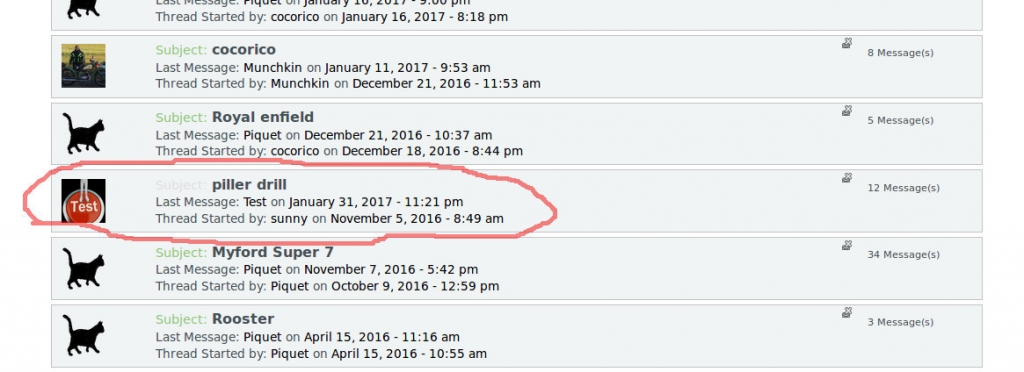
No, see screenshot below, the only difference in colour is the word ‘Subject’.

Screenshot-at-2017-01-31-232541.jpg

I realise some of it may be to do with the colours we are using but this test example shows the ordering, there are actually 5 threads above the one highlighted.

BS BSABantam
BSABantam
Member

What I did was to select that thread and forward the latest message to a test account, logged out and the logged in to the test account, replied to the message and logged out.

When I logged in to my own account, I went to my inbox and took the screenshot of the list of message threads. The thread highlighted was the incoming message from the test account. The thread position in the list is exactly the same as before sending or receiving messages and the only indication that there was a new message was the change of text colour of the word ‘Subject’.

YS Yellow Swordfish
Yellow Swordfish
Member

So we will check the ordering.
Just above the thread listing – in the inbox header – there should be a select/dropdown box that shows the threads. Those with new posts should have a little icon beside them and you can click on that to open the thread.

BS BSABantam
BSABantam
Member

Yes, the drop down box is there and the threads are listed in the same order as the screenshot. There are just 5 threads listed and as the one with the new message is below those it doesn’t show.

YS Yellow Swordfish
Yellow Swordfish
Member

ok – will look at this also.
But – were any of the PMs above the new one – old – and by that I mean prior to the update that introduced PM paging?