Support Forum

Problem with TinyMCE – Very weird behavior

JM Joshua McQueen
Joshua McQueen
Member

Hey there, 

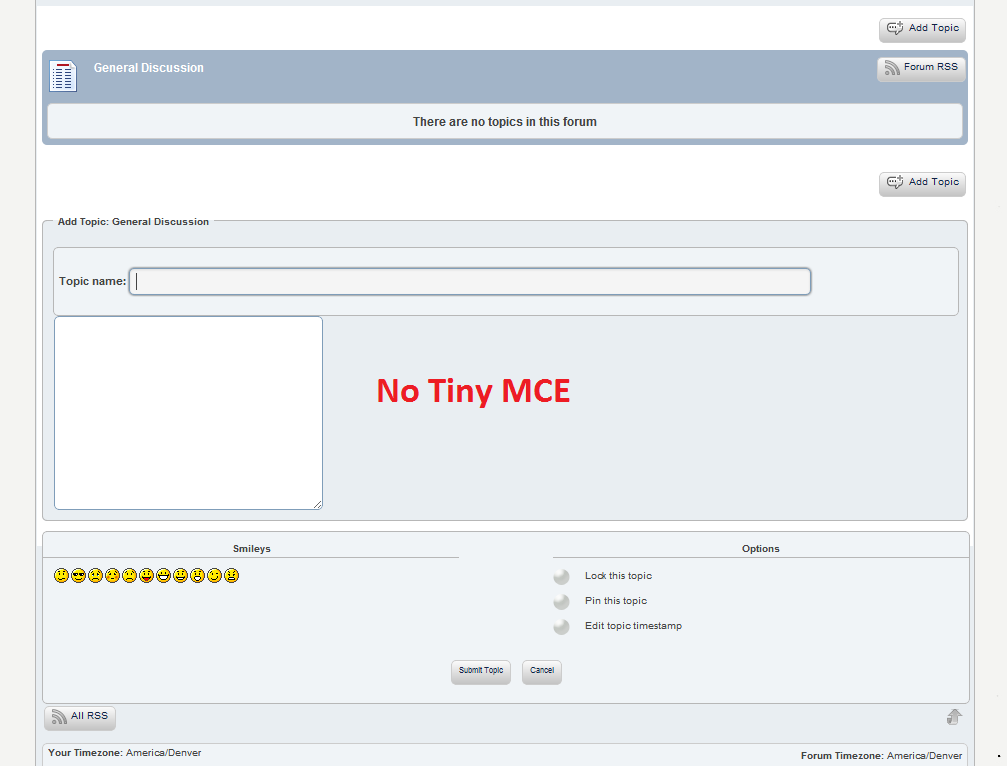
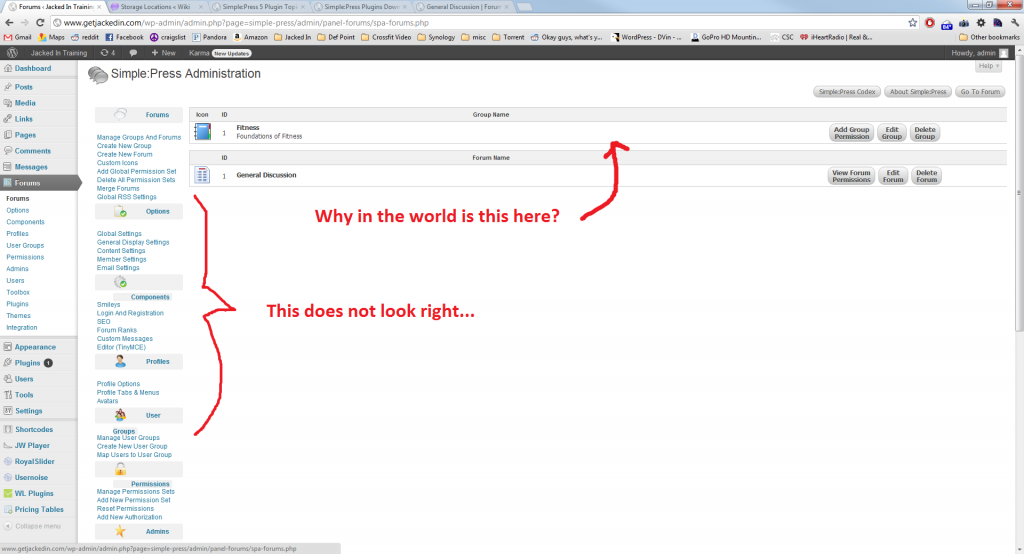
I’m having a weird problem with TinyMCE. It’s been driving me crazy. Here’s what I did to replicate: 

Totally new Simple Press installation (lastest version 5.1.2 8910). 

The first thing I did was install TinyMCE plugin (latest version 1.1.3). I upload the zip file through the plugin uploader. 

As soon as I activate it, BAM, it screws everything up. See screenshots. 

When I installed Simple Press there was an error that said “Storage location part 1 ownership failed” but when you go to folder permissions screen — they are all good. 

Any idea what’s going on here? 

-Joshtinymce1.pngtinymce2.png
19 Answers

New Answer

JM Joshua McQueen
Joshua McQueen
Member

Hey everyone,

Don’t worry about these issues. 

I rolled back to an earlier server snapshot, and tried everything again. 

Seems to have worked this time. 

Thanks anyway! 

-Josh

MP Mr Papa
Mr Papa
Member

When you say uploaded through the plugin uploader, are you referring to the wp plugin uploader or the sp plugin uploader?? since its a plugin for simple press, it must be the latter… and assume you followed the directions here: http://codex.simple-press.com/codex/plugins/plugin-basics/using-plugins/

replying by email, so cannot see the images – will try to look at them a bit later…

if you go to forum – components – editors (tinymce), do the options look correct? ie not corrupted… if look bad, any chance you are running wishlist member and the wishlist member tags plugin?

will check back later when can access a computer…

MP Mr Papa
Mr Papa
Member

odd, but glad its working now… thanks for the update!

JM Joshua McQueen
Joshua McQueen
Member

FIGURED IT OUT.

So, I rolled back to an earlier version, and everything worked (horray!) 

But then I started installing other plugins into my wordpress. It’s then I figured out who the culprit was:

WishList Tag Plugin (v1.0.69) — it’s a “social” plugin that lets you tag people in posts / comments / forum etc…

Sure enough I get a JavaScript error now:

Failed to load resource: the server responded with a status of 404 (Not Found)

Failed to load: “wp-content/sp-resources/forum-plugins/tinymce-richtext/tinymce/plugins/wltags/editor_plugin.js”

I’ll do a little more digging and see what I can come up with. 

-Josh

MP Mr Papa
Mr Papa
Member

lol. exactly what I said in my previous post… a known issue… we are working with the wishlist tags author to try to resolve this…

JM Joshua McQueen
Joshua McQueen
Member

never-mind… nothing to see here. 

Helps to read the “help” that is so conveniently located on each page. 

:-)  

-Josh

MY My
My
Member

I’m having the same problem since upgrading but I’m not using wishlist.

I’ve also noticed that in addition to messing things up on the forum I also lose my TinyMCE editor for editing wordpress posts/pages.

I tried uninstalling and reinstalling the plugin (via the SP uploader)

I can’t look at the Tiny MCE settings in SP admin because the settings page won’t load.

I also tried uninstalling other WP plugins which didn’t seem to help

MP Mr Papa
Mr Papa
Member

same issue? getting the errors listed in post #5??

if not, please explain a bit more… and check your server error log for data.. if the admin page wont load, there is an error and it should get logged…

MY My
My
Member

I was referring to what was described in the initial post, though the problem remains with no plugins (aside from SP) installed.

The admin page loads, just not the TinyMCE settings page, I get that eternal spiraling boxes thing.

I can’t easily check error logs, I have to ask my host to do it and I’ll need to ask them something specific so advice on that would be helpful.

YS Yellow Swordfish
Yellow Swordfish
Member

This clearly has no relation to the original problem in this thread which is caused by the WishjList Tags plugin corrupting the SP tinyMCE option settings in the database. So we can ignore that for a while.

It is also interesting that you say you have lost the TM editor in your WP post writing page. There is absolutely no connection between that and the SP tinyMCE which is independent. So if you are truly having problems with both editors something else is amiss on the site.

SO – first question. What happens when you uninstall the SP tinyMCE editor plugin? IS everything else site-wide working as it should? All SP Admin panels? WP Post Write?

MY My
My
Member

Activate the TinyMCE Plugin in SP and everything goes crazy, Deactivate it and everything goes back to normal, this happens with or without any other wordpress plugins active. I can set you up an account if you want to see it in action.

YS Yellow Swordfish
Yellow Swordfish
Member

Sorry – but ‘everything goes crazy’ is not really very descriptive or helpful in trying to diagnose a problem. Does ‘everything’ mean the whole website? Nothing works at all? As that s the only way I can interpret that. And ewhat does ‘crazy’ actually mean here?

By the way – have you downloaded a fresh copy of the tinymce plugin and completely replaced it in the sp plugins folder just in case there was some kind of problem with the previous donwload?

MY My
My
Member

Like I already stated, the images in the first post of this thread show the same thing that is happening on my site when the Tiny MCE plugin is activated, in addition I lose the TinyMCE editor on my WP post editing screen. I also noticed that the popout menu items in the wordpress dashboard also stop working. As soon as I deactivate the SP plugin everything reverts back to normal and this happens even when no other (aside from SP) wordpress plugins are active.

I also just ran the latest SP updates just in case that’d fix the problem but it did not.

Yes, I deleted the plugin via FTP and reinstalled it using the SP upload plugin feature.