The rate this post button is only showing the up vote. Users can no longer down vote?
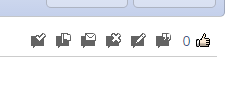
It’s been like this for a little while. Any thought on how to fix this?


The rate this post button is only showing the up vote. Users can no longer down vote?
It’s been like this for a little while. Any thought on how to fix this?

That’s a very good question. I’ve looked at your forum plugins post rating images folder and the thumb down image is definitely there. There are no settings or permissions associated with being able to choose whether a user can rate down or not, it should just work.
So with that being said, the first thing to do would be to inspect the page. Are you able to see if there are any errors on the page in the browser console?
It would also be interesting to see what the HTML is doing.
If you’d rather one of us took a look we’re more than happy to, please do as usual and PM login details with a brief reminder of the problem and a link to this thread – To me, Mr Papa and Yellow Swordfish.

No errors that I see. One thing I did notice though, when I check this.

It shows the this:
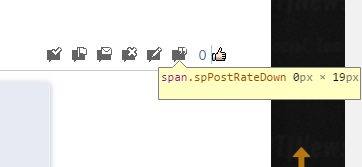
The 0px x 19px??? The up vote shows 16px x19px? Is this the cause?
That could absolutely be the cause, as if one dimension is 0px of an image, it won’t be displayed at all.
So something, somewhere is causing that particular image to change size. As it still technically exists on the page, are you able to inspect it and check the CSS rules applied (the box on the far right of the browser console) to see where the 0% width rule is coming from? You may need to find it in the HTML section on the left.
Again, happy to look so the above still applies if need be.

if you send it to the whole team, better chance one of us can take a look… Ike will of course get to it too…
As I’m in the UK I was in bed by the time the PM came! Just come to look at it this morning but unfortunately the login details don’t work – Password is incorrect for the user.
Ike said
As I’m in the UK I was in bed by the time the PM came! Just come to look at it this morning but unfortunately the login details don’t work – Password is incorrect for the user.
I just resent you a new one. I tested this and it logs in.
Thanks, yes that works.
After seeing the page it definitely doesn’t look like a CSS issue, it seems as though something is stripping out the image tag inside the spPostRateDown container. spPostRateUp works just fine however.
Do you remember when this started happening? Was anything changed that might be responsible?
And was everything else updated at the time including plugins and themes for both SP and WP?
Ike said
And was everything else updated at the time including plugins and themes for both SP and WP?
Yes, all was updated.
The only other thing I can suggest is trying a standard SP theme as opposed to your custom / child Reboot theme. Try Reboot itself or Unified / Default. If the button shows up fine then it could be something’s been knocked when creating your custom / child theme.
Past that, I’m afraid we will have to wait for Steve or Andy to take a look as there’s nothing I can see indicating where the problem is coming from.
It’s Reboot. I changed it to stock, still issues, then I changed to Barebones and it works properly.