I am testing this plugin, but the image links are broken as seen here, any suggestions?
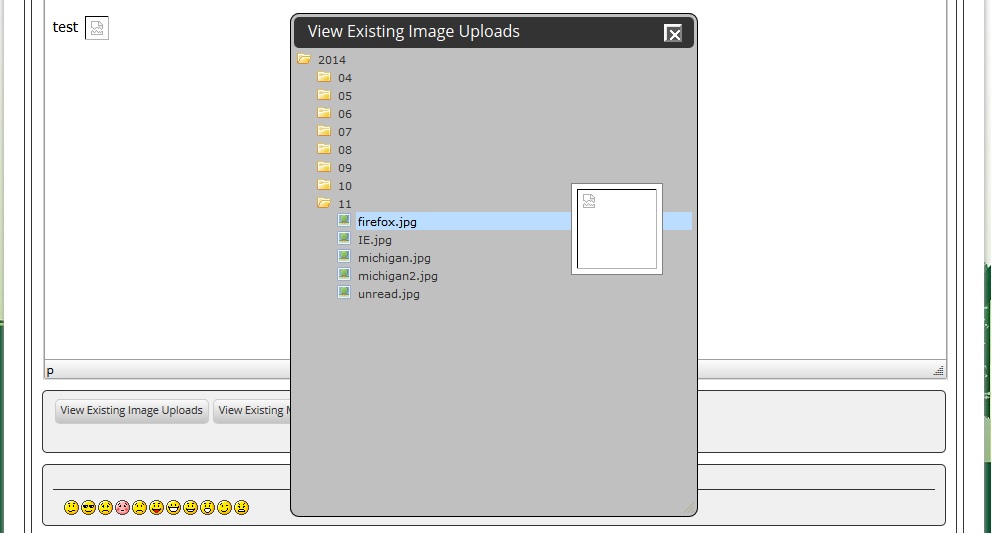


I am testing this plugin, but the image links are broken as seen here, any suggestions?


check the permissions on your storage folder… and the uploads viewer plugin… suspect the image cannot be viewed….
hmm, the permissions seem okay, some reason the path url is messed up, this is the path the image should be and I can see it fine
wp-content/sp-resources/forum-image-uploads/kvr28/2014/04/2014-04-06-16.37.34.jpg
this is the path being inserted into the forum post which is giving the broken links
wp-content/sp-resources/forum-image-uploads/kvr28/wp-content/sp-resources/forum-image-uploads/2014-04-06-16.37.34.jpg
any idea what would cause that?

Strange… Do you have any other image processing plugins active at all? Anything designed to work on blog posts for example? Though being an Ajax call I would have expected anything like that to be rendered redundant.
I have Ajax thumbnail rebuild, let me try disabling that and see if it works
nope, I even disabled all plugins except for simple press and reverted to 2014 theme and still the same
do you only see the incorrect path in the uploads viewer? the images are fine in posts and in the downloads section? Also, what about on your profile, the attachments tab – are they correct there?
The broken image shows up in the post and the thumbnail of the uploaded image selector as seen above, in my profile attachment tabs the thumbnails show fine
and on forum – integration – storage locations, does everything show okay? what is path for image uploads?
so this started as an issue with the uploads viewer plugin, but the file uploader pluign does not work right either? is that correct?
struggling with how you can get the double path though at least it appears consistent… dont think its a player, but curious what you setting for relative urls is on forum – components – tinymce editor…
trying to look through code and stumped…
the uploader plugin works fines, it’s just the viewer that is the issue, internal urls are are checkmarked for relative
now you have me confused… can you explain your comment in post $8? you said images in posts have the wrong url and dont show…
it shows up fine when originally uploaded in the post using the uploader, the broken image is when you try to choose using the previously uploaded option, that is when the issue arises
so going back to my original question (seem to have lost our way  )… then only an issue with uploads viewer?
and you verified the permissions on wp-content/sp-resources/forum-plugins/uploads-viewer, in particular /ahah/sp-uploads-viewer-aha-view.php?? only time we have seen it fail (though not with that path) was when it could access the ajax (ie ahah) file it needed…