Support Forum

White screen of death on the dashboard, buddypress plugin

SG Shawn Gaske
Shawn Gaske
Member

What the title says. I’ve double checked the folder name to ensure it’s correct – It is. Not really sure whats going on here, and the one other thread I was able to find on this issue was ….lacking in resolution.

Had anyone had this issue and been able to resolve it?


Thanks.

22 Answers

New Answer

MP Mr Papa
Mr Papa
Member

it has not been an issue for anyone…  short of wp missing name the uploaded plugin folder to buddypress1 or something…

check your server error log, it should have more info…

SG Shawn Gaske
Shawn Gaske
Member

There is nothing in my error log that has anything to do with simplepress. I checked my simplepress error log, and there is one error, mostly notices.


The one error is:

January 25, 20148:07 am | spaErrWarning | 2 | php


file: s/simple-press/sp-api/sp-api-plugins.php
line: 82
function: closedir
Warning | closedir() expects parameter 1 to be resource, null given


I’m no expert, but that doesn’t appear to be related to the buddypress plugin.

MP Mr Papa
Mr Papa
Member

to be sure… running wp 3.8.1, latest bp v1.9.1 and latest sp bp v1.1.1?

not sure how it could white screen of death without some sort of error message… there is an error somewhere, just need to know it…  it wont be an notice, but a critical error…  unless perhaps, just running out of php memory…

SG Shawn Gaske
Shawn Gaske
Member

Indeed, all my software is fully up to date. 


MP Mr Papa
Mr Papa
Member

well… gonna need some more info unfortunately…  its a one off and need a bit of guidance on where its dying…  when it dies like that, it almost always writes an error to the php error log…

maybe you could try adding this to your wp-config.php file and try again:

define(‘WP_DEBUG’, true);
define(‘WP_DEBUG_DISPLAY’, true);

this will allow wp to output more errors to the screen… and hopefully have some useful info…

SG Shawn Gaske
Shawn Gaske
Member

Ok. So now, rather than showing the white screen of death on the dashboard upon activation, it appears to work. Until I attempt to navigate anywhere on my site, I then get a “no data received” error in my browser. This plugin completely broke my site… I deleted the plugin manually and now all is fine. 

I just can’t believe that this isn’t happening to anyone else – My install is default wordpress 3.8.1, default simple:press, etc, nothing is customized or changed other than my theme (a few lines of CSS). I checked my PHP memory limit, it’s fine, I checked my logs, nothing related to simple:press or buddypress plugin that I can see. I’m at a loss. 

At this point I’m giving up on the buddypress plugin. All the other plugins that I paid for seem to be working fine, it’s just this one. I can live without it. 


YS Yellow Swordfish
Yellow Swordfish
Member

It is a most popular plugin used by a large number of users and no – no other such issues.

So did you not try the suggestion in post #6 which should have shown up any errors to the screen?

And have you considered the possibility that the download you made of the plugin is simply corrupt and might be worth replacing with a fresh copy?

SG Shawn Gaske
Shawn Gaske
Member

I checked everything, I re-downloaded the plugin, reinstalled, etc etc. Tonight i actually deleted wordpress completely and installed fresh. Loaded up simplepress fresh, installed the buddypress plugin and blam. The plugin works, however all the content in my wordpress admin dashboard, including the admin toolbar, are gone. The left side menus are intact but if I can’t access the options in the content area what use is that? I’m really disappointed here. I’m just not convinced that I’m the only person experiencing this – as I said, everything is fresh, no customizations, nothing. The only plugins installed are buddypress and simplepress. This is frustrating, because now that I can see what the plugin can do, i really want to use it. 

YS Yellow Swordfish
Yellow Swordfish
Member

Sorry – but what do you mean by ‘gone’? And what parts of the menu? Everything? WordPress? SP? BP? I do not have enough information here to understand what you are seeing.

And once again we ask – did you try the very simple suggestion in post #6.

Or – alternatively – there has to be something in your php error log – and I mean the php error log on the web-server. There was probably something in there regarding your white screen.

Oh – and yes – sorry – but this is unique and when something is unique it always comes down to a ‘local’ issue which are often the hardest to find of course.


SG Shawn Gaske
Shawn Gaske
Member

I tried #6, yes. I’m sorry I forgot to mention that. Nothing showed up on the screen when I enabled those lines. In fact, the instructions for their use is so vague that I wasn’t even sure where to look for error messages, because all it says is “on the screen”. I looked everywhere and didn’t see any error messages.


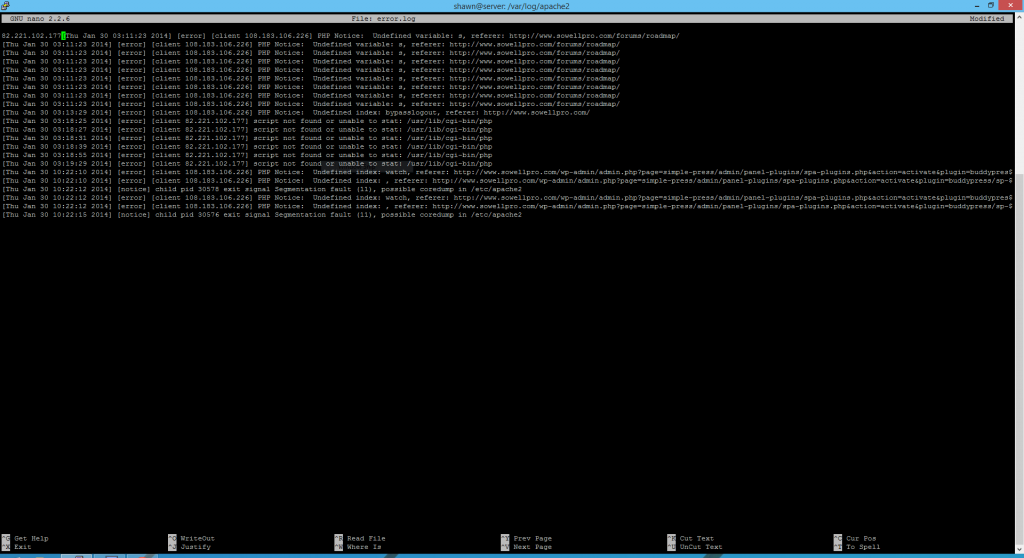
Attached is a screenshot of my php error log, during the time I activated the plugin. I don’t understand this stuff, so if you do please enlighten me. 


Also, what I mean by “gone” is just that. There’s white space where everything should be. Actually no, there’s not, I’m getting “NO DATA RECEIVED” in chrome with the error message err_empty _response now. 


Well, back to delete the plugin again Capture.PNGso I can go to my site. :(


YS Yellow Swordfish
Yellow Swordfish
Member

You need to talk to your host support. The core dump following segmentation errors is a concern as is the inability to load some scripts. Send them that image.

SG Shawn Gaske
Shawn Gaske
Member

….I am my own host. :/ 

I’m gonna see what I can find on Google. I really like Simple:Press and the buddypress plugin does exactly what I need it to do. I just need it to work! :)

SG Shawn Gaske
Shawn Gaske
Member

Yellow Swordfish said
let us know of you find anything useful.

I FINALLY found the solution for this issue – in order for your forum Buddypress plugin to work properly ALL parts of the wordpress plugin Buddypress have to be ENABLED. There were 3 features I never intended to use that when enabled fixed everything. I’m happy once again.
