Support Forum

Customizing my forum layout

65 Answers

New Answer

MP Mr Papa
Mr Papa
Member

that link I gave you on themes tells you that very thing – copy one of our theme to get started… and of course if you want to customize, you will need to change things…

as to localization, it does tell you where to put it…  but it does depend on which translation you are working with…

by default, the admin and front end core localizations will go in wp-content/sp-resources/forum-language/simple-press

by default, any plugin localizations will go in wp-content/sp-resources/forum-language/sp-plugins

by default any theme localizations will go in wp-content/sp-resources/forum-language/sp-themes

I say by default, because per that code page, you could have moved them elsewhere as determined on forum – integration – storage locations…

keep in mind, that you may need core, plugin an theme localizations to get your entire site translated…

RG Rodrigo B Galluf
Rodrigo B Galluf
Member

lol

what looks very easy and simple for ones are very foggy for others, I see this on my job everyday…

I sent .mo file to 3 different folders (trying to hit the right one) but did not work.. :(

but that’s ok for now.. I’ll try it again later. Forget it.

moving on

Is that a way to hide all that “forum stats” and “members stats” information showing at the bottom of the page from the users?

number of groups, number of topics, number of members, numbers of users and etc…

Is that a way to make it only appears to me (admin)?


MP Mr Papa
Mr Papa
Member

they are all done with template function calls…  so you can either remove them or make a check for sp admin… you have the power…

in the spFoot.php template file of your sp theme…  find

    # Start the 'stats' section
    # ----------------------------------------------------------------------
    sp_SectionStart('tagClass=spStatsSection', 'stats');
        sp_ForumTimeZone('tagClass=spForumTimeZone', __sp('Forum Timezone: '));
        sp_UserTimeZone('tagClass=spUserTimeZone', __sp('Your Timezone: '));

        sp_InsertBreak();

        sp_ColumnStart('tagClass=spColumnSection spLeft spOnlineStats&width=40%&height=0');
            sp_OnlineStats('tagClass=spLeft', __sp('Most Users Ever Online: '), __sp('Currently Online: '), __sp('Currently Browsing this Page: '), __sp('Guest(s)'));
            if (function_exists('sp_OnlinePageLink')) sp_OnlinePageLink('', __sp('See All Online Activity'));
            if (function_exists('sp_ListBirthdays')) sp_ListBirthdays('tagClass=spCustomTag&spLeft', __sp('Members Birthdays'), __sp('Today'), __sp('Upcoming'));
        sp_ColumnEnd();

        sp_ColumnStart('tagClass=spColumnSection spRight spTopPosterStats&width=15%&height=0');
            sp_TopPostersStats('tagClass=spRight', __sp('Top Posters: '));
        sp_ColumnEnd();

        sp_ColumnStart('tagClass=spColumnSection spRight spMembershipStats&width=20%&height=0');
            sp_MembershipStats('tagClass=spRight', __sp('Member Stats: '), __sp('Members: %COUNT%'), __sp('Guest Posters: %COUNT%'), __sp('Moderators: %COUNT%'), __sp('Admins: %COUNT%'));
        sp_ColumnEnd();

        sp_ColumnStart('tagClass=spColumnSection spRight spForumStats&width=17%&height=0');
            sp_ForumStats('tagClass=spRight', __sp('Forum Stats: '), __sp('Groups: '), __sp('Forums: '), __sp('Topics: '), __sp('Posts: '));
        sp_ColumnEnd();

        sp_InsertBreak();

        sp_NewMembers('tagClass=spLeft spNewMembers', __sp('Newest Members: '));

        sp_InsertBreak();

        sp_ModsList('tagClass=spLeft spModerators', __sp('Moderators: '));

        sp_InsertBreak();

        sp_AdminsList('tagClass=spLeft spAdministrators', __sp('Administrators: '));
    sp_SectionEnd('tagClass=spClear', 'stats');

thats your stats output…  if you want to check for admin, just wrap in

if ($spThisUser->admin) {
#stats stuff
}

and you should be good….

as to the localization, please provide more info… what .mo file? and where did you put it?  if core, did you also make the change to the wp-config.php file as the codex page says?

RG Rodrigo B Galluf
Rodrigo B Galluf
Member

thanks for this code “if ($spThisUser->admin)”

awesome!


moving…


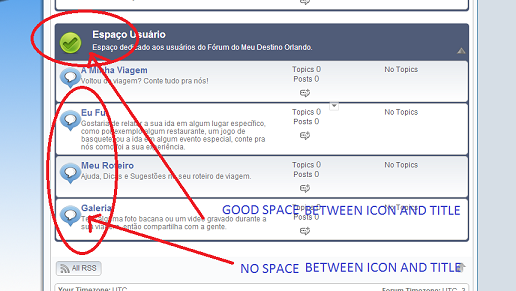
How do I manage the space between the icon and the title?

If you look up here there is a space between the “blue baloon with a paint border inside” and the “Customizing my forum layout title”. 

Asking this because I add an icon for my foruns but they look very close to the forum titles. 

how to post pictures here?

tks

MP Mr Papa
Mr Papa
Member

why do you want to remove??? if its showing, you have rss feeds enabled… if you dont want rss, just disable the rss feeds and the buttons wont be shown…

but like all the other display stuff, its in a theme template file… just remove the elements you dont want… in this case, is spGroupView.php

RG Rodrigo B Galluf
Rodrigo B Galluf
Member

Tks I removed via template file.

I don’t know what this is for so remove it.. hahahha.. Is it a good thing?

I don’t know if you saw that question above..

How do I manage the space between the icon and the title?

If you look up here there is a space between the “blue baloon with a paint border inside” and the “Customizing my forum layout title”. 

Asking this because I add an icon for my foruns but they look very close to the forum titles. 

how do I post pictures here?

keep helping!

MP Mr Papa
Mr Papa
Member

you must be running on a narrow wp theme…  you can adjust the width of the columns in your sp template themes…

but not sure which page view your are talking about, ie group, forum or topic…  but it will be in the corresponding sp theme template file…

see:  http://codex.simple-press.com/codex/faq/troubleshooting/why-do-columns-appear-underneath-each-other/

MP Mr Papa
Mr Papa
Member

yes, I know… told you how to fix in post #22… you need to adjust column widths…  as per the codex article…

this is group view, so in spGroupView.php…

                                sp_ColumnStart('tagClass=spColumnSection spLeft&width=6%&height=55px');
                                    sp_ForumIndexIcon('tagClass=spRowIcon spLeft');
                                sp_ColumnEnd();

but you will need to adjust the other columns too in order to stay below 100% total… in this case increase the 6%

RG Rodrigo B Galluf
Rodrigo B Galluf
Member
bug.png


I decreased my colum theme size but there was no effect on the space pointed above.

MP Mr Papa
Mr Papa
Member

why decrease???  I said increase…  change 6% to 10%… but take 4% out of one of the other columns…

RG Rodrigo B Galluf
Rodrigo B Galluf
Member

Done!!

I was looking at spTopic no spGroup…. my fault!

——-

Still unable to add a new topic. 

When I put my mouse over the “add topic” button I see javascript:void(null) 


MP Mr Papa
Mr Papa
Member

cannot see…  asked for password…

but based on the image you uploaded and my previous post, you are in the wrong template file… as I said, you should be in the spGroupView.php file… 

MP Mr Papa
Mr Papa
Member

as to javascript:void, see:  http://codex.simple-press.com/codex/faq/troubleshooting/i-am-seeing-javascriptvoidnull-for-a-browser-link/

sounds like a js conflict… see:  http://codex.simple-press.com/codex/faq/troubleshooting/what-is-this-jquery-conflict/

but since cannot see forum, cannot look for obvious conflict…