Ok it’s open again.
Go to forum and try to create a new topic
http://www.meudestinoorlando.com/?page_id=125


Ok it’s open again.
Go to forum and try to create a new topic
http://www.meudestinoorlando.com/?page_id=125

I pointed you to a codex article about jquery conflicts… your wp theme is improperly loading its own version of jquery
<script type=’text/javascript’ src=’http://www.meudestinoorlando.com/wp-content/themes/MEUDESTINOORLANDO3/jquery.js?ver=3.5.1′></script>
that is version 1.7.1 which is much older than the version that ships with wp (1.8.3)… so it causes conflicts as plugins expect the wp version of jquery…
if you can find in your theme where its loading that, we can help fix the theme…
“if you can find”
This is the problem..
If you tell me where do I need to look it will be I good first step.
well its really just a search… windows and mac both allow searching a directory and its subdirs for a string… use the filename as the string…
wp_register_script and wp_deregister_script would be another couple of strings you could search for…
it can be just about anywhere since the theme structure is in wp is quite flexible… but if you are going to manually search files, I would start in header.php or functions.php in the theme…
Just for a test I activated another theme (twenty ten) to make sure if the problem remains on any other theme and it does remains.
My theme was made with artisteer 4.
Does this help something?
found in function.php
function theme_update_scripts() {
global $wp_scripts;
wp_register_script(“script.js”, get_bloginfo(‘template_url’, ‘display’) . ‘/script.js’, array(‘jquery’));
wp_enqueue_script(“script.js”);
}
function theme_update_jquery_scripts() {
if(is_admin()) {
return;
}
wp_deregister_script(‘jquery’);
if (theme_get_option(‘theme_iclude_scripts_from_cdn’)) {
wp_register_script(‘jquery’, ‘https://ajax.googleapis.com/ajax/libs/jquery/1.7.1/jquery.min.js’);
} else {
wp_register_script(‘jquery’, get_bloginfo(‘template_url’, ‘display’) . ‘/jquery.js’);
}
}
function theme_update_styles() {
global $wp_styles;
wp_register_style(“style.ie7.css”, get_bloginfo(‘template_url’, ‘display’) . ‘/style.ie7.css’, array(), false, “screen”);
wp_enqueue_style(“style.ie7.css”);
$wp_styles->add_data(“style.ie7.css”, “conditional”, “lte IE 7”);
yes, that is not cool…. might be worth checking to see if the theme options can allow you to tell it not to load its own version of jquery…
I would comment out this line:
wp_register_script(“script.js”, get_bloginfo(‘template_url’, ‘display’) . ‘/script.js’, array(‘jquery’));
and change this line:
wp_enqueue_script(“script.js”);
to:
wp_enqueue_script(“jquery”);
which loads the wp version…
please be sure to check your other page/post behaviour using the wp version of jquery instead of the theme specific version…
if there is still issues after that, we can look further but usually best to rule out incorrect things first…
there is no option for this in theme options.
ok..
and I changed that line as you requested but still not working…. only thing that seems to happened is a huge menu bar! kk
homepage is open and you can check if you want it.
http://www.meudestinoorlando.com/forum/
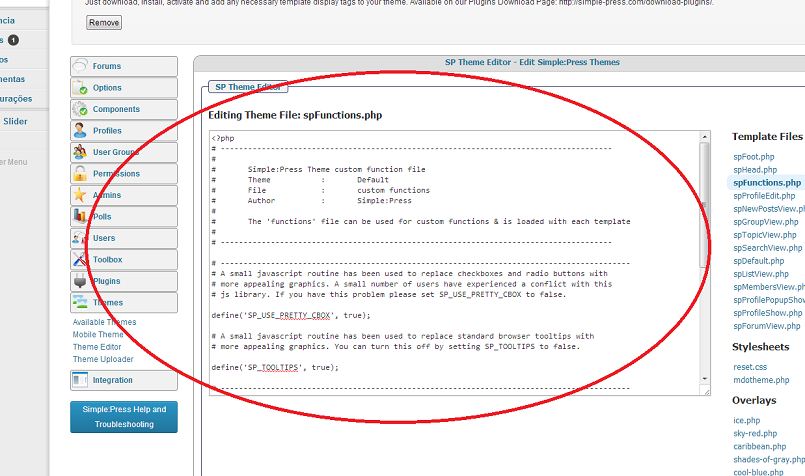
I remember that at the first time that I downloaded simple:press I did not have that bug. I was able to add new topics anytime. So I found this… Does it has something to do it with?


Steve (Mr Papa) You may want to check that. I don’t think that was the right code to change – seems to be loading a file called script.js = not jQuery.js…
Mr Y Swordfish you should join the topic and help me fix that issue!
Steve is helping me a lot, 2 heads can double the help…
yes, my bad… too quick on the copy and paste… the code in question is:
wp_deregister_script(‘jquery’);
if (theme_get_option(‘theme_iclude_scripts_from_cdn’)) {
wp_register_script(‘jquery’, ‘https://ajax.googleapis.com/ajax/libs/jquery/1.7.1/jquery.min.js’);
} else {
wp_register_script(‘jquery’, get_bloginfo(‘template_url’, ‘display’) . ‘/jquery.js’);
}
try replacing all that with:
wp_enqueue_script(“jquery”);
and revert the earlier change…
made all the changes, unfortunately it did not work too.
why add topic button is the only button on the entire site with this?
should I try to uninstall simple:press and install back again?
should I remove all plugins trying to find a conflict?
should I contact my web host?
So let’s just check this shall we.
Change this:
wp_register_script('jquery', get_bloginfo('template_url', 'display') . '/jquery.js');
which loads the incorrect version of jQuery from your theme. To this:
wp_enqueue_script("jquery");
which will load the correct version. So – please double check. Is this what you have done now?
If you have done the above and the add topic button still does not work then there is clearly something else that is a conflict but as I can not see the site I can not guess what that might be.
As to your questions then I very much doubt it is only the add topic button that this will effect. There will be other areas you have not yet found also effected. Re-installing is pretty much a waste of time. That is not the issue. If the above changes did not fix it then the issue may well be in another WP plugin so that can sometimes help. Your web host will doubtless not be able to help.
These sorts of mis-use of jQuery and other scripts are sadly quite common – to the extent where the WordPress dev team are discussing ways they can try to trap them in the core code to try and stamp them out. They are most usually fairly easy to spot, track down and repair but they do need a certain effort to look for them which we canlt do as we do not have your code.
Sworfish I made your request but it didn’t work too.
I’ll let the homepage open so you guys can take a look.
www.meudestinoorlando.com/forum