Support Forum

reboot and large image spacing issue

KV kvr28
kvr28
Member

I just searched for the thread but can’t seem to find it. If a member posts a picture that is large, in FF with reboot it adds space below the post where the picture would be. I just edited the pics on this thread to remove the constraints which you can check with ff on desktop, chrome it renders fine

http://kvr28.staging.wpengine.com/forums/alternative-energy-1/our-offgrid-power-setup/

32 Answers

New Answer

KV kvr28
kvr28
Member

one solution I found was to use thumbnails under image enlargement in content settings if I set them for 600px, it automatically constrains the pics, the only issue is is there are quite a few threads with hundreds of pics and then it takes a long time for the thread to load as simple press tries to reduce and render them

MP Mr Papa
Mr Papa
Member

have moved to its own topic so we dont lose it…

KV kvr28
kvr28
Member

lol, okay, freaked me out there for a second, thought I was having a flashback

MP Mr Papa
Mr Papa
Member

cool better to have one topic per issue…  keeps things from getting lost… eek

KV kvr28
kvr28
Member

okay, so testing with the image enlargement settings it seems to fix the issue, only down side is with threads with extensive amounts of pictures it can take awhile for the thread to load as SP adjusts the image sizes.

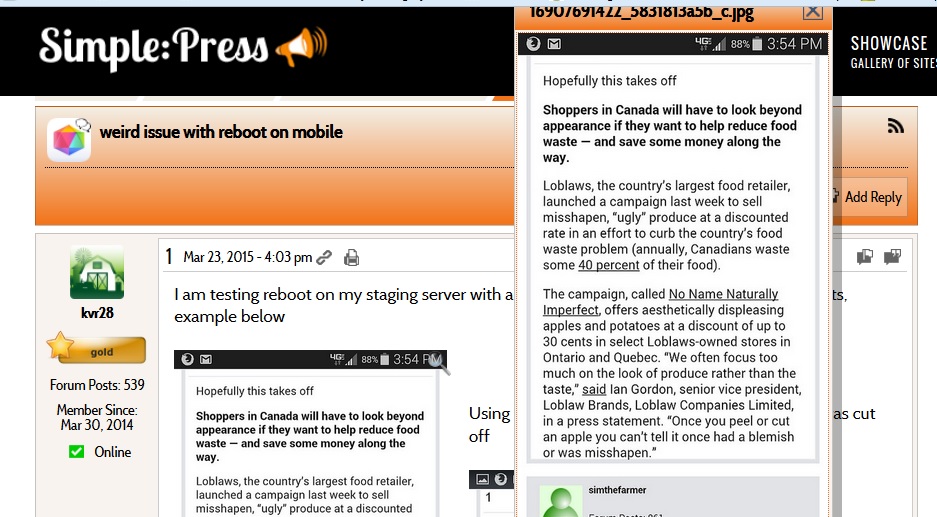
The size of the frame is still an issue if you use the pop up enlargement setting where the x to close the frame can be hidden under the admin bar, you can see how in this picture you can barely see the x, it’s worse with much larger pics.

rebootpopup.jpg

Is it possible if when you click on the picture to enlarge it with the pop up turned off that the image opens in a new window instead of the same one? 

KV kvr28
kvr28
Member

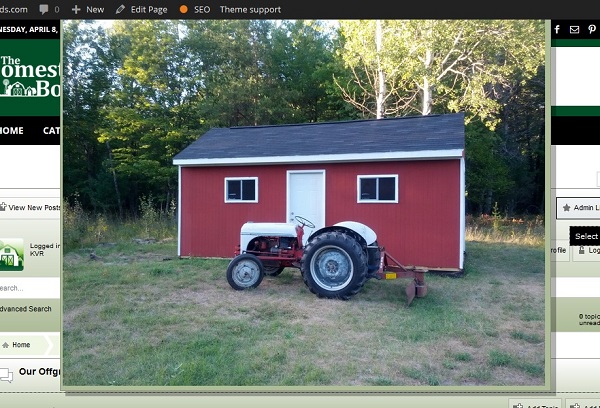
here’s an example of the pop up with admin bar enabled, could that be adjusted with z-index?

popup.jpg
KV kvr28
kvr28
Member

actually forget that, I just checked my WP error log and I am getting a ton of errors generated when it’s enabled like this

PHP Warning - getimagesize(//ecx.images-amazon.com/images/I/618NBQBXJZL._SL500_AA300_.jpg) [<a href='function.getimagesize'>function.getimagesize</a>]: failed to open stream: No such file or directory - file: /simple-press/sp-api/sp-api-filters.php - line: 2035 - function: getimagesize
KV kvr28
kvr28
Member

just checked sp-error log and it is showing this

file: /simple-press/sp-api/sp-api-filters.php
line: 2035
function: getimagesize
Warning | getimagesize() [function.getimagesize]: php_network_getaddresses: getaddrinfo failed: Name or service not known

YS Yellow Swordfish
Yellow Swordfish
Member

First up – are you aware that you can actually just hit the esc key to close an image popup? And basically no matter what you use there is likely to be resizing going on. That is always going to be the case unless you restrict your users to sensible sizes that don’t eat up the bandwidth and take an age to download!

I can look into what would need to be done to open in another tab/window. Not sure if we use the setting for that or not.

The ‘getimagesize’ errors are an odd one. This is actually set to NOT raise an error when it fails using the standard php method but for reasons unknown it does not obey the rules. Personally I believe this to be an ongoing bug in php itself. The problem is that we do need to use it as so many people just put images in place in their posts bit do NOT include the image dimensions and we need to know that. The call is only made when no dimensions (actually just width) are included. Sadly – we can not repress the error entries until we find out why it outputs them in the first place.

KV kvr28
kvr28
Member

Had no clue on the first one yellow, as far as image sizes, I do have constraints on what they can upload, but when they embed from imgur etc, I have no control over it. That’s where the images are coming from in the link above

Is there any way or is possible with a plugin to set auto constraints for images embedded? I know I can manually edit them.

YS Yellow Swordfish
Yellow Swordfish
Member

Not as far as I know. And that is also where most of the getimagesize() errors occur- trying to find the size of remote images…

KV kvr28
kvr28
Member

understood

I guess my question would be what is different with the way reboot handles picture embeds than previous themes? The pictures in question have been on our forums for almost 2 years and we have used the default, custom and unified theme with no issues of spacing with firefox. I can revert to those one of those themes on the staging server if you would like to look.

YS Yellow Swordfish
Yellow Swordfish
Member

I am not sure I follow.

Reboot does nothing different just for the Firefox browser.