Support Forum

Barebones Glyphs?

46 Answers

New Answer

YS Yellow Swordfish
Yellow Swordfish
Member

Oh well. Thanks for the info and the link. I am probably a little worse for the meal I have just had at a new restaurant and the wine… oh the wine! But I will chase up tomorrow morning 🙂

BL Bluedrake42
Bluedrake42
Member

So seriously can I just throw money at someone to fix our site? haha

Otherwise I’m gonna start going to Fiverr. Which would be lame. Cause Fiverr is weird.

Also you all probably have better experience with this tbh

BL Bluedrake42
Bluedrake42
Member

We hosted Arrowchat and Simple:Press on another forum. You mind looking at this to see if its giving the same JQuery issues? The glyphs are working on it however.

http://24.156.232.140/index.php/forum/

YS Yellow Swordfish
Yellow Swordfish
Member

I am not seeing any errors on your test site but there again – it has to remembered that it is not actually doing anything!

ALL the ArrowChat people have to do is enqueue their javascript loading using the proper WP protocols and all would be well on that score. We are talking here about them changing maybe as little as 3 or 4 lines of code and things would be done properly.

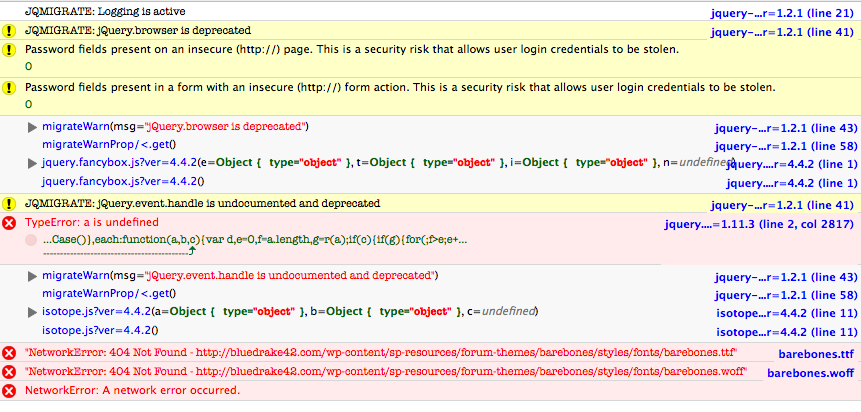
There are also clearly a lot more components at play ion your main site as well. It is curious how the errors change from one page load to another however. I seem to be seeing a different set this morning to what I was seeing yesterday. At the moment the errors I am seeing are in the screenshot attached.

The migration errors are due to the arrowchat force-loaded jQuery being an older version. There have been changes in the latest jQuery which needed plugins to make some minor alterations here and there. At the moment things work bit will cease to work probably in the next version.

The Network Errors are unknown. You will see that trying to load the Barebones font is actually a network error and showing a 404. I have no idea why it can not be found unless it is a permission issue.

Quote possibly the main problem there is the TypeErrror. Clearly something being run is causing that script error – again it often occurs when the script has not been specifically written for WordPress. you can only deactivate things one at a time until it goes away to find out what it is.

And I am afraid I do not know what Fiverr is…

Screen-Shot-2016-02-11-at-07.33.41.png
BL Bluedrake42
Bluedrake42
Member

So seriously can I pay anyone from your team to help me fix this hands on? I really can’t seem to figure it out, and I don’t mind paying. I just want this completed so our community can move forward on other development projects.

YS Yellow Swordfish
Yellow Swordfish
Member

If you want to set up an admin account – and that is a Simple:Press admin account and provide an ftp login to your website so we can inspect files then we don’t mind taking a look at the theme issue to see if we can find the cause.

If that is acceptable then please PM credentials to both myself, to ‘Mr Papa‘ and to ‘Ike‘. Please include in the PM a link to your site, a link to this thread and brief reminder of the problem. And one of us will take a look for you.

MP Mr Papa
Mr Papa
Member

just to check, are either of you using barebones on multisite?

BL Bluedrake42
Bluedrake42
Member

[2:25:09 PM] bluedrake42: so yeah this is what the other guys told me but
[2:25:12 PM] bluedrake42: its in that directory
[2:25:17 PM] bluedrake42: barebones
[2:37:37 PM] Sladey: it can’t be, as it wouldn’t respond with a 404 then
[2:40:39 PM] bluedrake42: hold up
[2:40:40 PM] bluedrake42: I’ll show
[2:41:29 PM] bluedrake42: /var/www/html/wp-content/sp-resources/forum-themes/barebones/styles/fonts/
[2:41:52 PM] bluedrake42: they’re all in there
[2:41:54 PM] Sladey: yes
[2:41:56 PM] Sladey: very much so
[2:41:57 PM] Sladey: except
[2:42:01 PM] Sladey: it’s capitalized
[2:42:07 PM] bluedrake42: ….
[2:42:08 PM] bluedrake42: oh
[2:42:09 PM] bluedrake42: m
[2:42:10 PM] bluedrake42: yy
[2:42:12 PM] bluedrake42: fucking
[2:42:13 PM] bluedrake42: god
[2:42:17 PM] bluedrake42: if that’s the issue
[2:42:20 PM] bluedrake42: if that’s seriously the issue
[2:42:21 PM] Sladey: it is lol
[2:42:58 PM] bluedrake42: OH
[2:42:59 PM] bluedrake42: MY
[2:43:00 PM] bluedrake42: FUCKING
[2:43:01 PM] bluedrake42: GOD
[2:43:01 PM] bluedrake42: .
[2:43:02 PM] bluedrake42: .
[2:43:02 PM] bluedrake42: .
[2:43:03 PM] bluedrake42: OH
[2:43:04 PM] bluedrake42: …
[2:43:06 PM] bluedrake42: MY FUCKING
[2:43:07 PM] bluedrake42: .
[2:43:08 PM] bluedrake42: GOD.
[2:43:14 PM] Sladey: c:

BL Bluedrake42
Bluedrake42
Member

So it turned out that literally the only problem was that the font files had a capital B.

That was literally the only problem.

KV kvr28
kvr28
Member

Just changed it myself and can confirm that was the problem

YS Yellow Swordfish
Yellow Swordfish
Member

Sometimes I just feel so stupid…..!

MP Mr Papa
Mr Papa
Member

well, that is mighty odd…  unix is case sensitive, but we hadnt seen the problem here…  windows really isnt which would explain Ike and I not seeing it… Andy uses mac and not sure about it…

will look into further… thanks for the info…

KV kvr28
kvr28
Member

Yellow Swordfish said
Sometimes I just feel so stupid…..!

you guys have saved my ass many times over the years, I’ll allow it.


This one time!

🙂

BL Bluedrake42
Bluedrake42
Member

the weirdest thing is that we did that complete reinstall with WordPress and Simple:Press and it worked.

The ONLY thing that I could think of. Or at least the most likely issue… is that this happened with the Simple:Press UPDATE, and not with the fresh install. That would be the only reason I can think a fresh install would fix it.

If you need any more info feel free to ask, such as our operating system, or any other idiosyncrasies that would have perhaps led to this issue.