Support Forum

custom profile fields

JH JINCUI HAO
JINCUI HAO
Member

I’m trying to add custom profile fields, however i’m confused, in the help pop up it says 

“Please note, that on this panel, you are only creating the custom field. After creating the custom field, you will need to decide where you want it to display when a profile is viewed by another user.
You will need to use one of the special template tag functions provided with the plugin in you SP theme where you want it to display. See the Simple:Press Codex for details of the plugin and it’s available tags.”

when I go to “simple press codex” to find out about how to locate and use the “special template tag functions” the page is empty.

can you walk me through as to where I find this plugin in my SP theme and how to add the custom profile fields so that the info is displayed on the members main profile page ?

Thanks

65 Answers

New Answer

YS Yellow Swordfish
Yellow Swordfish
Member

This is the page you should be looking at… 

https://simple-press.com/documentation/codex/plugins/our-plugins/available-plugins/custom-profile-fields/

JH JINCUI HAO
JINCUI HAO
Member

Thank that was very useful, I will try and do it.


heres my draft, can you check it please

‘profileAvatarRank’);

                                               sp_SectionStart(‘tagClass=spPlainSection spCenter’, ”);

                                                        sp_UserAvatar(‘context=user&link=’, $spProfileUser);

                                                        sp_UserForumRank($args=”, $spProfileUser->rank);

                                                        sp_UserSpecialRank($args=”, $spProfileUser->special_rank);

                        sp_CustomProfileFieldsDisplay($Country, $spPostUser->ID);

                        sp_CustomProfileFieldsDisplay($Gender, $spPostUser->ID);

                                               sp_SectionEnd();

                                     sp_ColumnEnd(”, ‘profileAvatarRank’);


                                     # show profile info

                                     sp_ColumnStart(‘tagClass=spProfileShowInfoSection spRight&width=65%’, ‘profileInfo’);

                                               sp_ProfileShowDisplayName(”, __sp(‘Username’));

                                               sp_ProfileShowFirstName(”, __sp(‘First Name’));

                                               sp_ProfileShowLastName(”, __sp(‘Last Name’));

                                               sp_ProfileShowLocation(”, __sp(‘Location’));

                                               sp_ProfileShowWebsite(”, __sp(‘Website’));

                    sp_CustomProfileFieldsDisplay($Orientation, $spProfileUser->ID);

                    sp_CustomProfileFieldsDisplay($Looking For, $spProfileUser->ID);

                    sp_CustomProfileFieldsDisplay($Preference, $spProfileUser->ID);

                                               sp_ProfileShowBio(”, __sp(‘Bio’));

                                     sp_ColumnEnd(”, ‘profileInfo’);

                            sp_SectionEnd(‘tagClass=spClear’, ‘profileBasic’);


                            # output section for detailed user info

                            sp_SectionStart(‘tagClass=spProfileShowDetailsSection’, ‘profileDetails’);

                                     # show user identities

                                     sp_ColumnStart(‘tagClass=spProfileShowIdentitiesSection spLeft&width=45%’,


Two other questions, if I wanted to display a icon, for example their gender ,country under their avatar and forum rank on forum posts how do I link that icon to the selection they made from the dropdowns/menus ?

Where do I put these icons, as user groups ?

MP Mr Papa
Mr Papa
Member

sorry, what are:  $country, $gender, $orientation, $lookingfor and $preference??

are those variables you have defined somewhere?

per the codex Andy linked to, you want the name of the custom profile field… so perhaps you meant:

sp_CustomProfileFieldsDisplay(‘Country’, $spProfileUser->ID);

for example…  assuming the custom profile field you created was named Country…  if you filled $Country somewhere with that string, it would be fine…

currently, the custom profile fields doesn’t support images (though we had one other request for such and have a ticket for future consideration)… so you would have to add the coding logic yourself for images…

JH JINCUI HAO
JINCUI HAO
Member

yes they are variables from the dropdowns in the custom profile fields, all I did was copy what is posted here 


Displaying Custom Profiles
You would use the sp_CustomProfileFieldsDisplay($name, $userid=0) template tag in your Simple:Press theme where you want it to display.

Pass the name of the custom field as the first argument and the userid of the user whose profile is being displayed as the second argument.

Using the Video game example above to display the video game owned next to the member’s name/avatar in every one of his forum posts you would use the following in the spTopicView.php file by the Avatar display.

1
sp_CustomProfileFieldsDisplay(

'Game Type'

,

$spPostUser
->ID);

Depending on who and where you are showing the custom field you would get the userid in various ways.

An  example of showing a custom field for a user under his avatar would be

1
sp_CustomProfileFieldsDisplay(

$name

,

$spPostUser
->ID);

If you wanted to show the Custom profile display to the current logged in user then

1
sp_CustomProfileFieldsDisplay(

$name

,

$spTheUser
->ID);

To show the Custom profile display of a user in their profile pages you could use.

1
sp_CustomProfileFieldsDisplay(

$name

,

$spProfileUser
->ID);

but replaced $name with  for $country as your instructs to do.


MP Mr Papa
Mr Papa
Member

No, there are multiple examples there for different situations… you would pick the example most germane to your situation…

the first argument to sp_CustomProfileFieldsDisplay() MUST be the name of the custom profile field…

if you created a variable with that in it (like later examples) in the same area as the use of the template function or used a global variable name, then fine…   but the contents of a dropdown are not a variable and the custom profile field plugin variables are not in scope where you attempting to use the template arguments…

hence why I think you want the first example…  put the name of the custom profile fields (only you know the name as you named it on the admin panel when you created it) as the first argument…

sp_CustomProfileFieldsDisplay(‘Country’, $spProfileUser->ID);

and so forth for your other custom fields you created…

JH JINCUI HAO
JINCUI HAO
Member

to put on profile page (not under avatar on posts) it says to do it like this 

sp_CustomProfileFieldsDisplay($name, $spProfileUser->ID);


so i dont see what i did wrong

sp_CustomProfileFieldsDisplay($Orientation, $spProfileUser->ID);

                    sp_CustomProfileFieldsDisplay($Looking For, $spProfileUser->ID);

                    sp_CustomProfileFieldsDisplay($Preference, $spProfileUser->ID);

MP Mr Papa
Mr Papa
Member

you are using variables that dont exist, unless you defined them…  you CANNOT use what you think are variables from the pluign – they are not in scope in the profile template file you are trying to use them in…  and by the way ‘$Looking For’ would be an invalid variable name anyways – cannot have spaces in variable names…

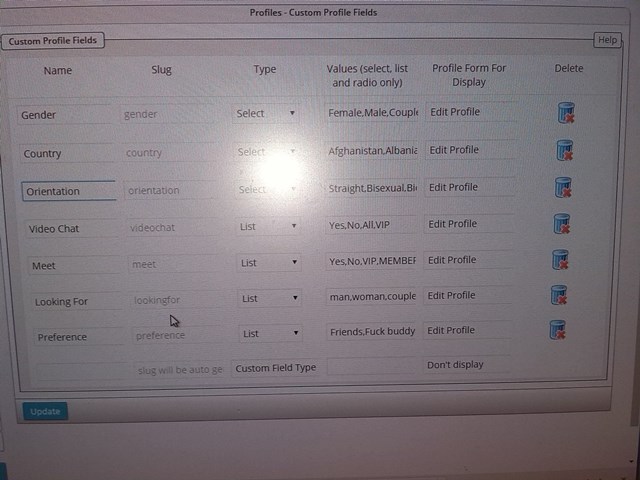
you seem to be mixing up php variables and the actual name of the field that you created… look on the forum – profiles – custom profile fields admin panel.. you will see the profile fields you created and the name you gave them (one of the columns)…

sorry, not sure how to be more clear…  assuming you named the profile field ‘Country’, you want:

sp_CustomProfileFieldsDisplay(‘Country’, $spProfileUser->ID);

for the others, replace Country with the other names of the profile fields you created…  at least for the profile…

JH JINCUI HAO
JINCUI HAO
Member

Mr Papa said
sorry, what are:  $country, $gender, $orientation, $lookingfor and $preference??

are those variables you have defined somewhere?

per the codex Andy linked to, you want the name of the custom profile field… so perhaps you meant:

sp_CustomProfileFieldsDisplay(‘Country’, $spProfileUser->ID);

for example…  assuming the custom profile field you created was named Country…  if you filled $Country somewhere with that string, it would be fine…

currently, the custom profile fields doesn’t support images (though we had one other request for such and have a ticket for future consideration)… so you would have to add the coding logic yourself for images…

sorry i misunderstood you, they are not variables , they are custom profile fields, they have dropdowns (which I assume is what you mean by variables within each, the member selects their gender, country, etc, from the selects, or lists and thats what is displayed to other members..


I assumed that as the custom field has variables within it you have to put the $ in otherwise it will not recognize anything but Afghanistan, the first on the list.


Are you saying that i have to put a $ before every 248 country in the dropdown value list in any/all custom field select list ?/

no $orietation,$gender,are are not saved anywhere, Gender,Orientation,country,preference are though as custom fields in the custom profile fields., each has “selects or  lists” within them.

MP Mr Papa
Mr Papa
Member

no… ignore the values in the dropdown – they are unimportant for display which a user has selected..

did you look at the admin page I reference?  do you see a Name column for each custom profile field you specified?  you only need the tag once with that Name as the first argument..

sp_CustomProfileFieldsDisplay(‘Country’, $spProfileUser->ID);

IF you custom profile field name for the country field is ‘Country’…

JH JINCUI HAO
JINCUI HAO
Member

ok i corrected it to this

‘profileAvatarRank’);

                                               sp_SectionStart(‘tagClass=spPlainSection spCenter’, ”);

                                                        sp_UserAvatar(‘context=user&link=’, $spProfileUser);

                                                        sp_UserForumRank($args=”, $spProfileUser->rank);

                                                        sp_UserSpecialRank($args=”, $spProfileUser->special_rank);

                        sp_CustomProfileFieldsDisplay(‘Country’, $spPostUser->ID);

                        sp_CustomProfileFieldsDisplay(‘Gender’, $spPostUser->ID);

                                               sp_SectionEnd();

                                     sp_ColumnEnd(”, ‘profileAvatarRank’);


                                     # show profile info

                                     sp_ColumnStart(‘tagClass=spProfileShowInfoSection spRight&width=65%’, ‘profileInfo’);

                                               sp_ProfileShowDisplayName(”, __sp(‘Username’));

                                               sp_ProfileShowFirstName(”, __sp(‘First Name’));

                                               sp_ProfileShowLastName(”, __sp(‘Last Name’));

                                               sp_ProfileShowLocation(”, __sp(‘Location’));

                                               sp_ProfileShowWebsite(”, __sp(‘Website’));

                    sp_CustomProfileFieldsDisplay(‘Orientation’, $spProfileUser->ID);

                    sp_CustomProfileFieldsDisplay(‘Lookingfor’, $spProfileUser->ID);

                    sp_CustomProfileFieldsDisplay(‘Preference’, $spProfileUser->ID);

                                               sp_ProfileShowBio(”, __sp(‘Bio’));

                                     sp_ColumnEnd(”, ‘profileInfo’);

                            sp_SectionEnd(‘tagClass=spClear’, ‘profileBasic’);


                            # output section for detailed user info

                            sp_SectionStart(‘tagClass=spProfileShowDetailsSection’, ‘profileDetails’);

                                     # show user identities

                                     sp_ColumnStart(‘tagClass=spProfileShowIdentitiesSection spLeft&width=45%’,

MP Mr Papa
Mr Papa
Member

the country and gender ones should be using $spProfileUser->ID and not $spPostUser…

could you please upload an image of your forum – profile – custom profile fields admin panel?

JH JINCUI HAO
JINCUI HAO
Member

There written like that so they appear under the avatar and forum rank on posts as directed here :

An  example of showing a custom field for a user under his avatar would be

1
sp_CustomProfileFieldsDisplay(

$name,$spPostUser->ID);


The others follow this example so they appear on the profile page only

To show the Custom profile display of a user in their profile pages you could use.

1
sp_CustomProfileFieldsDisplay(

$name$spProfileUser->ID);

,


084.jpg