Please see http://sensibility.com/community/message-forum. I’ve already tried all the cache’ dumping and even deactivating WP plugins. Nothing works. Still just a page full of text. Help?
Support Forum
Well actually that is one of the weirdest things I have seen. As far as I can tell all of the CCS rules ARE being loaded but seem to be ignored.
Let’s do this one thing at a time. Can you go to the forum admin > Options > Global Settings and turn off the use of the combined and cached CSS – over on the right. Se eif that helps at all. I would like to see the page again after that to see if anything appears to be missing,.
Bingo. That did it. But do I really need those to be checked? If so, how do I fix this?
Thanks,
Jennie
need what to be checked? the combined caches enabled? up to you… they will give your site a performance boost as far viewer css/js files have to be loaded… but you can disabled if you prefer…
we have had a couple cases of this so will be redoubling our efforts to make sure the caches are auto cleared when you upgrade…
Well, I spoke too soon. The forum still isn’t working for IE users after the update. I can see it fine in Safari. No go for IE users….
Ideas?
As a Mac/OSX user I can not try it in IE but Steve should be able to later tonight. Are you sure this is just not the infamous IE cache which does seem to hold on to things longer than other browsers? Can you clear the cache and make sure of that?
that is weird… multiple strange things going on…
first, most of your html head stuff is loading in the page body…
you also have your wp theme which is outputting php code to the head tags…
add_theme_support( ‘post-thumbnails’ );
set_post_thumbnail_size( 150, 250 ); // 150 pixels wide by 250 pixels tall, resize mode;}
that is bad…
but more worried about the head stuff being at the end of the body… did anything else update at this time? like the wp theme or other wp plugins?
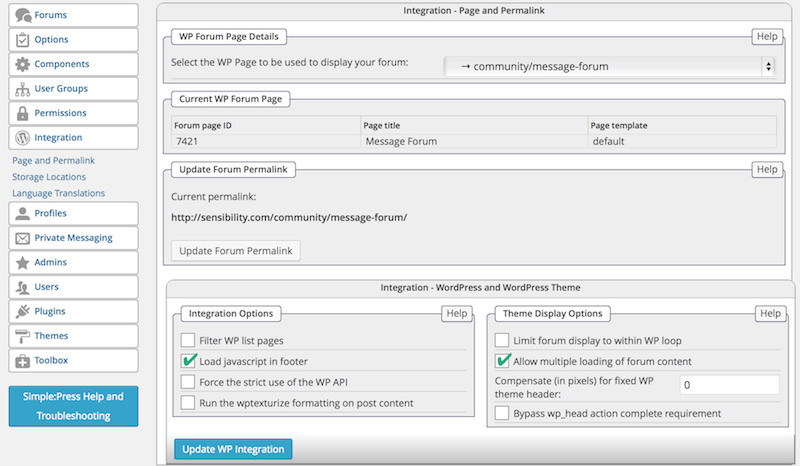
can you go to forum – integration – page and permalink and tell me what the display options there are set to? thinking it should have display in loop set and display multiple not set…
Thanks for the quick reply. I actually haven’t updated this theme in a while, but I did update a few plugins at the same time I updated Simple Press — namely, Google Analytics Dashboard and the Pinterest Pin-It on Hover plugin.
I’ve attached the screenshot of the Integration panel to show you what boxes are ticked.
Cheers,
Jennie
Okay, I’ve also updated my theme now. Let me know if that helps at all.
Thanks,
Jennie
No, the two lines I referenced are coming from your wp theme… they are dumping php to the screen which is wrong… i guess there could be some other error causing it – perhaps the scripts in body I referred tooo…
your options are reversed… could you try setting limit display to loop and unset allow multiple..
Okay, are you still seeing the odd PHP in the header? I think I fixed that by adding a missing bracket to the custom CSS.
Also fixed the integration as per your note.
Cheers,
Jennie
Sorry this takes so long to get you an answer but I do not have access to a PC with IE so we have to wait…
yes… the entire ‘format’ of the page is still messed up…
there is still something wrong here
<style type="text/css">
body {border-top: 10px solid #AAD1E8;}
.es-carousel ul li span {background: #AAD1E8; filter:alpha(opacity=85);
-moz-opacity:0.85;
-khtml-opacity: 0.85;
opacity: 0.85;}
{add_theme_support( 'post-thumbnails' );
set_post_thumbnail_size( 150, 250 ); // 150 pixels wide by 250 pixels tall, resize mode;} </style>
Okay, I think I have finally gotten rid of that stray code. The forum looks fine in Safari and Firefox (I also do not have IE). Do you still see any odd code hanging out?
Thanks,
Jennie
Looks to me (Chrome & Firefox – Mac/OSX) that the actual forum CSS file is corrupted in some way. It is not loading the proper CSS now… but `i am not seeing any errors in the web console.