Support Forum

Forum Issues

ST Stephen
Stephen
Member

Hi, I am having issues with both of my forums.

When hovering over a link, there is text floating to the left and when opening a pop-up box or image, half the window greys out.

I am using different WordPress themes and the forum is behind Wishlist Member. Any ideas?

38 Answers

New Answer

YS Yellow Swordfish
Yellow Swordfish
Member

Can you set something up so we can see this? If so…
Please PM credentials to both myself, to ‘Mr Papa’ and to ‘Ike’. Please include in the PM a link to your site, a link to this thread and brief reminder of the problem. And one of us will take a look for you.

YS Yellow Swordfish
Yellow Swordfish
Member

Before delving too deeply I notice that you are using a fully custom theme (at least I assume this is not a child theme in use). Can you tell me what version of Simple:Press you are running there and if, over the different upgrades, you have applied any of the CSS styling changes that have been recommended?

ST Stephen
Stephen
Member

I’m using whatever the latest version is – I apply updates whenever they appear. I don’t know anything about CSS, daren’t touch any of that.

YS Yellow Swordfish
Yellow Swordfish
Member

The main problem with a custom theme is that if we do need to make styling changes then custom themes do not get updated. This is why we moved to child themes as soon as were able as they are much easier to work with.

Could you perform a quick test for me please? That theme you are using looks like it is based on our original ‘default’ theme. You will almost certainly have a copy of this available. If so could you (a) ensure it is updated to the latest version and then (b) switch your site over to use it (c) clear your browser cache before trying it and then see if it resolves these issues….

ST Stephen
Stephen
Member

Yes, that solves everything. What do I need to do in order to set up a child theme? Then I will need to get rid of all the user stats at the bottom again as these are not required.

IK Ike
Ike
Member

First thing to do would be to read up on Creating a Child Theme, then next download the correct child theme framework from the store.

It’s then a case of adding back in your changes, so for example if you’ve made changes to spFoot.php to remove stats, you will need to copy the entire spFoot.php template from the untouched Default themes templates folder to your child themes templates folder. You can then make the changes required. You can do the same for any other templates that you’ve made changes to.

CSS works differently, as if you need to add anything you just add it one custom rule at a time to your child themes stylesheet which will be loaded after the parent theme.

Hope that helps!

ST Stephen
Stephen
Member

Fantastic! Followed all of that and it works – thank you!

How do I put a blank line between the bottom of the forum and the footer of my site? I can’t do it on the WordPress page, so I assume it needs to be in the code somewhere.


Forum-Footer.JPG
IK Ike
Ike
Member

Good news! Child themes are always worth while..

As to the gap at the bottom, you should be able to fix it in your WordPress stylesheet by adding some padding to the bottom of your page, but if you’re having trouble you can always add margin to the bottom of the forum container. Something like:

#spMainContainer {
    margin-bottom: 10px;
}

In your child theme stylesheet should do the job. Of course you can always up the 10px to whatever value suits your needs.

ST Stephen
Stephen
Member

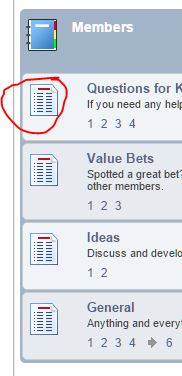
Oh almost… when a new reply is posted, there is no icon showing. It worked fine before.

IK Ike
Ike
Member

Nothing we’ve suggested should have any affect on icons..

What icon are you referring to? Where was it / where is it now missing?

Could you take a screenshot?

ST Stephen
Stephen
Member

Before, there would be a little marker when there was an unread message but it doesn’t show up since I changed to the child themes.


Forum-Icons-Missing.JPG
YS Yellow Swordfish
Yellow Swordfish
Member

That icon is still in the standard default images folder. Nothing in the child theme will change that as no images are supplied in the child theme…

ST Stephen
Stephen
Member

How strange… I can see the sp_NewPost image but it doesn’t show on either forum since I switched to the child theme. Any ideas?