
Support Forum

Having multiple issues with Simple Press

MO mike olson
mike olson
Member

Ok this is going to be a bit of a laundry list of items here but there are a number of things that are problematic. 

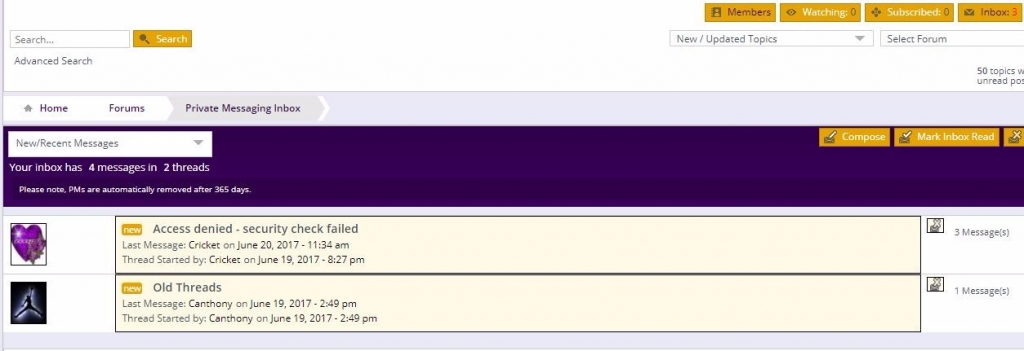
The first is that messages are not being marked as read. I have added a page rule to cloudflare to bypass caching on the following URL which is the base of my forum installation: http://vikefans.com/forums/* Additionally it looks like the PM’s are not sorting correctly. It appears that it is sorting by the first PM date rather than the last PM date. 

The next issue is that for some reason everyone including admins is getting a security check failed when trying to post polls out of the blue. 


The final issue is that I cannot complete an update of the forum software as it fails and then leaves the forum deactivated. I go back and reactivate and everything seems fine but I cannot get it to update correctly. 
12 Answers

New Answer

MO mike olson
mike olson
Member

As far as upgrading the forum software this is what I get when trying to run the upgrade:


The update process is starting. This process may take a while on some hosts, so please be patient.

Enabling Maintenance mode…

Updating Plugin Simple:Press (1/1)

Downloading update from https://simple-press.com/download-manager.php?id=747
Unpacking the update…
Installing the latest version…
Removing the old version of the plugin…
Plugin update failed.
An error occurred while updating Simple:Press: The update cannot be installed because we will be unable to copy some files. This is usually due to inconsistent file permissions. 
 
[Updated by the admin – there followed a list of every single file in the plugin which did not seem necessary to include so it has been removed]
MO mike olson
mike olson
Member

Actually now some users are getting failed security check for regular posts as well without polls. 

MO mike olson
mike olson
Member

How is it possible to have 3 unread messages when there are only 2 messages in my inbox and I have read them both? 


Capture.JPG
YS Yellow Swordfish
Yellow Swordfish
Member

The first – and perhaps only question – is what has changed on your site that may be responsible for all of this? It has to be something unless it has been like this since day 1.

MO mike olson
mike olson
Member

The security check thing just started but I haven’t really changed anything in that regard that I can think of. 


THe private message issue has been a problem from the get go. 

YS Yellow Swordfish
Yellow Swordfish
Member

No caching introduced? The security check has been there for as very long time – although we did change the Ui a few versions back. All of this could be explained by caching…

MO mike olson
mike olson
Member

I don’t know where in jetpack to turn off caching if there is any caching being done by them. Like I said cloudflare I put in a page rule to bypass caching. 

YS Yellow Swordfish
Yellow Swordfish
Member

I don’t personally know enough about Cloudflare to pass a verdict on whether a simple url rule is enough to stop it. I DO know people have had many issues with it in the past and turned it off altogether. The important part of the question would be was cloudflare in use when these things were not happening. And if the answer to that is no then what happens if you turn it off totally again?

As to JetPack I do not believe it comes with any caching but it does come with an awful lot of junk that is turned on by default. Sadly – as it comes from the Automattic stable – it is notoriously problematic. But I think we should follow the caching question first.

MP Mr Papa
Mr Papa
Member

well, there are folks that run cloudflare okay (see posts from @fidosysop-2 where he talks about config) but like any CDN its very sensitive to configuration for sites with dynamic data…

but I am seeing many js errors on your site… mostly that content is blocked… like infolinks and other… its running cross site scripts (not really cool)…  not sure if affecting site, since I cant do much as a guest…

YS Yellow Swordfish
Yellow Swordfish
Member

@mr-papa – I think they are mostly advertising links…

Concentrating on the front end first – another possibility of course is that the AJAX calls are getting highjacked which may explain the nonce/security issues. Caching may also explain that but I see no evidence of that this morning. So it is back to a question on changes… Has anything been added to the website – ie., extra WP theme items or a new WP plugin – that may also be making AJAX calls?

By the way – if you used to use Vanilla forums there is still some inline JavaScript on page loads that should probably be removed.

MO mike olson
mike olson
Member

I am going to start going through plugins to see if I can isolate anything. Will post back to see if I found anything.