Support Forum

Importing from bbpress

AD Adam D
Adam D
Member

I have a question concerning the importer plugin.


1. I have tried to import my bbpress data to simple:press, which is mandatory to get simple:press in use on my webpage. However the import of my bbpress data only imported the topics and just a few post. But still there are missing the most posts from my bbpress forum. How can I fix it?


2. When once imported, I cannot repeat the import, since the database already includes data. How can I delete it to retry the import function? Is there any button to do so, or shall I deinstall the complete forum including all database entries?


Thanks a lot for your support!


Adam 

16 Answers

New Answer

YS Yellow Swordfish
Yellow Swordfish
Member

Let me answer question 2 first. If you go to the WP plugins page you can uninstall SP which will remove all data. Then you can simply install it again with a clean sheet.

On the import question – can we assume you are using the correct bbPress importer version? The stand-alone v the plugin versions?

AD Adam D
Adam D
Member

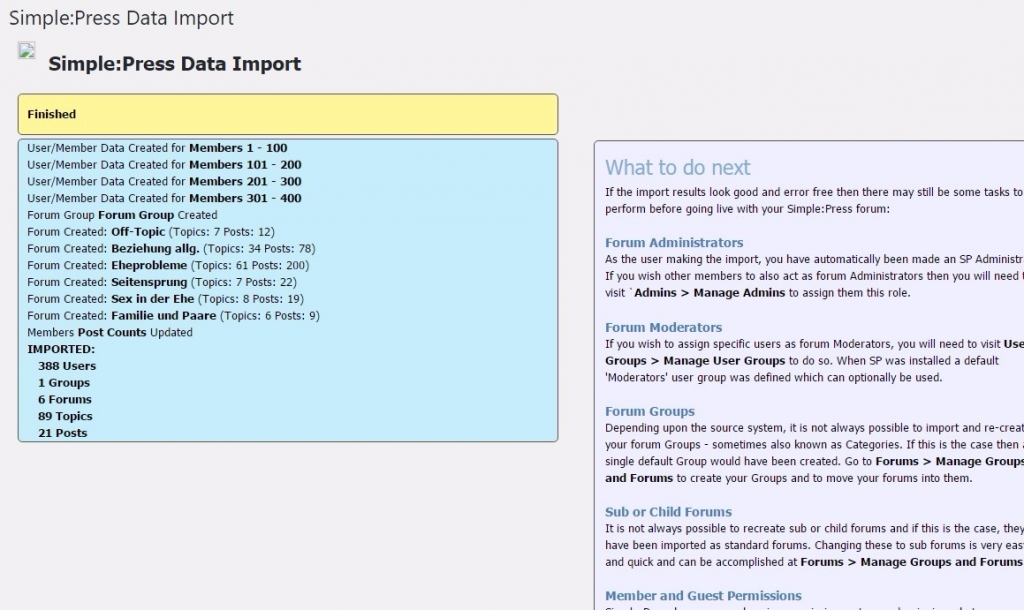
import.jpgConcerning the import question. I have used the stand alone plugin, available on your website.

https://simple-press.com/downloads/simple-press-importer-plugin/ which is Simple:Press V5 Importer Framework Version 3.0


And I have chosen to import newer plugin version, since my bbpress version is 2.5.12 (WP version 4.8).


also I tried several times, but have the same result. I attached a screenshot, which shows the problem in detail. You see that your plugin does not import all posts, which it finds in the older forum.


another problem is, that the category does not show all imported topics. The counts indicates in the forum index view, that it should be much more. But if you click on the category, there are only two topics shown instead of 23.

You can see this phenomena here:

www.lovenlife.de/forum-3

The original bbpress forum by the way is at www.lovenlife.de/forum where all posts and topics are visible for everyone. 

YS Yellow Swordfish
Yellow Swordfish
Member

Not really sure what to suggest. Mostly bbPress imports work just fine even though the way that bbPress stores data is, in our opinion, pretty awful.

The inly way that I can troubleshoot an import issue is to have a copy of the actual database so I can trace the real data to see what is not being picked up. If that is acceptable to you then we can advise on how to accomplish this easily. I can also assure you of your privacy in doing this and any db’s that are used are always destroyed after the fault is found.

AD Adam D
Adam D
Member

Hi again,


this is not a problem. how can I send you the database? And do you need any other information?


Best regards


Adam

YS Yellow Swordfish
Yellow Swordfish
Member

If you can put it somewhere where I can download it from that would be best. Maybe on your site somewhere and after I download it you can remove it quickly. Would that do? I would advise a PM to me when ready which will keep the location secret for the time it takes to download.

That’s probably all I need… It has been a long time since I have done this for anyone!

YS Yellow Swordfish
Yellow Swordfish
Member

Actually – sorry – but I could do with some more information.

Can you tell me how many forums, topics and topic posts there should be in total?

AD Adam D
Adam D
Member

Hi, sorry for my late answer. You can find the original website and the forum, where the database is from.at the following location:

http://www.lovenlife.de/forum

There you also have the correct count of topics and posts.

YS Yellow Swordfish
Yellow Swordfish
Member

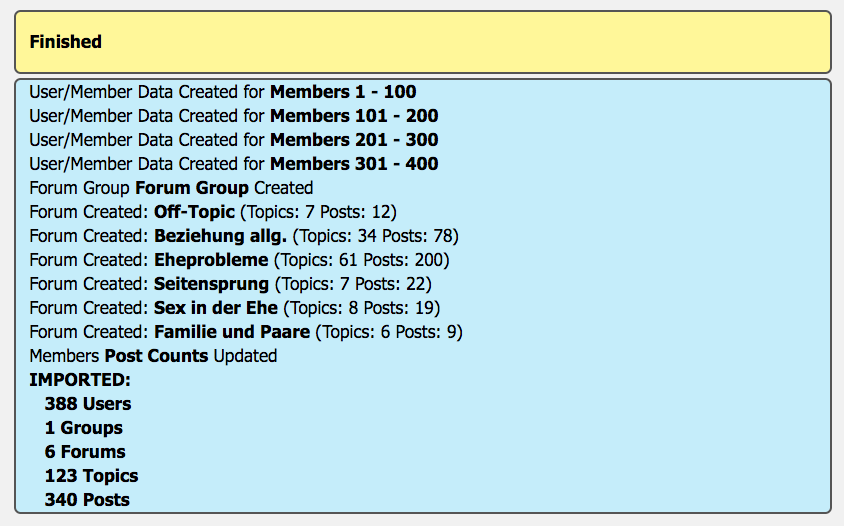
Well – the good news is that I was able to import them all first time…

Screen-Shot-2017-06-17-at-11.36.36-am.png

So – the most likely cause is going to be timeout on your server. With such a small forum I am surprised but if the timeout on the server is set very low then that could be it. To be fair, the import script is not that well optimised – but as I say – will usually import a far bigger forum than yours.

If you could try making the timeout value bigger I think you should be able to do it. 

AD Adam D
Adam D
Member

Hi,


thank you a lot for your help. Well, the only possibility I have is to increase the script excecution timout in htaccess with php_value max_execution_time 60. However also setting it to 60 sec it did not help, and I get the same results.

So which server timeout did you explicitely mean? Becasue I do not get any error message about a server timeout.

Also the whole import process is rather fast. So I cannot really believe, that it is a timeout problem. But if so, I would need to know which specific timeout you mean. Some of the timeouts are server global and anyhow cannot be changed by my provider.

So is there another possibility, eg. that you send me the imported data as SQL files (db tables) which I can import into my database?

Thank you again for your help.

Best regards

Adam

YS Yellow Swordfish
Yellow Swordfish
Member

I will email you a dump of the sp specific tables. I can’t do any harm of course!

AD Adam D
Adam D
Member

Hello again,


I just tried out to import the database and now it works and all posts and topics are shown correlctly.


Thank you for the really great help and great support!!


Best regards


Adam 

YS Yellow Swordfish
Yellow Swordfish
Member

That’s good news.

I did find it odd that you had three forums installed!