
Support Forum
 Support Forum


 Offline
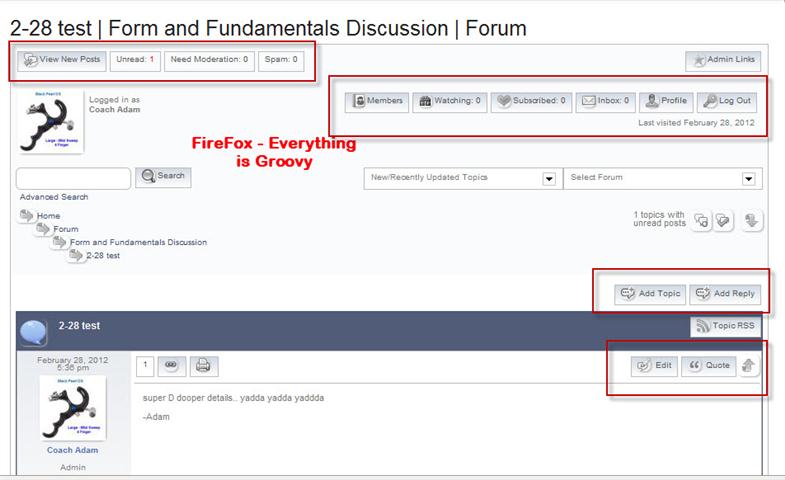
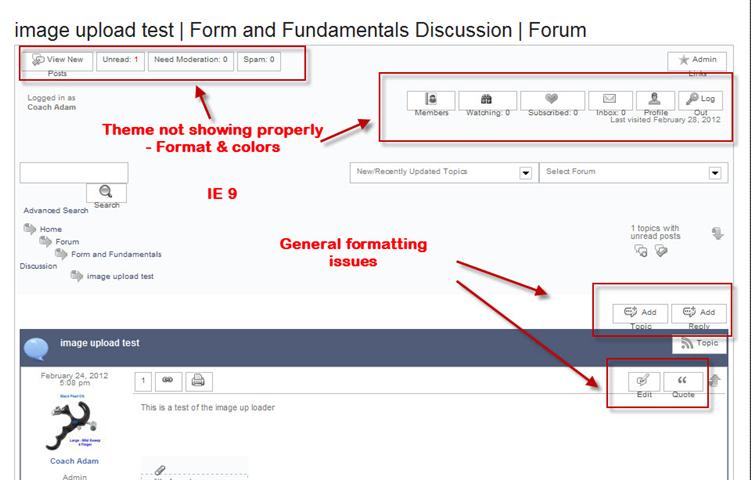
I see that even the SimplePress forum is leveraging the iThemes builder theme. I also notice that the bahvior is the same with my builder website & this forum. The theme colors to not show up the same in IE as in FireFox & on my site specifically, the formatting is messed up.
Can someone PLEASE moderate my threads so I can get some feedback on this? I have been posting for 3 days now with nobody moderating my posts??
Offline

-Adam
 Offline
Well first up you posted once yesterday and Steve replied about 16 hours ago. And you did not respond to that.
Now a new thread.
As I am on forum duty at the moment I can not help as I do not have IE. I am sure Steve will however but he is going to ask the same questions as he left on your first thread so they will still need answering. Here would probably be best.
Without seeing it and having IE however, that looks a little to me like you may have some 'IE specific' CSS being loaded.
 |
YELLOW
SWORDFISH
|
 Offline
Adam,
I have replied to your question in Builder support forum here.
I am pasting it below for the benefit of everyone else who might come across this in the future.
==========================================================
The reason for the button images backgrounds not appearing in IE is because the gradient backgrounds are set in wp-content/sp-resources/forum-themes/default/styles/default.php?color=cool-blue to appear only in Mozilla specific browsers like Firefox.
Example:
#spMainContainer a.spButton,
#spMainContainer .spButtonAsLabel {
    width: auto;
    height: 21px;
    text-align: center;
    line-height: 1.6em;
    padding: 1px 7px;
    margin: 2px 2px;
    font-size: 80%;
    font-family: inherit;
    outline-style: none;
    color: #555555;
    text-decoration: none;
    cursor: pointer;
    background: -moz-linear-gradient(100% 100% 90deg, #ffffff, #d0d9e3); background: -webkit-gradient(linear, 0% 0%, 0% 100%, from(#d0d9e3), to(#ffffff)); background-color: #ffffff;;
    border: 1px solid #bbbbbb;
    -webkit-gradientborder-radius: 5px; border-radius: 5px;}
Notice the Mozilla vendor specific CSS property,
background: -moz-linear-gradient(100% 100% 90deg, #ffffff, #d0d9e3); background: -webkit-gradient(linear, 0% 0%, 0% 100%, from(#d0d9e3), to(#ffffff)); background-color: #ffffff;;
Offline
Sorry guys... Didn't see the reply on the other thread. 
The issue is with IE8. IE 9 seems to work fine now oddly enough barring the color issue.
I noticed that even this forum behaves that way in IE for me, but with less formatting issues. it's mostly color issues with your forum.
I appreciate the responses & any help you can provide. I can PM the URL details to anyone who might be willing to take a closer look. i do not want to post it here as it is not yet a publicly live membership site & is unprotected at this time.
Oddly enough it seems to be working fine in IE9 other than the color scheme, so it's not a major concern at this time. The toolset is working properly in IE 9 now as well.
-Adam
Offline
I thought we were talking about the centered images with the text below...
|
YELLOW
SWORDFISH
|
Offline
Yellow Swordfish said
I thought we were talking about the centered images with the text below...
Yes, that was also an issue, but apparently only in IE 8. IE 9 does not seem to have the issue. I think SRIDHR answered my question as to why the colors were not working. Overall I think I am good to go now! Thanks everyone!
Great product!
-Adam
Offline
Had the same problem, worse in IE7 of course. Finally I decided to install the recent WP plugin called Browser Blocker and now everyone below IE9 get a message displayed to update. At first I wanted to keep IE8 but I don't like when the site you design and spend many hours in, don't looks good in a browser because of lack of CSS support and such and Browser Blocker let you choose exactly what you want to block and will display a nice message. Worth a look.
My site aims people at home and I believe everyone at home should have an up to date browser. I know it may be different in large corporation though.
Offline
SPQC said
Had the same problem, worse in IE7 of course. Finally I decided to install the recent WP plugin called Browser Blocker and now everyone below IE9 get a message displayed to update. At first I wanted to keep IE8 but I don't like when the site you design and spend many hours in, don't looks good in a browser because of lack of CSS support and such and Browser Blocker let you choose exactly what you want to block and will display a nice message. Worth a look.
My site aims people at home and I believe everyone at home should have an up to date browser. I know it may be different in large corporation though.
Great suggestion! Thank you! Perfect for my needs as well.
-Adam
 All RSS
1 Guest(s)