Support Forum

Simple:Press 5.0 Ready for Translation

129 Answers

New Answer

YS Yellow Swordfish
Yellow Swordfish
Member

Are you saying you HAVE translated those text strings in the panel?

LU LucasOrso
LucasOrso
Member

Yellow Swordfish said

Are you saying you HAVE translated those text strings in the panel?

Yes. But just noticed that the problem is not in the translation. I’ll try to tell about it in pictures:


YS Yellow Swordfish
Yellow Swordfish
Member

How very curious. Have not seen or had that reported before.
And this is happening to you on all panels I assume.
I will open a ticket and investigate

LU LucasOrso
LucasOrso
Member

Yellow Swordfish said

How very curious. Have not seen or had that reported before.
And this is happening to you on all panels I assume.
I will open a ticket and investigate

It happens to all of the administration panel SP, but not with the plugins(SP plugins) panel. Translated to the SP plugins panels displays excellent

MP Mr Papa
Mr Papa
Member

odd.  no other reports… 

translation users:  anyone else seen this?  will pm a couple…

As Andy says, ticket open for investigation…

SP SPQC
SPQC
Member

Can’t say yet, the only parts I translted in Admin are about updating S:P that show up in WP updates.

MP Mr Papa
Mr Papa
Member

okay, thanks… we will work on getting something to test…

SO sofiafoot
sofiafoot
Member

Hello and thanks again for this plugin


Sorry for my stupid question , but once you ve downloaded this .MO file, what to do with it ?


I tried to upload the french version (canadian one renamed to fr_FR) in wp-content/sp-resources/forum-language/simple-press but the front end is still in english.


I tried to add the .PO file too, same result.


Thank you

YS Yellow Swordfish
Yellow Swordfish
Member

http://codex.simple-press.com/codex/installation/localization/

You may need the bit in the yellow box.
Also remember that much of what is displayed is actually from the theme so this needs to be translated as well to cover everything

SO sofiafoot
sofiafoot
Member

Yellow Swordfish said

http://codex.simple-press.com/codex/installation/localization/

You may need the bit in the yellow box.
Also remember that much of what is displayed is actually from the theme so this needs to be translated as well to cover everything

thanks

Actually I tried all the solutions, even the logical one (fr_FR) but it doesn’t work.

I will try with the theme’s file, after translating it with poedit.

Thanks again for your great support !

SO sofiafoot
sofiafoot
Member

Confirmation : the default theme’s file is working : 90% of the displayed text is in French.

Thank you so much !!!

SP SPQC
SPQC
Member

sofiafoot said

I tried to upload the french version (canadian one renamed to fr_FR) in wp-content/sp-resources/forum-language/simple-press but the front end is still in english.

Hey!  You know that French Canada was added just a week ago after asking for it, and that I’ve put many hours and I’m not finished yet.


It takes me a lot of time to explore S:P then find out that there is a word there that’s I’m not happy with, so I go back and change it then upload the file again ad see if it’s better.  I focused on the Theme and Front End for now and in Admin I only translated what is related to updating S:P within WP Update page.


If you see something that doesn’t seem to fit then PM me and I’ll take a look.

SO sofiafoot
sofiafoot
Member

Great !

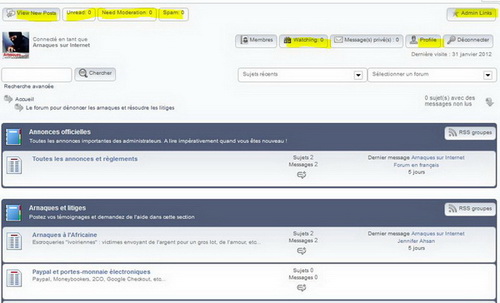
Despite my French_Freench usage, all the canadian translation that you made look good to me (I just renamed it to fr_FR).

The only problem is that some english words are remaining (see attached file).

simplepress.jpg

I guess because the translation progress that was less than 100% is the reason, but I can edit it with poedit to fil the missing translations if you want.


Cheers


Kris


SPQC said

sofiafoot said

I tried to upload the french version (canadian one renamed to fr_FR) in wp-content/sp-resources/forum-language/simple-press but the front end is still in english.

Hey!  You know that French Canada was added just a week ago after asking for it, and that I’ve put many hours and I’m not finished yet.


It takes me a lot of time to explore S:P then find out that there is a word there that’s I’m not happy with, so I go back and change it then upload the file again ad see if it’s better.  I focused on the Theme and Front End for now and in Admin I only translated what is related to updating S:P within WP Update page.


If you see something that doesn’t seem to fit then PM me and I’ll take a look.

SP SPQC
SPQC
Member

I don’t see those buttons at the top left, neither Watching, Subscribed and Inbox but I do see Members, Profile and Logout…  do I have to enable something?