Support Forum

BuddyPress Plugin Integration Beta

373 Answers

New Answer

MP Mr Papa
Mr Papa
Member

256M available and still only 65M used?  weird… not sure I understand what is going on there…

and those two lines for errors dont really make sense either…  all that from activating our buddypress plugin in the simple press plugin admin panel?  and go away if deactivated?

TO ToySoldiersUnite
ToySoldiersUnite
Member

Go away once I’ve removed the folder via FTP. Once activated, the sidebar in the dashboard is the only thing that shows. The centre column is blank with that error at the top.

Front end, the site still works, save for the buddypress related pages and simplepress pages.

Interesting. NOW, however, it’s giving me:

Fatal error: Allowed memory size of 75497472 bytes exhausted (tried to allocate 523800 bytes) in /problem-with-post-edit-buttonome/toysoldi/public_html/wp-includes/functions.php on line 271

On the dashboard side, but

Fatal error: Allowed memory size of 268435456 bytes exhausted (tried to allocate 523800 bytes) in /problem-with-post-edit-buttonome/toysoldi/public_html/wp-includes/functions.php on line 271

on the front end. It’s taking a while for the wp-config changes to take effect it would seem. Toolbox environment is still telling me 256m though.

MP Mr Papa
Mr Papa
Member

mystified… and since you didnt verify last time, the folder is in wp-content/sp-resources/forum-plugins?

MP Mr Papa
Mr Papa
Member

and the folder you uploaded was buddypress?  can you try reuploading in case something was corrupted in the transfer?

TO ToySoldiersUnite
ToySoldiersUnite
Member

Downloaded from here twice, loaded via the plugin uploader several times, and also via FTP putting the unzipped folder in the plugins folder. Everytime, get the same error.

TO ToySoldiersUnite
ToySoldiersUnite
Member

Here’s the entire Environment log. Maybe you can spot something that’s interfering.

Simple:Press   Version: 5.2.6
Build: 9877
Release: Released
WordPress   Version: 3.4.2
Language: en-US
Character Set: UTF-8
Theme: Custom Community
PHP   Version: 5.3.8
Memory: 256M
Max Upload: 64M
Timeout: 300
MySQL   Version: 5.1.68
Prefix: wp_
Server   Version: Apache
WP Plugins   Add New Default Avatar (1.3.1)
Better Plugin Compatibility Control (3.5.1)
BP Auto Login on Activation (1.0.1)
BP Group Email (1.0.6)
BuddyBar Widget (0.15)
BuddyPress (1.6.1)
BuddyPress Album (0.1.8.11)
BuddyPress Group Tags (2.0.3)
Cool Video Gallery (1.8)
Exclude Pages from Navigation (1.92)
Fast Secure Contact Form (3.1.8.1)
Google Analyticator (6.4.3)
Infinite SEO (1.5)
Login Redirect (1.0.3)
Mibbit Webchat (1.2.3)
NextGEN Gallery (1.9.10)
Restrict Content (2.1)
SI CAPTCHA Anti-Spam (2.7.6.4)
Simple:Press (5.2.6)
WangGuard (1.5.3)
WordPress Mobile Pack (1.2.5)
WP Login (1.0)
WpShopcart Professional (1.1.0)
SP Plugins   Editor TinyMCE Rich Text (2.0.6)
Font Resizer (1.2.1)
Polls (1.3.5)
Post Preview (1.2.1)
Profanity Filter (1.2.1)
Report Post (1.2.1)
Subscriptions (1.2.4)
Template Tags and Widgets (1.3.1)
Topic Status (1.2.2)
MP Mr Papa
Mr Papa
Member

I dont see the SP buddypress plugin in that list??

So would like to run some tests…  can you disable the other buddypress plugins you have? just want to make sure nothing odd in those since I dont have anything but core buddypress…

and your buddypress is a bit out of data (1.7 is latest and think latest in 1.6.x series is 1.6.5)… and reason you cannot upgrade to make sure no issue there?

OA oakwood
oakwood
Member

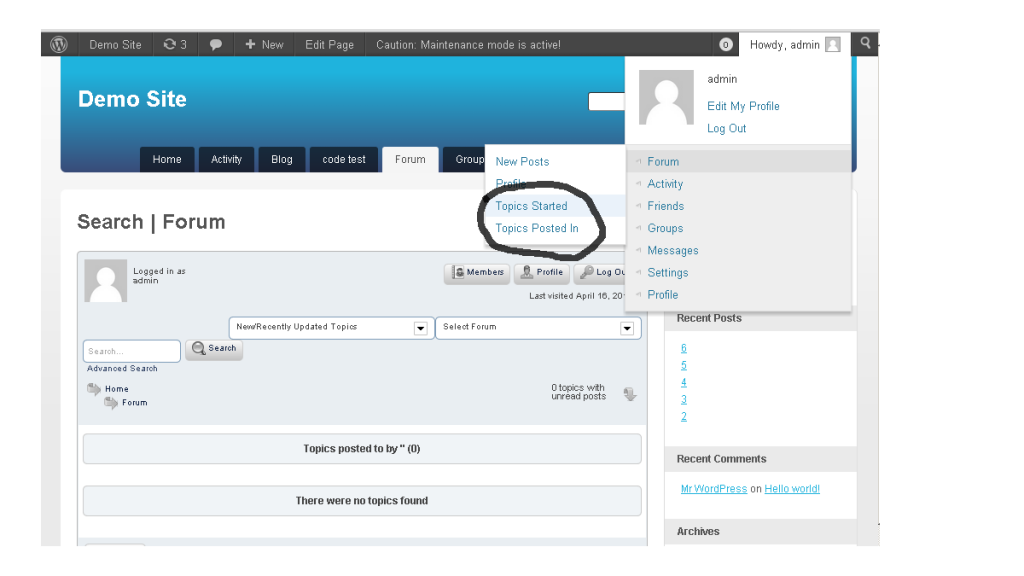
I noticed that links from the buddypress admin bar (see attached picture) go to the wrong place. The url goes to a link such as: /forum/?search=1&new=1&forum=all&value=3&type=4

If I look at the ‘value=3’ part of the url, and replace the ‘3’ with the user id number, it does work properly. Right now it always shows the topics and posts for the user with the id ‘3’, but it should be dynamic.

Looking around a little, I found file: /wp-content/sp-resources/forum-plugins/buddypress/library/sp-buddypress-component.php lines 153, 165, 340, and 349.

Thanks again for the plugin!

 sp-bp-links.png

TO ToySoldiersUnite
ToySoldiersUnite
Member

Mr Papa said
I dont see the SP buddypress plugin in that list??

So would like to run some tests…  can you disable the other buddypress plugins you have? just want to make sure nothing odd in those since I dont have anything but core buddypress…

and your buddypress is a bit out of data (1.7 is latest and think latest in 1.6.x series is 1.6.5)… and reason you cannot upgrade to make sure no issue there?

Sorry didn’t get back to you sooner.

WordPress is now 3.5.1, Buddypress 1.7, and all themes and plugins that were updatable have been updated. Deactivated several plugins, but no luck still. I’ll try again later today.

MP Mr Papa
Mr Papa
Member

Dutch, thanks… will be around later today to try to look into your issue…

MP Mr Papa
Mr Papa
Member

Oakwood, good catch! silly copy and paste error as that is my user id on my test site…. will get it fixed up… thanks!

MP Mr Papa
Mr Papa
Member

updated to v9… fixes the links to the forum search for topics user started and posted in… thanks Oakwood!

Sgt Dutch, let me know what you find…  if still having issues, maybe you can give me wp admin and sp admin access to see if I can figure it out… might need ftp too…


OA oakwood
oakwood
Member

Mr Papa said
updated to v9… fixes the links to the forum search for topics user started and posted in… thanks Oakwood!
 

No problem…glad to help. Version 9 fixed it, so far so good, thanks!