Support Forum

Unable to Add a Topic

DN David Norman
David Norman
Member

Hello,

We are testing our new Simple:Press forum and have run into a quandry.

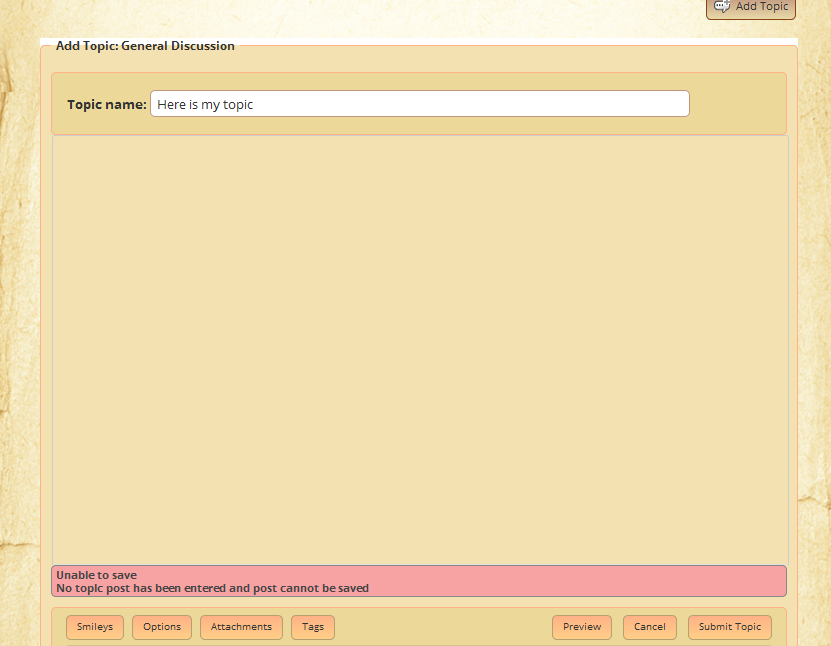
Whether logged in as an administrator or a standard member, I am unable to create a new post because I can’t create a new topic. I am attaching a screenshot of the error message I receive.

Does anyone know why I am receiving this error and how to resolve it so we can add new posts to the forum?

Thank you.

81 Answers

New Answer

MP Mr Papa
Mr Papa
Member

No screenshot attached…

really need to know what  you might be seeing…

DN David Norman
David Norman
Member

My apologies. I thought it had S_P_Unable_to_Add_Topic_2014-0328.pnguploaded and attached. Let me try again…

MP Mr Papa
Mr Papa
Member

I dont see any post content… you cannot save a post without some content…

DN David Norman
David Norman
Member

Hi Mr. Papa,

Thank you for replying.

The reason you don’t see any  post content is because S:P isn’t allowing me to enter any post content. That big empty area is completely devoid of any area where I can type a post. The only option I am given is to “Add Topic”. But then, according to what you’re seeing, even that won’t work until I can type a post.

So it sounds like my problem is actually that S:P isn’t allowing me to type any post content.

Any idea on how to fix that issue?

Here is a short 1 minute screencast video of what it looks and acts like…

http://screencast.com/t/O7KqOL2eh2Q8

Thanks, in advance, for your help.

Best regards.

DN David Norman
David Norman
Member

As an update, I discovered that if I disabled the TinyMCEEditor S:P plugin, I can now add new posts and topics.

Is there a particular setting within the MCE plugin that I likely missed that caused it to prevent the post editing screen from appearing?

MP Mr Papa
Mr Papa
Member

so that leads to one of two issues…  a js conflict… or a wp theme or plugin that is improperly adding things to tinymce…

do  you have a theme or plugin that is adding any buttons or functionality to the wp editor?  they may be mistakenly assuming its only used on the admin side but the wp editor fully supports its use on the front side too…

perhaps try a quick temp switch to the default wp theme and see if it works…

or disable any plugins that might be adding stuff to tinymce – or if unsure all other plugins and see if it works…

with a link to your site, we may be able to troubleshoot a bit more…  videos or screenshots dont really help much except to explain the issue…

DN David Norman
David Norman
Member

Hi Mr. Papa,

Thank you for your thoughts.

It appears that our site has only one other plugin that adds any type of functionality to the default WordPress visual editor is Wishlist Member. Given that Wishlist Member is a very popular and well-used piece of software, as is Simple:Press, I’d expect that if the conflict were between those two, someone would have come across it long ago and a mention of it noted somewhere. So I’m inclined to think that it’s not Wishlist.

As for the theme, we are using the Catalyst framework instead of a pre-canned theme. Even if we disable the Catalyst framework and use the default 2014 theme, we still cannot add a new topic/post if the MCE Editor plugin for S:P is active.

I appreciate your offer of taking a quick peek at my site. It is http://www.alcohemy.com/

The forum is behind a paid Wishlist membership wall, so you won’t be able to see it without a Wishlist account. I would be happy to set you up with a temporary free account so you can see the forum if you’d like. Please let me know.

Many thanks.

MP Mr Papa
Mr Papa
Member

Well, we use wishlist too… But there is at least one known plugin for wishlist called wishlist tags that does it wrong… We actually worked with the author the plugin to fix it but was never incorporated – at least last time we checked…. We sent the code fix to wishlist too but no joy…

Are you using any wishlist plugins?

You can set up a temp account moor us to look closer… Please pm the info to myself and yellow Swordfish and link to this topic….

DN David Norman
David Norman
Member

Hi Mr. Papa,

That was a great call about Wishlist Tags. We are, indeed, using that plugin.

I have created a temporary account for you and Swordfish in my “Gold” level program which will give you access to the forum. I will PM you with the details.

Thank you.

YS Yellow Swordfish
Yellow Swordfish
Member

Assuming you have confirmed that the WishList Tags plugin is the culprit then I am afraid there is not much we can do to help – this really needs to go to the tags plugin author. I really do not understand why this was not corrected months ago when we worked with them to diagnose and fix the issue. To be honest – it was so long ago I am not even sure of what the problem is now although I can search through my old mail backlog!

But is my assumption correct – that the tags plugin is the problem area?

DN David Norman
David Norman
Member

Hi Yellow Swordfish,

Unfortunately, it doesn’t seem that the Wishlist Tags plugin is *solely* responsible for preventing the MCE editor from working. I disabled all of the Wishlist plugins in use on the site — Wishlist Content Control, Wishlist Directory and Wishlist Tags — but I’m still not able to add a new topic or post to the forum if the MCE editor is enabled.

So if the Wishlist Tags plugin is, indeed, causing the conflict, it is not the only thing causing the conflict.

Any thoughts on what else might be the issue or where I should look next?

Thank you.

MP Mr Papa
Mr Papa
Member

what about the rest of your plugins?  have you tried with them disabled?

if that doesnt help, try a temp switch to the wp default theme too and see if any better…

just temp switches to collect more data…

I dont suppose you are running the wp 3.9 version yet and our 5.4.2?  both were release today and wp completely redid and replace tinymce so might be worth a try too…

MY My
My
Member

Since upgrading just now I’m also having this problem with tinyMCE .. I don’t have any wishlist plugins so it’s not that.

I do have a bunch of other plugins – but this has only started happening since I upgraded SP.

UPDATE: I just tried disabling all plugins and the issue remains. I hope this isn’t a genesis thing again!

YS Yellow Swordfish
Yellow Swordfish
Member

I really do have to ask this… but can we safely assume you ARE now running this under WordPress 3.9?

I doubt a Genesis problem… Steve uses Genesis on some other sites and would have surely noticed.

What about other plugins that may add something to TinyMCE (in the admin write blog post for example). Anything like that active?

And have you tried clearing your browser cache because as Steve has pointed out – WP3.9 along with SP5.4.2 has changed a very large amount of JavaScript.